LightBlog

jeudi 6 octobre 2022

Acer’s new Swift Edge packs a OLED display and AMD Ryzen 6000 CPUs in a slim package

There’s a new device in Acer’s lineup, and it’s an exciting one if you’re a fan of OLED displays or thin and light laptops. Just announced is the Acer Swift Edge SFA16-41. This is being dubbed the world’s lightest 16-inch OLED laptop. It’s also powered by AMD Ryzen 6000 CPUs.

Coming later in October for $1,499, Acer is targetting on-the-go professionals with this machine, which is why it’s quite a lightweight device. It measures 0.51 inches thick and weighs 2.58 pounds. For reference, one of the thinnest laptops available, a 2022 MacBook Air, is 2.7 pounds in weight and 0.44 inches thick. In the Windows space, similar 16-inch OLED devices tend to have a GPU inside, so they’re much heavier. This year’s HP Envy 16, for example, is 0.78 inches thick and weighs 5.91 pounds.

But that’s just the weight and dimensions. To get that slim weight, the Acer Swift Edge SFA16-41 has a magnesium alloy chassis. Other design elements include a sharp rear edge, as well as a sharp-cut front recess. As for the specifics of the display, it’s a 4K OLED panel tuned to 3840 x 2400 resolution. The panel can hit 500 nits of brightness with HDR content, and is quite slim, giving the laptop a 92% screen-to-body ratio. Acer also mentioned that the laptop can hit 100% of the DCI-P3 color gamut, which is important for creators.

On the CPU, the Swift Edge packs four different options. It’s either the Ryzen 7 Pro 6850U, the Ryzen 7 6800U, the Ryzen 5 Pro 6650U, or the Ryzen 5 6600U.  With RAM, the system supports up to 32GB, and storage includes either 512GB or 1TB. You can choose Windows 11 Home or Windows 11 Pro. And do note that there’s a Microsoft Pluton processor onboard, for better encryption of passwords and other sensitive data.

Even for such a thin and light device, Acer is still packing a good mix of ports, too. The mix includes HDMI 2.1, 2 USB 3.2 Gen 2 Type-C ports 2 USB Type-A ports, and an audio jack. Those USB-C ports have fast-charging capabilities. And the webcam? It’s 1080p, which is somewhat of the new standard.

The post Acer’s new Swift Edge packs a OLED display and AMD Ryzen 6000 CPUs in a slim package appeared first on XDA.


from XDA https://ift.tt/pXl8OIW
via IFTTT

These are the best chargers, cables, and other accessories to buy for the Google Pixel 7 and Pixel 7 Pro in 2022

Google’s new Pixel 7 series is now official. The new phones bring some nice upgrades under the hood, and they also carry the same starting price as the Pixel 6 series models from last year. But whether you buy the more affordable Pixel 7 or the top-of-the-line Pixel 7 Pro, you won’t find any additional accessories in the box. Google didn’t include a charger or a pair of earphones with its Pixel 6 series last year, and the new Pixel phones aren’t any different. That’s why we decided to round up some of the best chargers for the Pixel 7 series in this post. Additionally, we’re also leaving some recommendations for the best cables, and other accessories that you should consider picking up for the Pixel 7 and the Pixel 7 Pro.

Note: This collection only includes the best chargers and some other miscellaneous accessories. We’ve highlighted the best Pixel 7 cases and the Pixel 7 Pro cases in separate collections, so be sure to check them based on the phone you’re planning to buy.

Best chargers for the Pixel 7 and the Pixel 7 Pro

Just like the last year’s models, the new Pixel 7 and Pixel 7 Pro are also said to support up to 30W wired charging via a USB-C charger with USB-PD 3.0 (PPS). We won’t be surprised if these phones end up drawing less power from the charger, but we still recommend buying chargers that support the USB-PD standard with PPS and at least 30W output. Both phones also support wireless charging but you’ll have to use Google’s first-party Pixel Stand wireless charger to get some good speeds, or else you’re stuck with 15W wireless charging speeds.

Note: The new Pixel 7 and the Pixel 7 Pro come with a USB-C to USB-C cable inside the box, meaning you should look for chargers with a USB-C port. You also get a USB-A to USB-C adapter, but that is intended for use for data transfer and connecting accessories, not for charging.

    Anker 511 Nano 3

    30W compact charger

    The Anker 511 Nano 3 is one of the smaller 30W chargers on the market with support for USB-PD PSS. This particular GaN charger is just 1.12-inch thick and up to 70-percent smaller than a lot of other 30W chargers on the market, and it works well with a variety of devices including the new Pixel 7 series phones.
    Ultranet 30W power adapter

    Best budget pick

    This Ultranet 30W charger, as you can see, is just as compact as the Anker charger. It comes with a single USB Type-C port that supports 30W output with USB-PD PSS standard. This is one of the most affordable GaN chargers on the market, and it has some good reviews from customers.
    Google 30W USB-C charger

    Made by Google

    This 30W charger from Google is one of the best options to consider for the new Pixel 7 and the Pixel 7 Pro. This particular charger doesn't come with a cable but that shouldn't be an issue considering the phones come with a USB-C to USB-C cable in the box.
    Google Pixel Stand 2nd Gen

    Best wireless charger for Pixel phones

    The second-generation Google Pixel Stand is the perfect companion for the Pixel 7 and the Pixel 7 Pro as it can wirelessly charge the phone faster than other wireless chargers on the market. One of the best things about the Pixel Stand is that it can also be used to charge other Qi-compatible devices.
    Spigen ArcField 15W

    Best 3rd party wireless charger

    The Spigen ArcField is a simple-looking wireless charging pad that can charge the new Pixel 7 and the Pixel 7 Pro wirelessly at 15W. It has rubber pads on both the front as well as the back for a 'No slip' design, and it also comes with a USB-C to USB-C cable in the box.
    Anker 533 wireless powerbank

    10,000mAh wireless portable charger

    The Anker 533 is a wireless portable charger that packs a 10,000mAh battery. It supports 18W wired charging and 10W wireless charging speeds, so we think it's perfect for devices that support both wired and wireless charging.

Best charging cables for Google Pixel 7 and Pixel 7 Pro

The new Google Pixel 7 series phones, as mentioned earlier, come with a USB-C to USB-C cable in the box. While the included cable should be enough for most users, we’re highlighting some more options in case you an additional one, perhaps for a different device or in a different color. Here, take a look:

    Anker Nylon USB-C to USB-C

    Nylon Braided cable

    Anker's Nylon USB-C to USB-C cable is available to purchase in a bunch of different lengths. This particular version of the cable is 10ft long and it supports 100W charging. This braided cable is available to purchase in silver and red colorways, so be sure to pick the one that you like.
    Spigen DuraSync cable

    Cotton braided cable

    The Spigen DuraSync is a USB-C to USB-C cotton braided cable that supports up to 60W charging. It's available to purchase in both black and white color options, and it works well with the Pixel 7 series phones.
    UGREEN USB-C cable

    Right angle connector

    This pack of UGREEN cable comes with two USB-C to USB-C cables that support up to 60W charging. It's a braided cable that comes with a right-angle connector on one side, making it easier to use while gaming.

Best wireless earbuds to use with Google Pixel 7 and Pixel 7 Pro

Neither of the two phones in the Pixel 7 series have a 3.5mm headphone jack and Google doesn’t even bundle a 3.5mm to USB-C adapter in the box. This means you’ll have to buy an adapter separately to use your existing 3.5mm wired earphones or rely on a pair of truly wireless earbuds. We recommend the latter as they bring other advantages too.

    Google Pixel Buds Pro

    Best for Pixel phones

    The Google Pixel Buds Pro are a flagship pair of earphones from Google with a ton of features, a great fit, and long battery life. The Pixel Buds also come with some other noteworthy features including active noise cancelling and Google fast pair.
    Samsung Galaxy Buds 2 Pro

    Alternate best TWS

    The Galaxy Buds 2 Pro is one of the latest pairs of TWS to hit the shelves. Compared to the older Buds Pro TWS, these high-end earbuds come with a slightly different design and they're up to 15-percent smaller in size. The Galaxy Buds 2 Pro earbuds also support noise-canceling, 3D audio, and more.
    Nothing Ear 1

    Best budget pick

    The Nothing Ear 1 wireless earbuds stand out from the sea of other truly wireless earbuds with their semi-transparent design. These earbuds sound good for the price, and they also offer features including effective ANC, long battery life, and more.

If none of these wireless earbuds catch your fancy then we’d like to point you towards our collection of the best TWS earbuds in which you’ll find more options.


Best smartwatch and other accessories

Here’s a quick look at the best smartwatch and some other accessories to help you make the most out of your Pixel 7 and the Pixel 7 Pro.

    Pixel Watch

    Best to pair with Pixel phones

    The new Pixel Watch, as you can see, comes with a beautiful circular watch face and a rotating crown. The watch itself is available to purchase in a few different finishes and you can also get a bunch of different bands for it. The Pixel Watch runs Wear OS out of the box and comes with Fitbit integration for health and wellness features.
    Vicseed phone mount

    Phone mount with a suction cup

    The Vicseed car mount, as you can see, is a suction-cup-based mount that can easily hold your smartphone in place while you drive. This particular phone mount is reasonably priced and it's suitable to hold both the regular Pixel 7 and the Pixel 7 Pro without any issues.
    JOBY GorillaPod

    Best tripod stand

    The JOBY GorillaPod is the perfect accessory to pair with your Google Pixel phones if you like recording a lot of videos on your phone. Both Pixel 7 and Pixel 7 Pro support 4K video recording and we think the JOBY GorillaPod will help you capture some good footage.

    Google Pixel 7 series
    Google's new Pixel 7 and the Pixel 7 Pro bring a lot of improvement over the last year's models. Both phones have upgraded internals and a slightly different design among other things.

Well, that wraps up our collection of the best chargers and other accessories that we recommend buying for the new Pixel 7 and the Pixel 7 Pro. This is an ever-evolving list, so we’ll continue to look for better items to add to this list, so be sure to check back frequently if you’ve already purchased or are planning to buy one of the new Pixel phones. The Pixel phones are competitively priced in the US, but you can always check our best deals post to see if you can save some money to splurge on these accessories.

The post These are the best chargers, cables, and other accessories to buy for the Google Pixel 7 and Pixel 7 Pro in 2022 appeared first on XDA.


from XDA https://ift.tt/rDphEIY
via IFTTT

Valve debuts SteamOS 3.3.2 and a new Steam Client update

Valve has made SteamOS 3.3.2 available to the public through its stable channel, along with an updated Steam Client. The new update brings bug fixes, enhancements to the Steam Deck’s docked mode, and other quality-of-life improvements. There’s a lot to unpack with the latest update, so let’s get to it.

SteamOS 3.3.2 brings enhancements to the console’s docked mode, adding a new resolution and refresh rate option in the Display settings menu, specifically when the device is connected to an external display. The new update also brings a new fail-safe feature that will allow the console to avoid outputting problematic resolutions and refresh rates. In addition, the console will now output much quicker when connected to an external display. As far as fixes go, the console will now properly switch its aspect ratio and resolution when connected to an external display, will have better performance at lower refresh rates, and will improve controls when using a physical mouse.

Along with external display improvements and fixes, the new update will also bring some general fixes, like balancing the volume of the boot tone across all console models, fixing random haptic occurrences, improving sensitivity on the console’s trackpads, and more. You can check out the rest of the general improvements and fixes listed below.

      • Fixed a crash in Red Dead Redemption 2
      • Improved frame pacing when compositing (such as when FSR is enabled)
      • Improved touch / de-touch detection speeds
      • Modified USB descriptors to support controller navigation in EFI menu at boot
      • Fixed controller firmware update applying on every boot
      • Fixed a scenario where an SD Card format operation could fail

In addition to the new SteamOS update, the Steam Client was also updated and includes a long list of improvements and fixes. The Steam Client will now have better performance when rendering the home screen, cloud sync will no longer occur when offline, haptics when booting has been fixed, and auto focus on chat textboxes. The new update also includes enhancements to the controls, along with improvements for custom boot videos, which were tested in past beta releases. Since the list is quite extensive, the contents of the update have been listed below verbatim from Steam Deck’s news portal.

  • Docked Mode
    • Added a toggle allowing Steam Deck to automatically control the display resolution for external displays. When toggled on, Steam Deck will automatically adjust the resolution for best performance on higher resolution displays.
    • Steam Deck now keeps track of refresh rate and FPS limit settings independently for internal and external displays
    • Disabled refresh rate switching via the quick access menu for external displays by default. Alternative refresh rates are still accessible via the resolution dropdown in Settings->Display.
    • Added a toggle to developer settings to re-enable refresh rate switching in the quick access menu for external displays. (Please note that the Steam Deck’s built-in display was validated to support the full range of refresh rates available in the slider, but for arbitrary external displays we can’t provide a guarantee that the resolution + refresh rate combination will be functional. This can lead to a scenario where the external display doesn’t display an image, so there isn’t an easy way to undo the change. Here be dragons, we don’t recommend turning this setting on.)
  • Steam Input
    • Controller configurations now automatically switch to be per-device when multiple of the same controller are connected at once
    • Virtual menu previews in the Configurator now highlight the appropriate button when navigating to its associated command in the command list
    • Reduced occurrence of double-activations on Soft Press on Touch Pads and Sticks.
    • Fixed scaling of the virtual hotbar menu preview in the Configurator
    • Fixed an issue where “Disabled” would be listed multiple times the dropdown options for modes
    • Fix an issue where booting into offline mode in desktop would result in unresponsive controller inputs until the “stay offline” dialog was clicked.
    • Fix an issue with setting command settings inside a modeshift
    • Fixed a bug where switching the active controller in the configurator could lose unsaved changes
    • Fixed a crash with editing the mode settings for an input (e.g. joystick)
    • Fixed a crash when setting a trigger input to “Disabled” in an action set layer
    • Fixed a crash when loading some Steam Input configs.
  • Steam Input: FlickStick
    • Reduced update rate from 240hz to 120hz to reduce instances of maxed out mouse movement between game frames
    • Added a “Slap Back” check so that the stick does not accidentally invoke an opposite-side turn when snapping home aggressively
    • Any remaining Snap Angle is doled as the stick returns to zero. This further reduces “mouse movement spikes”
    • Tweaked Inner Radius Default to be lower
    • Fixed Dampening Value not being used with the correct ranges
  • Custom boot videos
    • Steam Deck will now look for a custom boot video and/or a suspend animation in ~/.steam/root/config/uioverrides/movies/
    • Please note that you’ll need to create this folder first
    • You’ll need webm file format, no need to truncate the video, no need to mess with css
    • Play custom boot animations in full screen

Valve has been doing an excellent job on the software front these past few months, releasing numerous updates to its beta and preview channels. The firm has also met and exceeded expectations when it comes to shipping its console. The company is currently in its final stretch of fulfilling its pre-orders, with only a few months remaining. The firm has promised that it will fulfill all of the original pre-orders placed by the end of the year. If you’ve been curious about the console and wanted to pre-order one, now is the time. The wait for a console currently stands at around a month, which means if you order, you should also have your console by the end of the year.


Source: Steam Deck

The post Valve debuts SteamOS 3.3.2 and a new Steam Client update appeared first on XDA.


from XDA https://ift.tt/2L3WTty
via IFTTT

Samsung rolls out fourth One UI 5 beta for the Galaxy S22 series

The stable One UI 5 update is likely a few weeks away from its launch on eligible Samsung devices, but things are chugging along nicely. The Korean OEM is handling the Android 13 beta testing phase remarkably well, pushing the new One UI version to a multitude of devices. Now, the company has started rolling out the fourth beta for the Galaxy S22 lineup in the run-up to the public release.

According to multiple user reports on our forums and the Samsung Community, the beta 4 update has gradually started rolling out to the Galaxy S22 in the form of software version ZVJ2. The update includes the following bug fixes:

  • Bugs that have been fixed
    • Improved that Favorites and Recent items can be added and removed  in Gallery album
    • Fixed the issue executed sleep mode automatically
    • Fixed the issue occurred vibration sound/beep sound continuously
    • Fixed crash when entering App folder
    • Fixed crash when changing Wallpapers
    • Fixed crash in S pen Air Command
    • Fixed the problem for Object eraser not working
    • Fixed vibration feedback not working in Home gesture
    • Fixed the frame breaking issue when entering from Widget to Home
    • Deleted Multi-user function
    • Other minor bug fixes

Those running the third One UI 5 beta should receive the new update via an OTA soon. You can also manually check for the update via navigating to Settings > Software update > Download and install. The update is currently only available for the US, South Korean, and European models, with the international Snapdragon variants to follow suit in the coming days.

XDA Forums: Samsung Galaxy S22 || Galaxy S22 Plus || Galaxy S22 Ultra

Unfortunately, neither the Galaxy Z Fold 4 nor the Z Flip 4 has access to the One UI 5 program till date. We’ll likely have to wait a little longer to see Android 13 come to Samsung’s foldable portfolio.

If you own a Galaxy S22 and would like to try out the Android 13, you can sign up for the beta program using the Samsung Member app. Alternatively, you can check out our One UI 5 update tracker to grab the OTA package once it becomes available.

Samsung Members (Free, Google Play) →


Source: XDA Forums, Samsung Community Forums

The post Samsung rolls out fourth One UI 5 beta for the Galaxy S22 series appeared first on XDA.


from XDA https://ift.tt/EO5eXnL
via IFTTT

These are the best wireless earbuds to buy in 2022

For many of us, a set of earbuds are just about a must-carry whenever we leave the house. And in recent years, true wireless audio technology has improved by leaps and bounds, allowing for high-fidelity sound and nearly latency-free audio playback from the source device. And with prices plateauing or even dropping, now may be a good time to jump on board the wireless earbud era if you’re still tethered. If you’ve long been on board and looking to upgrade, we have seen some major releases in 2022 with much improved active noise cancellation (ANC) too.

If you are in the market for a good set of wireless buds, then you’ll want to give our list of the very best true wireless earbuds a look.

Navigate this guide:

Best Overall: Bose QuietComfort EarBuds 2

Bose QUIETCOMFORT EARBUDS II

Sony’s awkward named WF-1000XM4 had topped this list previously for its best overall blend of audio quality and ANC, but Bose’s new QuietComfort EarBuds 2, launched on the same day as the AirPods Pro 2 and iPhone 14 series, has taken over the crown as best overall wireless earbuds.

The QuietComfort EarBuds 2 can last six hours on a single charge, works well with either iOS or Android phones (along with other devices like Windows laptops or smart television of course), and pump out great sound. In terms of pure audio fidelity, it can be debatable if these buds are the absolute best — though they’re certainly in the running. But where the QuietComfort EarBuds 2 reign supreme, completely untouched, is in ANC. Using a quality silicon tip that seals off the ear canal, four microphones per bud, and smart software algorithms, these earbuds can block out more sound than any other true wireless earbuds on the market we have tried. If you are around loud environments often and would really like a break from the noise without something bulky like over-the-ear headphones, then these are the ones to get. Bose also has a strong transparency mode, which the company calls “Aware” mode and a robust mobile app that offers granular control over the audio.

The only downside of these buds is they are relatively pricey, and the most expensive buds on this list, at $299. Still, it’s hard to beat these earbuds if you want the best overall package.

Specification Bose QuietComfort EarBuds 2
Battery life 6 hours with ANC on (18 hours w/ charging case)
Water resistance IPX4
Colors Black
    Bose QuietComfort Earbuds 2
    Bose's new earbuds can do everything well, but it's in the area of active noise cancellation where it stands above all other earbuds.

Also Great: Samsung Galaxy Buds 2 Pro

Galaxy Buds 2 Pro

There are many other earbuds that can easily take this slot, but I’m giving it to the Samsung Galaxy Buds 2 Pro for its sleek design, discreet looks (no stems), and fun colors with a matte coating. Of course, all the praises I just bestowed on Samsung’s buds are subjective. What’s objective is that these sound great, with a 11mm driver fine-tuned by AKG, and it has arguably the most intelligent and practical software features around: these earbuds can intelligently switch from ANC to transparency mode if they detect your voice.

The idea is that let’s say you’re wearing the earbuds at a coffee shop with ANC on, and a friend spots you and comes to say hi. Instead of needing to fiddle with your earbuds, you can simply speak, and the Galaxy Buds 2 Pro will switch over to transparency mode so you can carry on a conversation. After a set amount of time without detecting your voice, the earbuds switch back to ANC mode.

galaxy buds 2 pro

The Galaxy Buds 2 Pro also is rated IPX7, which is more than the usual IPX4 you’ll see in most of these buds, this means Samsung’s buds can be immersed under water for short periods of time. Battery life is where it falls a bit short of rivals, lasting only five hours on a single charge with ANC on, with the case adding another three charges.

At $249, these are a bit cheaper than the Bose earbuds above, and while Samsung’s audio quality is arguably as good as Bose’s, the ANC is not quite as strong in blocking out outside sound.

If you use a Samsung device, there are some special features too, such as intelligent switching between a Samsung phone to a tablet and vice versa, and the option to stream 24-bit audio if you’re using a Samsung device running OneUI 4.1 or later and streaming from a source that supports it.

Specification Samsung Galaxy Buds 2 Pro
Battery life 5 hours with ANC on (18 hours w/ charging case)
Water resistance IPX7
Colors Black, Purple, White
    Samsung Galaxy Buds 2 Pro
    Samsung's new earbuds look great, fit comfortably and can automatically switch between ANC or transparency mode.

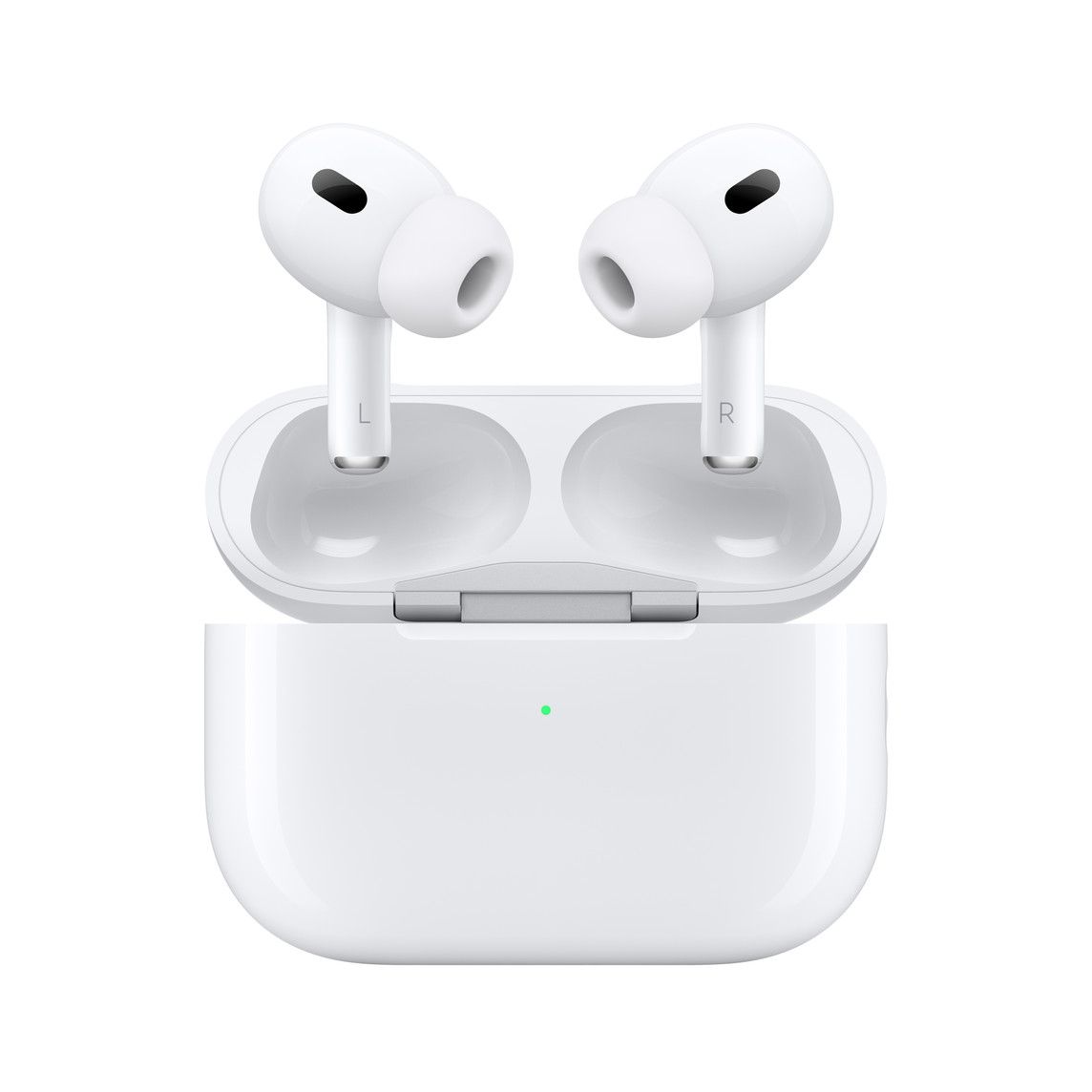
Best for iOS: Apple AirPods Pro (second gen, 2022)

Okay, so the official name of Apple’s just-released second-generation AirPods is just AirPods Pro. But for clarity, we will refer to the earbuds as AirPods Pro 2 here so as not to confuse them with the original pair released in 2019.

While the new AirPods Pro 2 look similar to the first generation, there are noticeable improvements. The audio drivers have been redesigned, which along with Apple’s H2 chip, pump out noticeably fuller and more immersive audio. The ANC has also improved, though still not at Bose’s level, and Apple’s transparency mode is one of the most natural-sounding ones we’ve tested. But perhaps most importantly, these earbuds are designed to work with Apple products, particularly the iPhone.

To be clear, you can use other brands’ earbuds with iPhones, and they’ll play audio perfectly fine. But the AirPods Pro 2 bring extra features such as Spatial Audio with head tracking, and the ability to respond to text messages directly via the earbuds without touching them or the phone. You can also access Siri easily via voice gestures or a long press of the stem. The AirPods Pro will also seamlessly switch between MacBooks, iPads, and iPhones depending on which device you’re using. So unless you’re actively looking for another brand or another feature that is missing in the AirPods Pro, these are simply the best options for iPhone users.

airpods pro 2

They’re also pretty good as regular Bluetooth earbuds for other brands. You lose out on most of the aforementioned features for iPhone users, but the AirPods Pro 2 will still pump out excellent audio, and ANC/transparency mode works well.

Battery life is fine, at five hours on a single charge, but shorter than some other buds listed here. The case adds roughly another 19 hours of playtime. If you’re an iPhone user, the AirPods Pro 2 should be leading the pack in consideration.

Specification Apple AirPods Pro 2
Battery life 5 hours with ANC on (24 hours w/ charging case)
Water resistance IPX4
Colors White
    Apple AirPods Pro (2nd generation)
    The second generation AirPods Pro improve in all the areas that matter

Also Great: AirPods (Third Generation)

Apple Airpods 3

If you’re not a fan of in-ear style silicon tips and want something that just rests a bit more gently inside your ear — or if you want something with a lower price tag– then the $179 AirPods 3 are for you. They come with an open-ear style design, meaning the buds aren’t meant to completely close off your ear canal like the AirPods Pro (or most other earbuds on this list). Of course, you also get the goodness of seamless connectivity with Apple devices thanks to the H1 chip. You get multi-device support if you’re using an iPhone, Mac, iPad, or Apple Watch with seamless switching. Apple has improved the sound quality of the AirPods 3 considerably compared to the last-gen AirPods.

There’s support for Spatial Audio too this time, so you can enjoy the surround sound effect from the AirPods Pro even on these. The major difference between the AirPods Pro and the third-generation AirPods is the absence of ANC. The AirPods Pro has Active Noise Cancellation which a lot of people will appreciate, especially while commuting or flying. The AirPods 3 come in a new case that has support for MagSafe charging. The usual features like Siri integration and force sensors for play/pause, skip tracks, etc. are present. If you feel that in-ear earbuds aren’t comfortable, skip the AirPods Pro and get the AirPods 3.

Specification Apple AirPods 3
Battery life 6 hours (30 hours w/ charging case)
Water resistance IPX4
Colors White
    Apple AirPods 3rd Generation
    The AirPods 3 have a similar design to the AirPods Pro but do not have the silicone tips. If you do not like the in-ear design of the AirPods Pro, you can get the AirPods 3.

Best for Most People: Nothing Ear 1

Nothing branding on earbud

The Nothing Ear 1 is our suggestion for most people because, at $99, they can be considered more affordable to most people than the $200-and-up prices of most earbuds on this list. Of course, the more expensive earbuds have more dynamic audio and better ANC, but are they twice as good as the Nothing Ear 1? We don’t think so. In fact, to less demanding listeners, the 11.6mm drivers pump out more than satisfactory acoustics.

We are also a fan of the Nothing buds’ stylish transparent design. While the square-ish case is a bit bulkier than others, the whole set has more attitude and style than the typical wireless earbuds in our opinion.

Nothing ear (1) Featured Image

The Nothing Ear 1 can last four and half hours on a single charge with ANC, and six hours without ANC. The larger case comes into handy, adding another six charges for well over 30 hours of listening time.

ANC, as mentioned, is just good but not great. If you’re in a noisy city, it’s not going to eliminate the noise the way AirPods or Bose’s earbuds do, but it will get rid of the constant air conditioning whirring sound or typical coffee shop chatter from nearby tables. With three mics on each bud, they are fine for phone calls too.

Specification Nothing Ear 1
Battery life 4.5 hours (34 hours w/ charging case)
Water resistance IPX4
Colors Transparent
    Nothing Ear 1
    The Nothing Ear 1 is a stylish looking, good sounding set of earbuds for less than others on this list.

Also great: Google Pixel Buds Pro

The settings for the Google Pixel Buds Pro on the OnePlus 10T


Let it be known that, in a vacuum, the Google Pixel Buds Pro is better than the Nothing Ear 1, the hardware is better, and these buds allow you to access Google Assistant easily if you’re paired with most Android phones. But it has to rank below the Nothing Ear 1 in this category because it’s $100 more expensive, and in our review, we found the out-of-the-box audio tuning to be sub-par. Don’t worry, the audio can be fixed with some fine-tuning. After doing so, the Pixel Buds Pro pump out balanced audio with clean high ends, crisp mids, and low end that’s not overbearing.

Google Pixel Buds Pro case

The Pixel Buds Pro offers great battery life, at seven hours of playtime on a single charge with ANC on and 11 hours without. The case bumps the total to 31 hours. The case supports wireless charging, and the buds are rated IPX4 like most other offerings here.

But ultimately, these are earbuds you get because you use an Android phone and want to access Google Assistant easily. Being able to just say “Hey Google” and then follow up with a question is better than needing to fiddle with the earbuds.

Specification Google Pixel Buds Pro
Battery life 7 hours with ANC on (31 hours w/ charging case)
Water resistance IPX4
Colors Charcoal, Fog, Coral, Lemongrass
    Google Pixel Buds Pro
    If you use an Android phone, the Pixel Buds Pro is an awesome option.

Best for Working Out: Jabra Elite Active 75t

Jabra Elite Active 75t

Having a good pair of earbuds is essential if you’re the kind of person that gets pumped up by a nice playlist on Spotify while working out, and the Jabra Elite Active 75t is a pair of earbuds that are specifically engineered for this use case. The Jabra Elite Active 75t belongs to the “Active” lineup of Jabra earbuds, and this means that they’re as good as they get for running and hitting the gym. They come with active noise cancellation so you never miss a beat, and they’re protected from sweat, water, and dust, coming with an IP57 rating, so they’ll keep up with you no matter how harsh the environment is.

At their price point, they’re not the most expensive earbuds out there, but also not the cheapest, trading bouts with a lot of options on our list. They also enjoy decent user reviews on Amazon, and Jabra is a company that has made a name for itself in the audio space over the years. They’re one of the best true wireless earbuds out there if you’re someone who works out a lot.

Specification Jabra Elite Active 75t
Battery life 5.5 hours with ANC on (24 hours w/ charging case)
Water resistance IP57
Colors Mint, Copper Black, Navy, Sienna, Gold Beige, Titanium Black
    Jabra Elite Active 75t
    The Jabra Elite Active 75t are one of the best pairs of TWS earphones for working out. They stay put in your ears and the IP57 rating ensures they're safe against sweat.

Best for Audiophiles: Sennheiser Momentum True Wireless 3

Sennheiser Momentum True Wireless 3

Sennheiser has a long history of releasing superb audio products, and the Momentum True Wireless 3 lives up to the brand’s reputation. Released in mid-2022, this third-generation model is a relatively iterative update over the already excellent second-generation model, with improvements coming mostly in the ANC, and support for more codecs including AAC, SBC, aptX, and aptX Adaptive. Chances are many readers won’t know what all those acronyms and alphabets mean, and it’s okay. They’re just various audio encoding/decoding programs, and only audiophiles really care about them. Sennheiser, as mentioned, has always catered to audiophiles.

This means you can expect high-fidelity audio from these buds regardless of the audio source, and the improved ANC sees the earbuds actively listening to the ambient noise around the wearer and adjusting accordingly. The 7mm drivers are fine-tuned to pump out dynamic, yet balanced audio, without overbearing bass. You can tweak the sound yourself with Sennheiser’s “Sound Personalization” feature available in the companion app.

Sennheiser Momentum True Wireless 3 earbuds in charging case

Battery life is also a plus, with seven hours of listening as well as a total of 28 hours with the charging case. There’s also an app available on both Android and iOS that allows you to use the earbuds’ built-in equalizer and tweak some of their other settings.

They’re definitely worth a look if you’re looking for the best true wireless earbuds and you have $250 burning in your pocket.

Specification Sennheiser Momentum True Wireless 3
Battery life 7 hours with ANC on (28 hours w/ charging case)
Water resistance IPX4
Colors White/Grey, Black
    Sennheiser Momentum True Wireless 3
    The Sennheiser Momentum True Wireless 2 are a premium pair of earbuds that pump out high fidelity sound.

Best Budget: OnePlus Nord Buds

OnePlus’ Nord series of phones are known for their value, so it only makes sense the earbuds are, too. Priced at just $40, the Nord Buds pack 12.4mm titanium drivers that pump out Dolby Atmos sound. With four microphones, you can make phone calls with the buds without issues.

You do lose out on some features found in pricier buds like active noise cancellation. But with silicon tips that can provide a seal around your ear canal, you should still be able to block out some outside noise.

A single charge can power these buds for seven hours, and with the case, you can get 30 hours of total charge time. With IP55 water and dust resistance and EQ settings via the companion app, there’s not much more you can ask for out of a $40 set of wireless earbuds.

Specification OnePlus Nord Buds
Battery life 7 hours (30 hours w/ charging case)
Water resistance IP55
Colors Black
    OnePlus Nord Buds
    If you're on a budget, the OnePlus Nord Buds with 12.4mm drivers and seven hours of play time on a single charge are good options.

These are our top picks for the best true wireless earbuds currently on the market. We think the Bose QuietComfort EarBuds 2 are the best overall buds, but as we said at the beginning, it’s a very close call and frankly, quite debatable. The Galaxy Buds 2 Pro is also excellent. If you’re on a budget, the OnePlus Nord Buds are worth a look.

Which do you like the most?

The post These are the best wireless earbuds to buy in 2022 appeared first on XDA.


from XDA https://ift.tt/XKGL1Rr
via IFTTT

Noctua’s latest product fixes a problem every AMD Ryzen 7000 owner may have

It’s not often I get excited by thermal paste and thermal paste accessories, but Noctua knocked it out of the park here. The company’s latest product isn’t brown, alas, but it fixes a problem with the Ryzen 7000 CPUs that many of us may not have even considered. It’s here to stop your thermal paste from gunking up the cutouts on the top of the CPU.

With Ryzen 7000 AMD changed the design of its heat spreader on the top of the CPU. Instead of being a complete square, it has little cutout sections on each side. As Noctua points out, these cutouts are the perfect place for thermal paste to gunk up once it spreads under the pressure from your cooler.

“While there’s no denying that AMD’s new Ryzen 7000 processors perform fantastic, we found that the cut-outs at the side of the heat-spreader tend to attract thermal paste that can be challenging to clean off. This is where our new thermal paste guard steps in: it’s a simple yet highly effective tool for keeping your new Ryzen 7000 series CPU nice and clean.”

So what is it? It’s basically a polycarbonate tray that sits around the CPU socket blocking off the cutouts. It’s heat-resistant, so you don’t have to worry about melting it, and as simple as it is, it’s a pretty brilliant idea. Why didn’t AMD think of this?

The thermal paste guard isn’t available just yet, though, it’ll be arriving in December. You’ll be able to get one in a set with a pack of Noctua’s cleaning wipes or alongside “AM5 editions” of its excellent NT-H1 and NT-H2 thermal paste. Prices will start at less than $8 for the guard and wipes set and around $14 with some thermal paste. Sometimes it really is the simple things that make all the difference.

Source: Noctua

The post Noctua’s latest product fixes a problem every AMD Ryzen 7000 owner may have appeared first on XDA.


from XDA https://ift.tt/SkyHg2Q
via IFTTT

These are the best Apple AirPods Pro 2 deals in 2022

After months of anticipation, the Apple AirPods Pro 2 are finally here. We had been hearing all sorts of rumors about these earbuds for a very long time, and now the wait is over. Revealed along with the iPhone 14 and iPhone 14 Pro, these wireless earphones come packed with features and technologies. The list includes Active Noise Cancellation (ANC) support, water resistance, Spatial Audio support, MagSafe charging, and much more! So, you must be wondering — Where can I find the best AirPods Pro 2 deals? The answer is Here! We’ve compiled a list of retailers selling these Apple wireless earbuds, along with the included perks and exclusives.

Apple Online Store

As you’d expect, Apple is selling the AirPods Pro 2 on its online store. By choosing the company’s own website, you get to engrave the AirPods case. This allows you to personalize it with letters, emoji, or Memoji of your choice. The engraving option remains exclusive to the Apple Online Store. Other official retailers don’t include this customization option. Additionally, you get to pay through Apple Card Monthly Installments if you’re an eligible user — if a one-time payment doesn’t match your current budget.

    Apple AirPods Pro 2
    The AirPods Pro 2 support Active Noise Cancellation, Dolby Atmos content, and MagSafe charging. They pack plenty of offerings, despite their compact build.

Best Buy

Best Buy is also selling the Apple AirPods Pro 2. Through this retailer, you can get the earbuds delivered to your doorstep. As we’ve highlighted, though, you can’t get the case engraved through this seller.

    Apple AirPods Pro 2
    The AirPods Pro 2 support Active Noise Cancellation, Dolby Atmos content, and MagSafe charging. They pack plenty of offerings, despite their compact build.

Amazon

If Amazon happens to be your retailer of choice, the Apple AirPods Pro 2 are also available here. Just like Best Buy, Amazon will deliver them to your doorstep, and you won’t get to have them engraved.

    Apple AirPods Pro 2
    The AirPods Pro 2 support Active Noise Cancellation, Dolby Atmos content, and MagSafe charging. They pack plenty of offerings, despite their compact build.

We will update this list of Apple AirPods Pro 2 deals as we find new ones. Though, if you spot an offer that you like, claim it before it expires or goes out of stock.

Where will you be buying the Apple AirPods Pro 2 from, and why? Let us know in the comments section below.

The post These are the best Apple AirPods Pro 2 deals in 2022 appeared first on XDA.


from XDA https://ift.tt/bnRqkoG
via IFTTT