LightBlog

lundi 26 septembre 2022

These are the best chargers for the Galaxy Z Flip 3 to buy in 2022

The Galaxy Z Flip 3 was launched in August 2020 alongside the Galaxy Z Fold 3. It was a massive upgrade over its predecessor, Galaxy Z Flip 2, and went on to become the most popular foldable phone on the market. While the Galaxy Z Flip 3 has been succeeded by the Galaxy Z Flip 4, it remains a great buy for anyone looking to jump on the foldable bandwagon.

If you recently picked up the Galaxy Z Flip 3 at a good discount and looking for a charger, you have come to the right place. We have rounded up the best fast chargers for the Galaxy Z Flip 3 below.

The Galaxy Z Flip 3 supports 15W wired charging via USB PD 3.0, Quick Charge 2.0, and Adaptive Fast Charging. So as long as your charger supports one of these standards with at least 15W output, you are good to go. Additionally, the phone supports 10W wireless charging if you’re looking for a wireless charger.

Another thing to keep in mind is the smartphone comes with a USB Type-C to Type-C cable in the box. So you should only buy a charger that has a Type-C port or if you’re getting a charger with a Type-A port, make sure it comes with a compatible cable in the box.

Best Samsung Galaxy Z Flip 3 Chargers

    Samsung 15W Fast Charger

    Our pick

    The Samsung 15W fast charger is an excellent option for your Z Flip 3. It will offer the top charging speed and comes with a Type-A to Type-C cable. It uses the company's Adaptive Fast Charging technology, which is compatible with the Z Flip 3.
    Samsung 25W Super Fast Wall Charger

    Designed by Samsung

    This official wall charger from Samsung comes with a USB Type-C port and can charge up to 25W. So you are sure to get the top charging speed on your Z Flip 3. It can also be used with other USB PD 3.0 and PPS compatible devices.
    Samsung 35W Power Adapter Duo

    Dual charging

    This is another wired charger designed by Samsung. It comes with two USB ports -- one Type-C and one Type-A. The Type-A port can deliver 15W power, whereas the Type-C port can go up to 35W, given the device supports USB PD 3.0 PPS.
    Anker Nano 3

    Foldable charger

    The Anker Nano 3 is one of the smallest GaN-based chargers on the market. It can deliver up to 30W of power to compatible devices and comes in five colorways. The company also offers a 24-month warrany on the charger.
    Anker PowerPort+ 1

    Foldable plug

    The Anker PowerPort+ 1 charger supports QuickCharge 3.0 and is backward compatible with QuickCharge 2.0. It includes a single Type-A port and is bundled with a compatible Type-A to Type-C cable. Additionally, it can deliver up to 18W fast charging.
    Spigen 20W ArcStation Pro

    GaN tech

    The Spigen 20W ArcStation Pro charger uses GaN technology to keep its size smaller and generate less heat than the Silicon-based chargers. It comes with a Type-C port and supports up to 20W fast charging.
    NekTeck USB Wall Charger

    The budget pick

    The NeckTeck USB Wall Charger is another budget option for the Galaxy Z Flip 3 smartphone. It supports Quick Charge 2.0 standard and offers up to 18W fast charging. You get a single Type-A port on the charger, and compatible Type-C and microUSB cables are bundled with it.
    Spigen USB C Car charger

    Fast charging in car

    The Spigen USB C Car Charger comes with two ports -- one Type-A and one Type-C. While the Type-C port can deliver up to 27W fast charging to USB PD-compatible devices, the Type-A port tops out at 18W with Quick Charge 3.0.
    Samsung Wireless Charging Stand

    The official charger

    The Samsung Wireless Charging Stand is a perfect wireless charger for your new Galaxy Z Flip 3. It supports up to 15W charging, so your phone will get the top charging speed. Additionally, the company bundles a wall charger with it.
    Elecjet Super Fast Charging Block

    25W charging

    This Elecjet wired charger is another great option for the new foldable smartphone. It supports up to 25W fast charging and comes with a single Type-C port. It's also bundled with a Type-C to Type-C cable, so you'll get a spare cable for use.
    Samsung Wireless Charger Duo (2nd Gen)

    Charge two devices

    The Samsung Wireless Charger Duo (2nd Gen) can charger your Galaxy Z Flip 3 and other Qi-compatible accessories at the same time. It offers 15W max charging speed and has a built-in fan to keep thermals in check.
    Ugreen 20W PD fast charger

    Affordable

    Ugreen is selling this excellent fast charger for a very affordable price. It can not only fast charge your Galaxy Z Flip 3 but other devices as well. It supports USB Power Delivery and Quick Charge 4.0+ fast charging standards.
    Ugreen Car charger

    20W power delivery

    Apart from its excellent wall charger, Ugreen also sells this amazing car charger that can fast charge your Galaxy Z Flip 3. It comes with two ports — one Type-C and one Type-A — so you can simultaneously charge two devices in the car.

These are the best chargers for the Galaxy Z Flip 3 smartphone. The Samsung 15W charger is the best option as it’s cheap and fully compatible with your smartphone. Anker, NekTeck, and Elecjet also provide some excellent options. If you’re looking for more wireless charger recommendations, be sure to check out our best Qi wireless chargers round-up.

    Samsung Galaxy Z Flip 3
    The Galaxy Flip 3 is Samsung’s new clamshell-style foldable phone. It features a 6.7 inch 120Hz flexible screen and Snapdragon 888 SoC.

Which charger are you planning to get for your Samsung Galaxy Z Flip 3? Let us know in the comments section. Meanwhile, we’ve also picked the best cases for the smartphone to help you keep it protected.

The post These are the best chargers for the Galaxy Z Flip 3 to buy in 2022 appeared first on XDA.


from XDA https://ift.tt/YZvQI3W
via IFTTT

XDA forums are now open for the Xiaomi Mix Fold 2, Motorola Edge 30 Ultra, and Poco F4

Since we last added new forum pages for the latest smartphones, Xiaomi and Motorola have announced a couple of new phones. Xiaomi unveiled its Galaxy Z Fold 4 competitor, the Mix Fold 2, and Motorola announced the Moto X30 Pro (AKA Motorola Edge 30 Ultra). We’ve now opened forum pages fo these devices to give buyers and enthusiasts a place for discussions, third-party development, mods, and more. In addition, we’ve opened a forum page for the mid-range Poco F4.

Xiaomi Mix Fold 2

The Mix Fold 2 is the latest flagship foldable from Xiaomi, featuring an updated design, Qualcomm’s Snapdragon 8 Plus Gen 1 SoC, 12GB RAM, and up to 1TB of storage. The phone features a 6.5-inch 1080p cover screen with a 120Hz refresh rate and a large 8-inch foldable LTPO 2.0 OLED display.

Xiaomi Mix Fold 2 in hand

In the camera department, Xiaomi offers a 50MP  primary camera, a 13MP ultra-wide camera, and an 8MP 2x telephoto came on the back, along with a 20MP selfie shooter over on the front. A 4,500mAh battery with 67W wired fast charging support and symmetrical stereo speakers round off the Mix Fold 2’s hardware. As far as software is concerned, the device runs MIUI Fold 13 based on Android 12 out of the box.

Xiaomi Mix Fold 2 XDA Forums

Motorola X30 Pro/Edge 30 Ultra

The Motorola X30 Pro is also a flagship phone featuring Qualcomm’s Snapdragon 8 Plus Gen 1 chip, up to 12GB RAM, and up to 512GB storage. However, unlike the Mix Fold 2, it features a regular candy bar form factor, with a 6.67-inch FHD+ display over on the front that refreshes at 144Hz.

Moto X30 Pro front and back on white background.

What sets the Motorola X30 Pro apart from other flagships is that it’s one of the first phones on the market to feature a 200MP camera. The 200MP sensor is accompanied by a 50MP ultra-wide camera, a 12MP telephoto camera, and a 60MP selfie shooter. Other noteworthy features include a 4,500mAh battery with 125W wired fast charging support and 50W wireless fast charging support. The device runs Motorola’s custom skin based on Android 12 out of the box.

Motorola Edge 30 Ultra/Moto X30 Pro XDA Forums

Poco F4/Redmi K40S

The Poco F4 is a mid-range device from earlier this year, which features Qualcomm’s Snapdragon 870 chipset, up to 8GB RAM, and up to 256GB storage. The device sports a 6.67-inch FHD+ 120Hz AMOLED display over on the front and a 4,500mAh battery on the inside with 67W wired fast charging support.

Poco F4

On the camera front, the Poco F4 features a 64MP primary shooter, an 8MP ultra-wide camera, a 2MP macro sensor, and a 20MP selfie camera. The device runs MIUI 13 for Poco based on Android 12 out of the box.

Poco F4/Redmi K40S XDA Forums

The post XDA forums are now open for the Xiaomi Mix Fold 2, Motorola Edge 30 Ultra, and Poco F4 appeared first on XDA.


from XDA https://ift.tt/zmKGdor
via IFTTT

Android 13 custom ROMs are now available for the ancient Galaxy S III and Galaxy Note II

Even though it’s been over a month since Google rolled out Android 13 on the stable channel, the update is officially only available on a handful of phones. But since the company has also uploaded the Android 13 source code to AOSP, the aftermarket development community has released custom ROMs based on Android 13 for quite a few devices. Earlier this month, developers on our forums released Android 13 custom ROMs for the Galaxy S7, Galaxy S8, and Galaxy Note 8. The ancient Galaxy S III and Galaxy Note II are now getting the same treatment.

XDA Recognized developer html6405, who released an Android 12 custom ROM for the Galaxy S III earlier this year, is back with an unofficial build of LineageOS 20 based on Android 13 for the 2012 flagship. In addition, the developer has released a similar build for the iconic Galaxy Note II. If you’re still rocking one of these devices, you can now try out Android 13 by downloading the unofficial LineageOS 20 release from the links provided below and following the instructions in the post to install the ROM.

Unofficial LineageOS 20 based on Android 13: Samsung Galaxy S III || Samsung Galaxy Note II

Note that the unofficial LineageOS 20 builds for the Galaxy S III and Galaxy Note II are early alpha releases, so you might encounter some issues. The developer notes that a few features, like NFC, Bluetooth audio in phone calls, network monitoring, and SD cards, don’t work on the current builds. However, most other features should work as expected.

XDA Forums: Samsung Galaxy S III || Samsung Galaxy Note II

Custom ROMs like these are a great way to give your old phone a new lease on life. If you have an old Android phone lying around that hasn’t received an update in years, be sure to check out our roundup of the Android 13 custom ROMs currently available on our forums.

The post Android 13 custom ROMs are now available for the ancient Galaxy S III and Galaxy Note II appeared first on XDA.


from XDA https://ift.tt/RQO4qUZ
via IFTTT

Samsung kicks off One UI 5.0 beta program for the Galaxy A52

Samsung opened the One UI 5 public beta program for its flagship Galaxy S22 series early last month. Over the last few weeks, the company has released a few beta builds for the devices, giving users a chance to experience everything new in the Android 13 release ahead of the stable rollout. While the Galaxy S22 series is yet to receive the first One UI 5 stable release, Samsung has now opened the Open UI 5 public beta program for the mid-range Galaxy A52.

According to a recent post on the Samsung community forums, Galaxy A52 users can now enroll in the beta program by heading to the Samsung Members app and clicking on the new One UI 5 beta banner. After successful registration, users should receive the first One UI 5 beta update via an OTA update. Currently, the One UI 5 beta program for the Galaxy A52 only seems to be live in India. But it should reach other regions shortly.

Samsung members app screenshot with One UI 5 beta announcement for Galaxy A52.

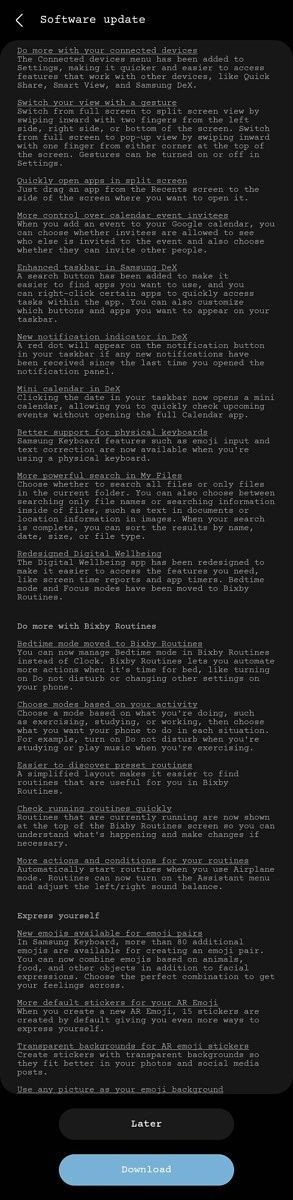
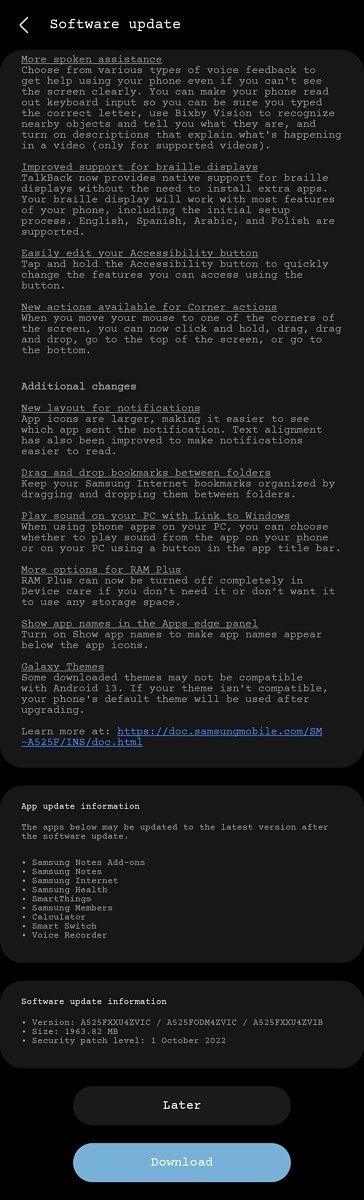
Screenshots of the One UI 5 beta changelog shared in a separate post reveal that the update (firmware version A525FXXU4ZVIC/A525FODM4ZVIC/A525FXXU4ZCIB) measures just under 2GB and packs the Android security patches for October 2022. It includes most of the changes Samsung introduced in One UI 5 beta for the Galaxy S22 series, including new color options for dynamic themes, stackable widgets support, new gestures for split screen video, improvements for the My Files app, camera app improvements, and more. Check out the full changelog in the screenshots attached below.

Galaxy A52 One UI 5 beta changelog screenshot. Galaxy A52 One UI 5 beta changelog screenshot. Galaxy A52 One UI 5 beta changelog screenshot. Galaxy A52 One UI 5 beta changelog screenshot.

Credit: Š on the Samsung Community forums

For more details on One UI 5 and all the new features it brings to the table, check out our hands-on preview of the open beta update.

Have you received One UI 5 beta based on Android 13 on your Galaxy A52? What do you like/dislike about the update? Let us know in the comments section below.


Source: Samsung Community (1,2)

The post Samsung kicks off One UI 5.0 beta program for the Galaxy A52 appeared first on XDA.


from XDA https://ift.tt/miSzxTU
via IFTTT

dimanche 25 septembre 2022

Do the Apple AirPods Pro 2 have Active Noise Cancellation (ANC)?

Apple unveiled the second-gen AirPods Pro alongside the iPhone 14 series recently. While the new model doesn’t feature any significant design changes, the AirPods Pro 2 brings some noteworthy improvements to the table. They come with Apple’s new H2 chip, a redesigned inward-facing microphone, Spatial Audio support, and a new Adaptive Transparency mode. Coming to the question on your mind, the AirPods Pro 2 also feature active noise cancellation (ANC) support.

Apple claims that the AirPods Pro 2 offers up to two times more ANC than the previous model. The company says the earbuds utilize the new H2 chip and updated computational algorithms to deliver smart noise cancellation. However, like the previous model, the AirPods Pro 2 still offer three levels of Noise Control — Off, Transparency, and Noise Cancellation.

AirPods Pro 2 Active Noise Cancellation graphic.

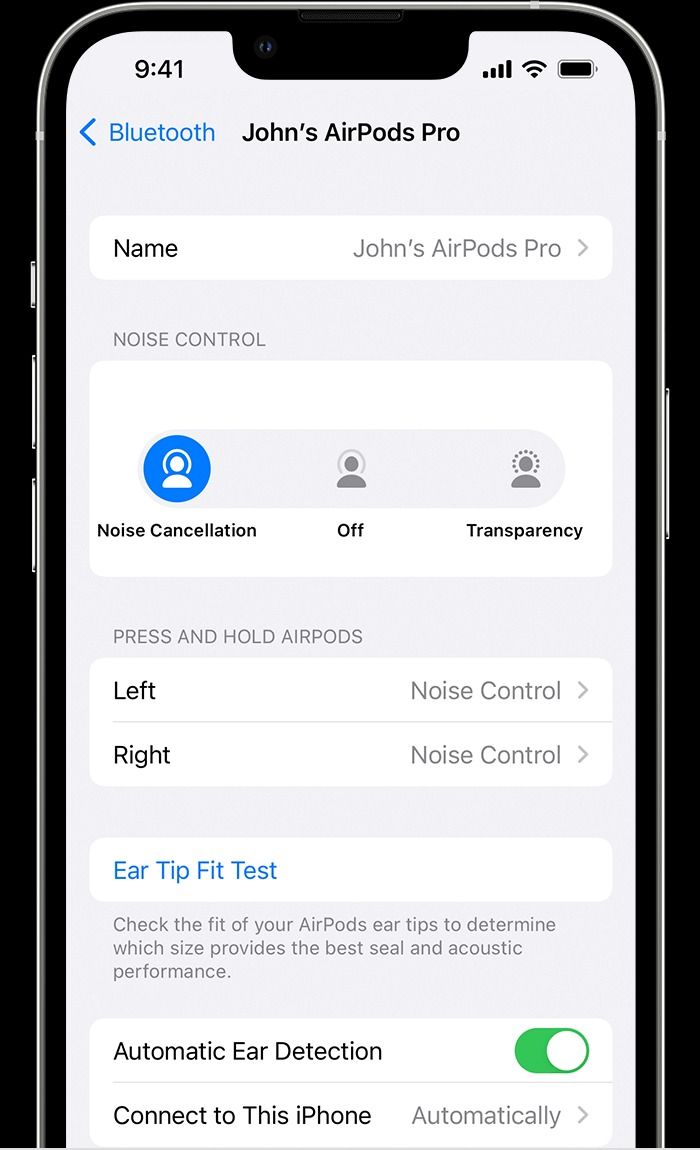
You can enable ANC on the AirPods Pro 2 by pressing and holding the force sensor on the stem of either earbud until you hear a chime. You can then switch between Noise Cancellation and Transparency mode by pressing and holding the force sensor. Alternatively, you can switch between the modes on your iPhone or iPad by heading to Settings > Bluetooth and tapping on the ‘i’ button next to your AirPods Pro 2 in the list of devices. Select the Noise Control option you wish to switch to on the following page.

AirPods Pro Noise Control settings on an iPhone. AirPods Pro 2 Noise Control settings in Control Center on an iPhone.

In addition to these two methods, you can switch between the Noise Control modes or activate ANC from the Control Center on your iOS or iPadOS device. To do so, touch and hold the volume slider in the Control Center while wearing your AirPods Pro 2 until you see the additional controls. Tap the Noise Control icon in the lower-left corner to switch between the Noise Control modes. Furthermore, you can use your Apple Watch and Mac to activate ANC on your AirPods Pro 2. If you use the former, you’ll also be able to view the level of noise reduced by the AirPods on your Apple Watch.

    Apple AirPods Pro 2
    Like its predecessor, the AirPods Pro 2 offer ANC support. Apple claims that the new earbuds offer up to two times more active noise cancellation than the previous model.

The new AirPods Pro 2 are available for purchase on the Apple Store, Best Buy, and Amazon. If you’re planning to pick one up, check out our roundup of the best AirPods Pro 2 deals to save some cash.

The post Do the Apple AirPods Pro 2 have Active Noise Cancellation (ANC)? appeared first on XDA.


from XDA https://ift.tt/TnvyHbB
via IFTTT

Does the Apple iPhone 14 series have dual-frequency GPS?

The iPhone 14 Pro and iPhone 14 Pro Max debut several exciting features that are not found on the standard iPhone 14 and iPhone 14 Plus. For one, there’s a Dynamic Island which cleverly uses the new pill-shaped notch to display alerts and controls around it. There’s also a brand new 48MP primary camera that delivers exceptional low-light images. But among these headline-grabbing features, the Pro models also bring many under-the-hood improvements that didn’t get much attention during the keynote. One such improvement is support for dual-frequency GPS.

The iPhone 14 Pro and iPhone 14 Pro Max support dual-frequency GPS

The iPhone 14 Pro and iPhone 14 Pro Max are the first iPhones to offer dual-frequency GPS. Both phones can receive GPS signals from L1 and L5 bands and can lock onto both bands simultaneously, offering faster and more accurate navigational positioning. Previous iPhones could only track GPS signals from the legacy L1 band, which operates on a slower frequency and is prone to signal distortions caused by the atmosphere and other obstacles. The L5 band, on the other hand, operates on a faster frequency and can more easily travel through clouds, trees, buildings, and other obstacles.

    Apple iPhone 14 Pro
    The iPhone 14 Pro supports dual-frequency GPS for a more accurate navigation experience.

But the iPhone 14 and iPhone 14 Plus do not

Unfortunately, dual-frequency GPS is only available on the Pro models. On the standard iPhone 14 and iPhone 14 Plus, you’re still limited to single frequency GPS (L1 band). Apple is a bit late to the party as many Android OEMs have offered phones with dual frequency global satellite navigation systems (GNSS) for some time now.

In addition to GPS, all iPhone 14 models support several other GNSS. These include GLONASS, GALILEO, QZSS, and BeiDou. Besides, the Pro models, the new Apple Watch Ultra also supports dual-frequency GPS for a more accurate navigation experience.


The new iPhone 14 series is now on sale worldwide. If you’ve got yourself a shiny new smartphone, do check out some charger and accessory recommendations, and don’t forget to pick up an iPhone 14 case.

The post Does the Apple iPhone 14 series have dual-frequency GPS? appeared first on XDA.


from XDA https://ift.tt/GQvpjy2
via IFTTT

How many software updates will the Apple Watch SE 2 get?

The Cupertino firm launched the 2022 additions to the Apple Watch family during its Far Out event. The SE 2 is a welcome upgrade to the original budget model. It comes with a faster processor and other improvements. This allows users to utilize the highest-end Apple silicon — without needing to buy an Apple Watch Series 8. What’s great about the SE 2 is that it will likely receive the same number of software updates as the Apple Watch Series 8. Considering both models pack the Apple S8 chip, they should be able to handle version bumps for years to come. So, how many years of software support will the Apple Watch SE 2 get? The Cupertino overlord doesn’t publicly state the exact number anywhere. However, we can still look at previous models and observe the pattern. After all, Apple typically sticks to its routines when it comes to these matters.

Software updates on the Apple Watch SE 2

Let’s take the Apple Watch Series 3 as an example — as this model recently got discontinued. The Series 3 launched back in 2017, and it received major software updates until 2022. That’s five years of updates — from watchOS 4 till the last version of watchOS 8. The S8 of the SE 2 is significantly faster than the S3 included in the Series 3. So we can safely assume that the Apple Watch Series SE 2 will receive at least five years of software updates. Of course, the number could be higher or lower — depending on Apple and its decisions. However, if we had to estimate and assume, four to five years is a safe bet. So, the Apple Watch SE 2 launched in 2022. This means you can expect it to receives major updates until at least 2027. It runs watchOS 9 out of the box, and it will likely supports versions up to at least watchOS 14.

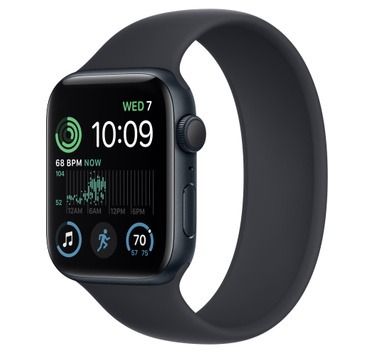
    Apple Watch SE 2
    The Apple Watch SE 2 comes in three finishes to choose from and packs the Apple S8 SoC.

Which Apple Watch SE 2 color have you chosen, and why? Let us know in the comments section below.

The post How many software updates will the Apple Watch SE 2 get? appeared first on XDA.


from XDA https://ift.tt/Vpvlfmt
via IFTTT