LightBlog

mercredi 31 août 2022

Logitech’s cloud gaming handheld could pack the Snapdragon 720G and a 6,000mAh battery

Logitech is working in partnership with Tencent to bring a new cloud gaming handheld to the market later this year. While the company is yet to release any details about the device, a recent leak gave us our first look at its design. Now, we have a few details about its hardware.

A Google Play Console listing of the Logitech cloud gaming handheld reveals that the device will have the model number GR0006 and will pack the Qualcomm SM7125 SoC (AKA the Snapdragon 720G), the Adreno 618 GPU, and 4GB of RAM. The listing also reveals that the device will run Android 11 out of the box, and it includes a render that confirms the design we saw in the recent leak.

Logitech G Cloud Gaming Handheld Google Play Console listing screenshot.

Via: Kuba Wojciechowski

An FCC listing of a Logitech device with the same model number further adds that it will pack a 6,000mAh battery and Wi-Fi 5 support. While there are no mentions of a cellular variant in the FCC listing, it does reveal that the device will likely be called Logitech G Cloud Gaming Handheld. A USPTO listing of the device also confirms this moniker.

Based on these specs, we suspect that the Logitech G Cloud Gaming Handheld might just be an affordable console exclusively for cloud gaming services. It might not be great for mobile games, however, due to the older Snapdragon 720G chip, Adreno 618 GPU, and 4GB of RAM. If that’s the case, the Logitech G Cloud Gaming Handheld might prove to be a tough sell compared to a mid-range smartphone with a gaming controller.

Would you pick a dedicated cloud gaming device over a similarly-priced mid-range Android smartphone and gaming controller combo? Let us know in the comments section below.

The post Logitech’s cloud gaming handheld could pack the Snapdragon 720G and a 6,000mAh battery appeared first on XDA.


from XDA https://ift.tt/iYlXSb0
via IFTTT

Asus ROG Phone 6D & ROG Phone 6D Ultimate renders surface ahead of September 19 launch

After launching the ROG Phone 6 and ROG Phone 6 Pro this July, Asus is now gearing up to launch a new gaming smartphone as part of its ROG Phone lineup. The Taiwanese OEM recently confirmed that the upcoming device, called the ROG Phone 6D Ultimate, would feature MediaTek’s flagship Dimensity 9000 Plus chip. While we’re still weeks away from the September 19 launch event, a new leak has revealed that the company will, in fact, launch two phones at the event — the ROG Phone 6D and ROG Phone 6D Ultimate. The leak also gives us our first look at their design and, as we speculated in our previous coverage, they look pretty much the same as the ROG Phone 6 series models.

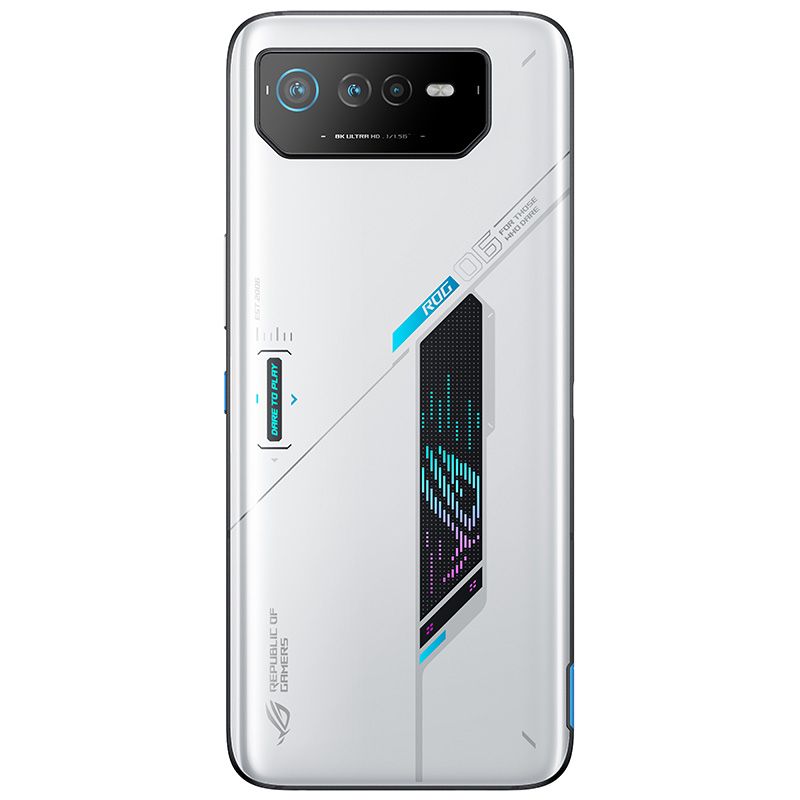
The leak in question comes from trusted leaker Evan Blass (via 91mobiles), and it showcases the ROG Phone 6D and ROG Phone 6D Ultimate in a new gunmetal gray colorway. As you can see in the attached images, the ROG Phone 6D is nearly indistinguishable from the ROG Phone 6, save for the new color.

ROG Phone 6D leaked render on white background Storm White ROG Phone 6 on white background.

It features a triple camera setup on the back, along with an RGB Asus ROG logo and ROG branding. Over on the front, it has an unobstructed display with slim bezels on the top and bottom. The button layout also remains unchanged, with the ROG Phone 6D sporting a volume rocker, a power button with a teal accent, and shoulder triggers on the right edge.

The story is the same with the ROG Phone 6D Ultimate, and it looks exactly like the ROG Phone 6 Pro, just in a different color. Instead of an RGB ROG logo, the Ultimate variant features an ROG Vision color PMOLED display on the back panel, along with the same triple camera setup and similar ROG branding. The display on the Ultimate models is no different from the one on the regular variant, and the button placement is also the same.

ROG Phone 6D Ultimate leaked render on white background. Storm White ROG Phone 6 Pro on white background.

The only notable difference between the two is the center-aligned gray tab on the back panel of the ROG Phone 6D Ultimate, which is missing on the ROG Phone 6 Pro. But we’re not exactly sure if that’s just for aesthetic purposes or not. Sadly, the leak doesn’t shed any light on the internal hardware. So far, we only know that the ROG Phone 6D and ROG Phone 6D Ultimate will pack MediaTek’s Dimensity 9000 Plus SoC. But we expect to learn more in the days leading up to the launch.

If Asus doesn’t change anything other than the SoC on the ROG Phone 6D and ROG Phone 6D Ultimate, would you choose the Dimensity 9000 Plus variants over the ones featuring Qualcomm’s Snapdragon 8 Plus Gen 1 chip? Why or why not? Let us know in the comments section below.


Via: 91mobiles

The post Asus ROG Phone 6D & ROG Phone 6D Ultimate renders surface ahead of September 19 launch appeared first on XDA.


from XDA https://ift.tt/0rZaExc
via IFTTT

How to factory reset an Apple HomePod or HomePod Mini

Almost all of the time, Apple’s HomePod and HomePod Mini are simple to use and just get on with their job without fuss. But occasionally things go wrong. In those instances, you have options, like rebooting the HomePod. But in others, you’ll need to pull out the big guns and go for a full factory reset. You also need to do this before disposing off or selling your HomePod speaker.

Setting up the HomePod is such an incredibly simple process you’re probably hoping the same is true of resetting. That isn’t totally untrue, but as the settings and controls are designed to get out of the way, it’s not immediately obvious how to do it.

Never fear. Let’s dive in and explain it all.

What to try first if your HomePod is misbehaving

Apple HomePod settings

Resetting your HomePod should be the last resort if it’s misbehaving. There was a time also you would need to do this just to change to a new Wi-Fi network, but thankfully that isn’t the case anymore. But before resetting you should try simply restarting your HomePod to see if it fixes the problem.

You can do this in the Home app either on a Mac or on an iOS device.

  1. Open the Home app.
  2. On iOS, touch and hold on your HomePod. On Mac, right-click on it.
  3. On iOS, scroll to the bottom and tap the settings cog. On Mac, select Settings from the right-click menu.
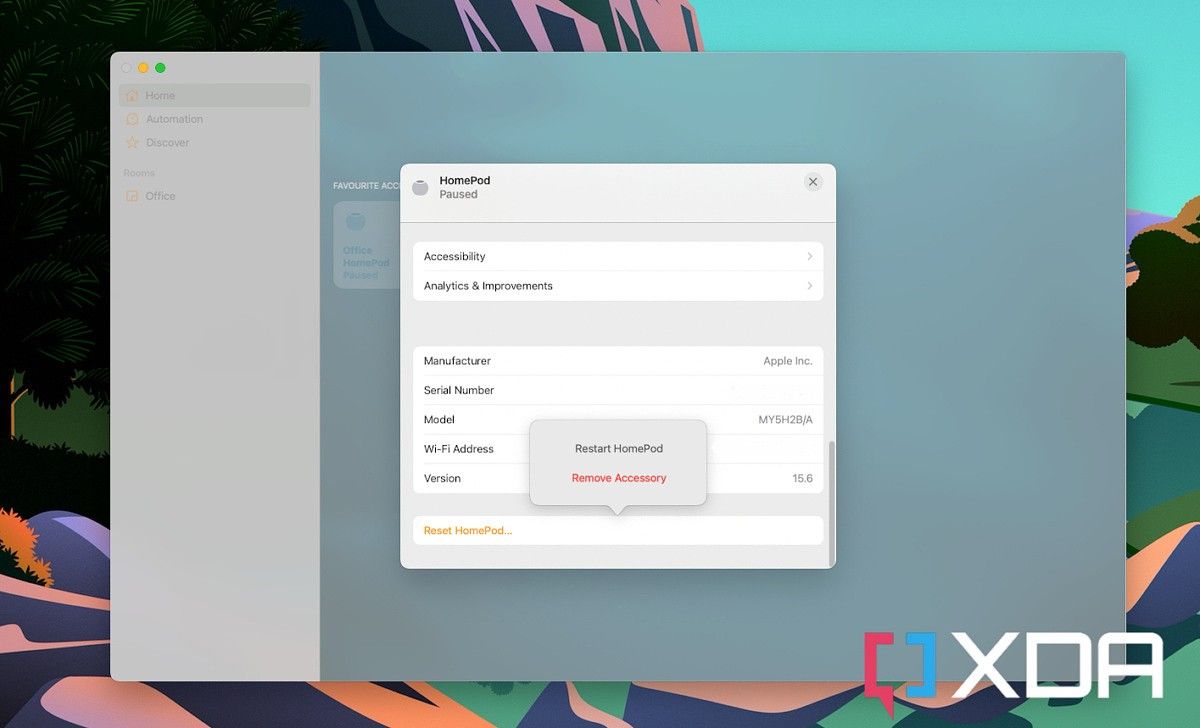
  4. Select Reset HomePod.
  5. Select Restart HomePod.

Your HomePod will now reboot itself and when it comes back to life hopefully rectified your issues. If it didn’t or you’re getting rid of your HomePod, then you’ll be looking at a full factory reset.

How to perform a factory reset on a HomePod

HomePod Mini

The process of doing a factory reset in the Home app is a little misleading. It involves following the steps from the previous section up to step four. But when you tap Reset HomePod you don’t actually have an option in the next menu that just says reset.

Instead, you have to remove the HomePod from your Home entirely. This triggers the factory reset. So, instead of choosing the restart option as above, select Remove Accessory instead. You can now set it up again as a new device and hopefully, your issues have been resolved.

Alternative methods to reset a HomePod

Restoring a HomePod with a Mac

There are a couple of alternative methods to reset a HomePod that don’t involve the Home app. You shouldn’t need to use these, but if the app method isn’t working it’s handy to have something to fall back on.

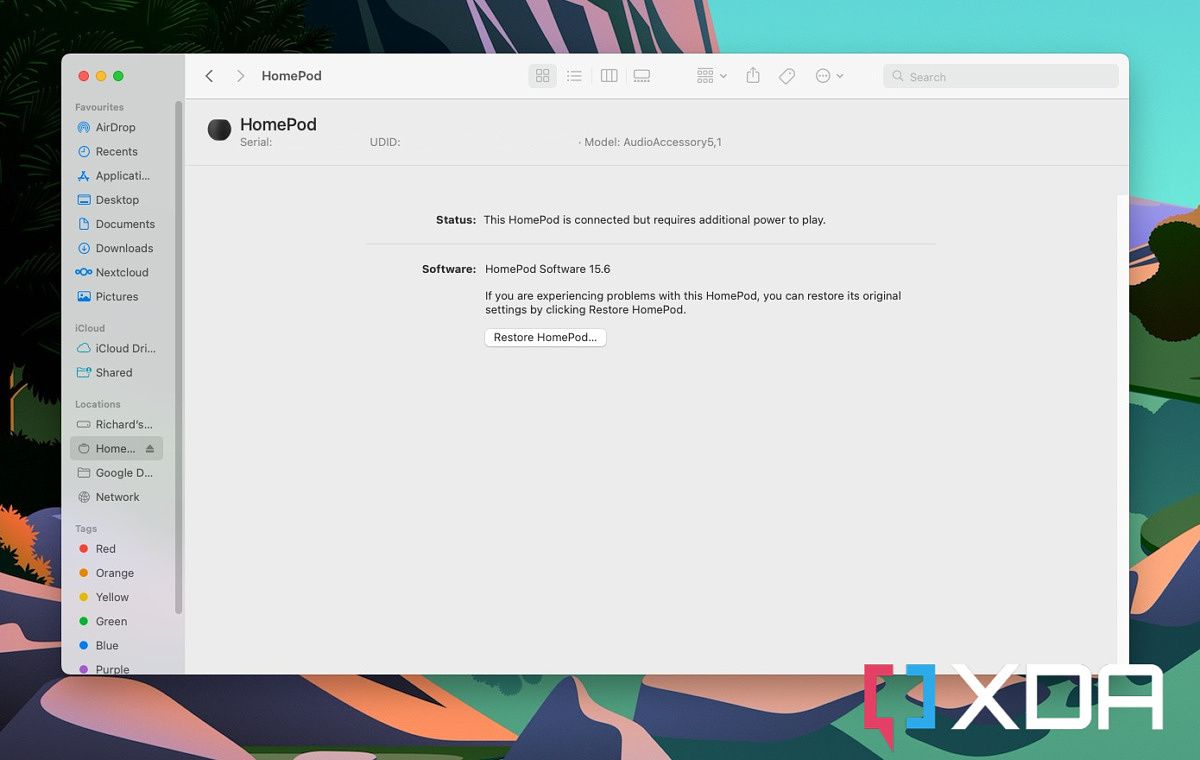
The first thing you can do is hook up your HomePod to your Mac or PC directly using its integrated cable. On the Mac, you’ll see the device show up inside Finder, but on Windows, you’ll need to have the latest version of iTunes installed.

iTunes (Free+, Microsoft Store) →

Whichever you’re using when your HomePod appears, click on it, then click the box that says Restore HomePod. Your Mac or PC will now go through the restore process to put your HomePod back to factory settings. Once the light on the top is no longer orange, the process is complete.

Alternatively, you can try the hardware method.

  1. Unplug your HomePod and wait for about 10 seconds.
  2. Plug it back in and wait for the same time.
  3. Touch and hold on top of the HomePod.
  4. Wait for the light to turn red and keep holding.
  5. When you hear a message from Siri about resetting followed by three beeps, release your finger.

As before this will restore the HomePod to factory settings and you can now set it up again using your Mac or iOS device.

    Apple HomePod Mini
    Apple's HomePod Mini is small in size but big in sound and is a great partner to the Mac, iPhone and iPad.

The post How to factory reset an Apple HomePod or HomePod Mini appeared first on XDA.


from XDA https://ift.tt/mh1U9MA
via IFTTT

mardi 30 août 2022

Instagram will begin testing a potentially powerful content filtering tool

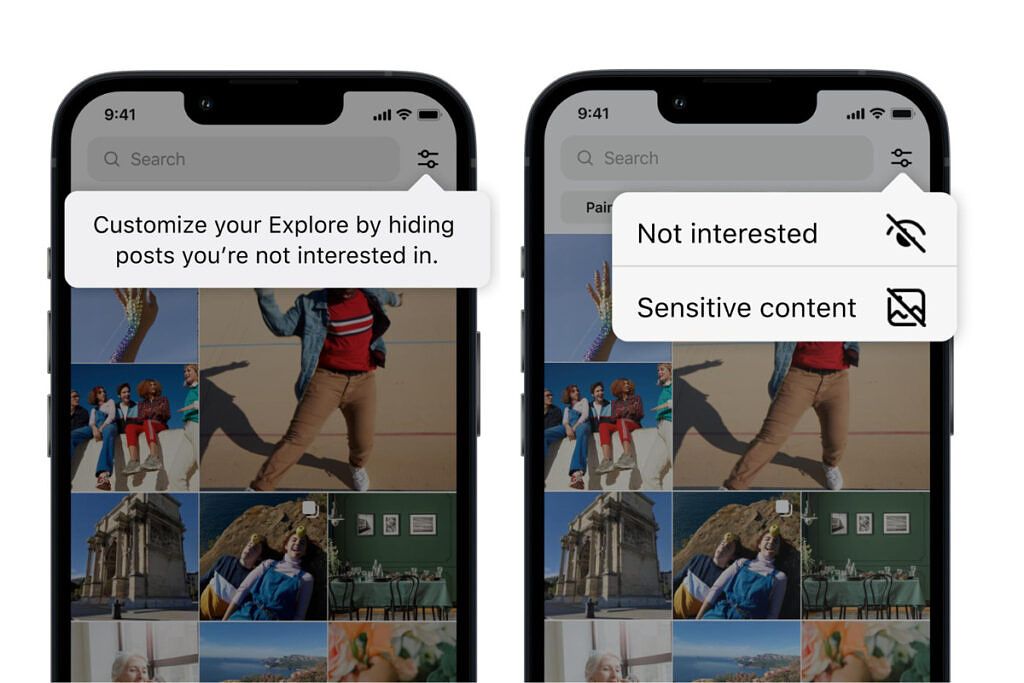
Instagram has been busy as of late, adding lots of new features to its platform. While the company currently does have a way to customize what ends up on the Explore page, it doesn’t have a precise way to refine the images and videos that pop up daily. Thankfully, the firm has announced that it is testing a couple of new ways to hopefully allow users to improve the content on the Explore page in the future.

Instagram Feed options

The new test will allow users to refine their feed further and, hopefully, have recommended content delivered that is more in line with what they are looking for. Users can currently refine their feed by selecting content and marking it as “Not Interested.” While this is a great solution, sometimes it can be slow if several items need to be marked at once. The new test allows users to mark multiple items at once, making it faster and more efficient to filter out content they don’t want to see. Furthermore, Instagram will take things a step further, allowing users to filter out suggested content using words, phrases, or even emoji found in the caption and hashtags. Currently, the more granular filtering option is not live in the test. Instagram did not offer a timeline for when it would become available.

Instagram Feed options

Recently, Instagram has put a lot of focus into creating a safe place for teens. Last week, it updated the Sensitive Content Control, showing less sensitive content by default to teens 16 years and under. The firm has also introduced age verification in the United States, requiring users to provide a valid form of identification when signing up for Instagram. But, being able to filter content will take things to another level. If this kind of filtering goes live, it could become an extremely powerful tool for the platform and its users.


Source: Facebook

The post Instagram will begin testing a potentially powerful content filtering tool appeared first on XDA.


from XDA https://ift.tt/GDbupj0
via IFTTT

Apple iPhone 14 Pro rumors indicate a better camera, stronger MagSafe, and more

We are a little over a week away from the release of the next iPhone, and more rumors and leaks are starting to roll in. As we count down the days to the “Far Out” event, let’s take a look at some of the more recent rumors that have popped up regarding the Apple iPhone 14 Pro.

While many things will change with the introduction of the iPhone 14 and iPhone 14 Pro, one of the most important changes rumored so far has been the look of the iPhone 14 Pro. The Pro devices this year will get a facelift, with the display notch being whittled down to a new pill and hole cutout. But, it appears the Pro model will get another improvement in the form of its camera. According to analyst Ming-Chi Kuo, the ultra-wide camera on the iPhone 14 Pro will be getting an upgrade to a larger sensor going from the current 1.0µm to 1.4µm. This should allow the upcoming phones to take better images in lower-light scenarios, relying less on computational photography.

Although the new parts will be good for the phones, Kuo does state that the parts are going to be considerably more expensive, with an increase of up to 70 percent. Kuo did not state whether this cost would be passed on to consumers. There have been rumors over the past few months that indicate that the Pro models could see a price increase. When it comes to colors, as expected, for the new Pro models, last year’s Sierra Blue will be retired, and a new color, purple, will be brought in to replace it. Apple will most likely have a better moniker for the color when it debuts at the Apple event. There is also the possibility that a variation of the Alpine Green color will stick around.

In addition to the color change, Naver reports that MagSafe for iPhone could be gaining a small improvement, with Apple using stronger magnets to create improved connections with accessories. This should greatly improve the experience with heavier accessories like the MagSafe Battery Pack and Wallet with MagSafe. The source also discusses a new battery accessory, although specifics of this device were not mentioned. Furthermore, those hoping to get their hands on a titanium model of the iPhone might be disappointed, as it might not come to fruition in this release. Apparently, a prototype was made, but due to cost and the difficulty in manufacturing, it has reportedly been canceled. Last but certainly not least, coming from the same source, the new iPhone Pro models will start at 128GB of storage and will once again top out at 1TB.

While there is certainly a lot of information coming out about the iPhone ahead of its release, it’s important to note that none of these have been confirmed by Apple. Although some of the sources have had good track records, things can always change. With that said, we have a little over a week to go before we hear official news from Apple, so what are some of the things you are looking forward to from the September event?


Source: Ming-Chi Kuo (Twitter), Naver, DuanRui (Twitter)
Via: 9to5Mac

The post Apple iPhone 14 Pro rumors indicate a better camera, stronger MagSafe, and more appeared first on XDA.


from XDA https://ift.tt/Od7mfIn
via IFTTT

lundi 29 août 2022

Instagram fixes Reels audio bug allowing iOS users to export video without issue

A little over a week ago, iOS Instagram users encountered a bug that removed sound from downloaded Reels video clips. This is probably something that wouldn’t normally cause too much of an uproar, but apparently, many TikTok and social media video creators rely on Instagram’s editing tools to create their videos. Thankfully, the issue has now been resolved, allowing iOS users to freely create and export their creations.

The latest update for Instagram that arrived on Friday has now fixed the bug according to Seine Kim, a spokesperson for Instagram’s parent company, Meta. Kim delivered the news to The Verge, in a follow up on its original story. Thankfully, the problem wasn’t intentional, so creators can feel a bit more confident using the tools found on Instagram going forward. The bug arrived at a really bad time for the company, as it had previously just rolled back changes to its platform following a massive uproar.

Short-form video has become quite popular over the past few years thanks to TikTok, and it has forced platforms like Instagram to adapt and change. Unfortunately, while it is currently catering to its users with recent changes, it has come out to say that the future of the platform is video. Platforms like Instagram and YouTube have been trying to combat TikTok for the better part of a year. Instagram has an algorithm that recognizes TikTok watermarked videos and once detected, does not promote those videos on its platform. YouTube has also become more protective of its content and it has begun watermarking its own short-form videos called Shorts in order to promote its platform.

Despite its recent blunders, Instagram has been adding numerous and much appreciated features over the past couple of months that aim to protect younger users. Most recently, it updated its sensitive content filters for teens, has started verifying the age of its users, and introduced a “nudge” feature that helps teens move on from subjects that they might be fixated on. So while not all of its new updates are appreciated, there are definitely some that are moving the platform in the right direction.


Source: The Verge 

The post Instagram fixes Reels audio bug allowing iOS users to export video without issue appeared first on XDA.


from XDA https://ift.tt/vpz8Qd3
via IFTTT

Does the Google Pixel 6a have a microSD card slot?

Google revealed the Pixel 6a during its I/O conference. This mid-range device packs some of the technologies included in the Pixel 6 and Pixel 6 Pro. However, it misses out on some of the offerings — such as the 120Hz refresh rate — to make it more affordable. If you buy a Pixel 6a, make sure to grab a case, too. A few more bucks on top of a $449 purchase won’t leave a hole in your pocket. However, it could save you a fortune if you drop your phone on an unfortunate day. Now, if you’re contemplating this purchase, you must be wondering — does the Google Pixel 6a support microSD cards? The short answer is no, it does not. But stick around for the longer answer.

Google Pixel 6a and microSD card support

For those unfamiliar with microSD cards, their size is around that of a micro SIM card, and they act as digital storage. People typically use it to expand the storage capacities of their digital devices. They’re also ideal for those who transfer a lot of data between different devices that support them.

So does the Google Pixel 6a have a microSD card slot? The answer is no. Just like most of the popular smartphones released nowadays, the Google Pixel 6a doesn’t include a microSD slot. This means that there’s no easy or convenient ways to expand. You’re limited to the 128GB that the company has included internally. This isn’t news for Google Pixel owners since none of the previous Pixels have offered microsd card storage, and the Pixel 6a changes nothing on that end.

If you have a massive photo library and don’t want to delete your memories, you could depend on cloud storage instead. Google Photos is an excellent service for backing up your photos and videos. This way, you get to leave a copy of your media online, and you clear the storage on your phone. Cloud photos you’ve deleted locally remain accessible as long as you have an internet connection.

    Google Pixel 6a
    The Pixel 6a is a middle-range phone from Google. It packs the Tensor chip and runs Android 12.

Is the lack of a microSD card slot on the Google Pixel 6a a dealbreaker? Why or why not? Let us know in the comments section below.

The post Does the Google Pixel 6a have a microSD card slot? appeared first on XDA.


from XDA https://ift.tt/fYvtQ7o
via IFTTT