Snapchat’s latest update, “Dual Camera,” allows creators to use the front and rear cameras to film content simultaneously. The update is undoubtedly a response to the social media app BeReal, which has become popular over the past few months and captures moments using the front and rear cameras. The Snapchat update arrives to supported iOS devices today and will roll out to Android handsets over the coming months.
With the new update, Snapchat users will see a new option when they tap the camera toolbar. Dual Camera has four different layouts. Users can position the camera in vertical or horizontal orientation, and there is also a picture-in-picture mode. A cutout layout will take whatever is captured on the rear camera and set it as a background. So while the BeReal trend might have inspired Snapchat, it is thinking of new ways to utilize dual camera functionality in its app. Furthermore, creators will still be able to take advantage of the app’s creator tools and add music, stickers, and lenses.
Snapchat isn’t the only taking an interest in this format, as Instagram launched its own dual camera feature in July and is now currently internally testing a more fleshed out experience. Despite its newfound popularity, BeReal actually launched back in 2020. For close to a year, it didn’t really gain any traction. But more recently, in 2022, it has done really well, landing at the top spot in the Top Free Apps section of the iOS App Store. The app keeps things simple, challenging its users to capture and upload authentic moments. It does this by randomly notifying users at different times each day to take a photo and share it within two minutes. From here users can react to the posts using comments or RealMojis.
There is no telling how long this trend will last, but regardless, the competition isn’t hesitating to capitalize. If you are interested in trying the new feature, you can head to the iOS App Store to download Snapchat. As stated above, the update is only currently available for iOS and will arrive to Android later.
Samsung debuted One UI 4.1.1 based on Android 12L with the recently-launched Galaxy Z Fold 4. The new software release included optimizations and features for large-screen devices, and it’s now finally available for Samsung’s flagship Galaxy Tab S8 series.
The One UI 4.1.1 update for the Galaxy Tab S8, Galaxy Tab S8 Plus, and Galaxy Tab S8 Ultra is currently rolling out to users in Europe and South Korea (via Sammobile). It includes the new Taskbar feature that Samsung showcased at its Galaxy Unpacked event earlier this month. It lets you quickly switch between frequently used apps or open apps in split-screen mode or as a pop-up window. You can also use it open frequently-used app pairs in split-screen mode. In addition, One UI 4.1.1 also includes a new two-finger gesture to help users quickly switch between fullscreen and split-screen views.
Via: Sammobile
Along with these multitasking improvements, One UI 4.1.1 also includes a new option to set custom call backgrounds for contacts. Furthermore, the updated My Files app in the release lets users search for information within files. The tablets also get support for a new text scanning feature that lets users copy text from images and share it with others. You can also use it to translate the copied text to Chinese, French, German, Italian, Korean, Portuguese, and Spanish.
The release also includes a new version of the Samsung Internet browser app, which brings drag-and-drop support to help users rearrange favorite websites and the ability to sort bookmarks in folders. Lastly, One UI 4.1.1 for the Galaxy Tab S8 series includes the Android security patches for August 2022.
The Android 12L update is available for both the Wi-Fi and cellular variants of all three tablets, and it measures slightly over 2.3GB. If you haven’t received the update prompt on your Galaxy Tab S8, you can manually check for it by heading over to the Software update section in the device settings.
For a very long time, I didn’t really care about smart home appliances. After all, the technologies we depend on sometimes don’t work as expected. The more technologies a device packs, the more likely it’ll glitch or malfunction. Of course, there are reputable companies with solid appliances out there. Nonetheless, I had been sticking to old-school lightbulbs and speakers. Despite my enthusiasm towards Apple products, the Apple TV and HomePod are two device categories I had been ignoring.
HomePod Mini: How it emerged on my desk
HomeKit-enabled devices are hard to come by in Turkey — where I live. There are smart appliances with their own dedicated mobile apps and Google Assistant support. However, if I’m building a smart home, I’d personally want it to be wholly accessible from the Apple Home app. I don’t want to go through mazes to toggle a light switch. That would defeat the entire purpose of an intuitive, smart home.
I had been using a JBL Go 3 for my louder music-listening sessions for a year. For those unfamiliar with it, it’s compact, water-resistant, wireless, and rechargeable. I’d place it in the kitchen when I’m cooking, in the bathroom during my shower singing shows, and on my desk when I’m working. Its portability was ideal, but there were two main annoyances — it not being always on, and me needing to manually connect it to one of my devices every time I want to use it.
Lastly, I recently bought a HomeKit smart bulb. While my mighty iPad currently acts as a HomeKit bridge, it won’t when I make the upgrade to Matter in a few months. When Matter is widely adopted, the interconnected possibilities will be endless. So my bridge options from the company would be either an Apple TV or a HomePod. Considering I don’t use (or like) TVs at all, the HomePod Mini remained my only option.
Design: Mini is an understatement
No matter how many size comparison photos/videos you check before you buy it, the HomePod Mini is even smaller than you’d think. This thing is tiny — like, really tiny. It quite literally is the size of an orange. The best part, though? Size doesn’t actually matter here. It’s loud, clear, and a joy to look at. Obviously, I went for the Space Gray color option — subjectively, the only right shade. While it doesn’t pop out on my black desk, next to my other Space Gray and Midnight devices, it still has a prominent personality to it.
The HomePod Mini is wrapped in a mesh fabric that certainly makes it more human and less of a soulless device. On its top, there’s a touch screen that lights up when you trigger Siri or are playing audio through it. On its side, towards the very bottom, there’s a color-matched, irremovable braided power cord. That’s pretty much it.
Brain: Smarter than your iPhone
So, as you might’ve guessed — Siri powers the HomePod Mini. While it’s the same Siri that lives in your new iPhone or great Mac, it actually works better. For starters, it recognizes the Hey Siri hot word significantly faster. The touch display instantly lights up when you trigger it. That’s not to mention that it detects my voice and executes my commands accurately, even when I’m in another room. The microphone sensitivity is incredible. Before buying the HomePod, toggling my smart bulb would take around three seconds when using Siri on my iPhone. On the smart speaker, the wait time is virtually zero.
That’s not to mention that you get certain exclusives — such as individual voice recognition for those sharing it with others, and white noise support. The former lets you make personal requests — such as sending one of your contacts a message — without announcing who you are beforehand. HomePod’s Siri can distinguish between different people’s voices and personalize the experience accordingly. As for the latter, you can ask it to play:
White Sounds
Stream Sounds
Rain Sounds
Ocean Sounds
Night Sounds
Forest Sounds
Fireplace Sounds
It will then play the respective sounds indefinitely. It’s a neat feature for those who can’t focus or sleep in a quiet environment.
Controls: HomePod Mini is the epitome of Apple’s tight ecosystem
Every year during WWDC, I wait for the Cupertino firm to announce Apple Music’s equivalent to Spotify Connect. How a company with an ecosystem as tight fails to deliver this basic continuity feature is beyond me. No, iOS 16, iPadOS 16, and macOS Ventura still don’t support that. When streaming Apple Music on the HomePod, it’s a different story, though. You get to control the playback and queue from any of your compatible iCloud devices.
So I can start a music session though the speaker’s Siri, then skip through the queue on the iPad Lock Screen player. I can then change the volume using my iPhone’s Control Center. That’s not to mention being able to hand off a queue by bringing the iPhone close to the HomePod. It blows my mind how a relatively insignificant implementation can bring me this much joy. This only makes me want HomePod-independent Apple Music continuity even more.
If you’d rather not use other iDevices to control the HomePod, you still can use the touch screen and Siri for that. Tapping the screen once acts as a play/pause button (or volume control if you aim at the plus/minus buttons). Touching and holding the screen triggers Siri — if you’d rather not use the hot word. Tapping twice skips to the next track, and, similarly, tapping thrice skips back. Of course with Siri you get to do more, such as asking it to play a certain playlist, album, song, etc.
Sound: Not so Mini
I’m not an audiophile. There, I’ve said it. Despite that, I do listen to music for around five hours every day. What I personally appreciate in speakers is loud bass. The listening experience becomes more immersive when it’s prominent. The HomePod Mini meets and surpasses my expectations in this department. For a speaker this small, I still am surprised by how clear and loud it can get, too. What’s more mind-blowing, though, is that it still catches the Hey Siri hot word — even when you’re blasting deafening tracks. To avoid interrupting your listening session, it continues playing audio in the background gently, while you talk to the virtual assistant. The way its volume transitions is smooth and, consequently, satisfying.
The HomePod isn’t for every home
Apple’s HomePod Mini can be a perfect smart speaker for many users, including me. That’s because I meet very specific conditions, though. A significant portion of people might find it lacking or unsatisfactory. Those who use Apple products almost exclusively will love how seamlessly it works with all of their devices. You set it up once on a single device, and it becomes an available AirPlay output everywhere. It also supports lossless and Dolby Atmos playback, making it a decent smart Apple speaker at $99. That’s not to mention that it’s fully integrated into Notes, Reminders, Messages, etc.
For basic commands — like controlling music playback, setting timers, asking about the weather, etc. — Siri manages just fine. Google Assistant is objectively smarter than Apple’s assistant. However, the Cupertino overlord has been improving it with almost every major, annual OS release. In my case, I just need a speaker that is always on and ready. That’s in addition to an assistant to control my light’s color and brightness, plus potential smart appliances in the future. The HomePod Mini does that — making it one of the best recent additions to my room.
The Apple HomePod Mini is an affordable, Siri-enabled speaker that offers plenty of neat smart features. It caters to a very particular group of users, though.
While Samsung has already started testing One UI 5 based on Android 13 for its flagship Galaxy S22 series, the company hasn’t forgotten those still on the Android 12 release. It is rolling out a fresh Android 12 update on the stable channel, bringing a host of new camera features to the Galaxy S22, Galaxy S22 Plus, and Galaxy S22 Ultra.
Samsung recently shared details about the latest Android 12 update for the Galaxy S22 series on its community forums. According to the company, the release brings telephoto camera support for the hyperlapse mode, QR code scanner improvements, AI engine optimizations for Photo, Night, and Video modes, and more. It has already started rolling out to users in South Korea (via Sammy Fans), and it should reach other regions in the coming days.
While we currently don’t have access to the full changelog for the update, Samsung notes that it improves the QR code scanner performance by increasing the guide size and enhancing scan speeds when using the feature from the Quick Settings panel.
The update also fixes a bug in the QR code scanner in the Camera app, which prevented users from scanning a QR code if the Camera app recognized a document in the scene.
In addition, the update addresses another usability issue for the QR code scanner in the Camera app because of which users couldn’t access the QR code prompt after accidentally canceling the original pop-up.
Other noteworthy improvements include picture quality optimizations for the motion picture feature, sharpness and contrast intensity adjustments for ultra-wide and telephoto cameras, sharpness and contrast intensity adjustments for the Pro and Portrait modes, and a few Night mode improvements. Samsung also notes that it’s also working on an “Astronomical Hyperlapse” mode and AI-enhancements for the ultra-low light mode, which will roll out with future updates.
As mentioned previously, the update is currently rolling out to Galaxy S22 users in South Korea. While Samsung has not shared a timeline for a wider rollout, the update should land in more regions in the coming days.
Qualcomm rebranded its Snapdragon lineup of smartphone SoCs with the Snapdragon 8 Gen 1 late last year. The company extended the new branding to its mid-tier Snapdragon 7 series this May, with the launch of the new Snapdragon 7 Gen 1 chip. While most Android OEMs are yet to launch devices featuring the latest Snapdragon 7 series chip, a new leak has revealed details about the upcoming Snapdragon 6 Gen 1 SoC.
The leak in question comes from Evan Blass, and it reveals pretty much everything about the next SoC in Qualcomm’s budget-friendly Snapdragon 6 series. Firstly, it confirms that Qualcomm will further extend its new SoC branding to Snapdragon 6 series SoCs and the upcoming chipset will go by the Snapdragon 6 Gen 1 moniker. It also reveals that Qualcomm will use a 4nm manufacturing process for the SoC and offer a 2.2GHz Kryo CPU and an unspecified Adreno GPU. However, it does not highlight the number of CPU or GPU cores on the Snapdragon 6 Gen 1.
Although the leaked specs sheet does not share enough details about the CPU or GPU, it confirms that the Snapdragon 6 Gen 1 will pack a Snapdragon X62 modem-RF system, bringing mmWave and sub-6GHz 5G support to budget-friendly devices. Additionally, the Snapdragon 6 Gen 1 will support up to 12GB LPDDR5 RAM clocked at 2,750MHz and UFS 3.1 storage.
Other noteworthy features include support for 120Hz FHD+ displays, Bluetooth 5.2, Wi-Fi 6E, and Quick Charge 4 Plus. On the camera front, the Spectra ISP on the Snapdragon 6 Gen 1 will support either triple 13MP rear-facing cameras, a 25MP and 16MP dual-camera setup, or a single 48MP camera, along with 4K HDR video capture.
Currently, Qualcomm has not made any official announcements about the Snapdragon 6 Gen 1 SoC. But the company has confirmed that it will host this year’s Snapdragon Tech Summit between November 15 and November 17. It will likely unveil the next-gen flagship Snapdragon 8 Gen 2 SoC during the event, and it may also showcase the Snapdragon 6 Gen 1 along with it.
Google Pixel phones are often ranked close to the “god tier” of best Android devices, often earning praise from reviewers and users alike. After all, Google makes Android, so a phone made by Google running Android should be the perfect Android phone, right? Well, some people would definitely agree. While Pixels have slowly made their way to the mainstream, there’s still a lot of improvement needed to get there. While that happens though, they still have their charm. It’s not a coincidence they consistently become fan favorites and they’re often considered among the best smartphones. You can’t truly experience Pixel phones without trying one out, though. So if you’re interested in getting a Google Pixel phone, we’ve compiled a list of some of the best Pixel phones you can currently get.
From flagship devices like the Pixel 6 Pro to cheaper ones like the Pixel 5a (5G), Google’s lineup has gotten extensive enough to warrant making a list.
If money is no object, the Pixel 6 Pro is the best Google phone you can buy right now. It showcases the best smartphone hardware Google has on offer, including a gorgeous display and versatile camera system. It was launched in October alongside the standard Pixel 6. While the Pixel 6 Pro shares the same general design and chipset with the standard model, it differs in a few key areas. The most striking difference and immediately noticeable difference is the display. The Pixel 6 Pro has a large 6.7-inch OLED display with QHD+ resolution and up to 120Hz refresh rate. QHD+ resolution means everything on the display, including photos, videos, graphics, etc., look crisp. The panel is curved on its edges, similar to the Galaxy S22 Ultra, offering a more immersive viewing experience. Peak brightness is sufficient for using the phone under direct sunlight, and you also get support for HDR10 and HDR10+ content on Netflix and other streaming platforms. Since it’s an LTPO display, you also get support for an adaptive refresh rate, meaning the display can automatically adjust the refresh rate between 10Hz to 120Hz based on content and screen interaction. Both the front and back are protected by Corning’s Gorilla Glass Victus.
The Pixel 6 Pro also gets a more versatile camera package. In addition to the same 50MP main camera and a 12MP ultra-wide shooter as the standard Pixel 6, the Pro model has an additional 48MP telephoto lens that lets you take better zoom shots without sacrificing details.
Powering the Google Pixel 6 Pro is Tensor, Google’s first in-house SoC. It’s not as fast as Qualcomm’s Snapdragon 8 Gen 1, but you’re unlikely to notice any slowdowns or stutters in day-to-day activity no matter what you throw at it. The only thing about the Pixel 6 Pro’s performance that’s not so Pro is gaming. The phone heats quite a bit and throttles when put under a heavy load for a prolonged period.
The Pixel 6 Pro delivers average battery life, and its 30W fast charging is nothing to write home about when the competition is offering up to 150W speeds. But if you’re not a heavy user, you can still expect the phone to provide a full day battery life. Wireless charging support is also on board, and the phone also lets you reverse wireless charge your smartwatch or earphones at up to 5W speed.
As for software, Google has promised three years of Android version updates and five years of security patches on the Pixel 6 Pro. It comes with the latest Android 12 out of the box with all the Material You goodness. If you’re looking for a flagship Pixel with excellent cameras, this is the one to get.
For those who do not care about the curved display and telephoto camera, the standard Pixel 6 would be a better choice. The Pixel 6 is the most balanced phone in the company’s lineup, offering a great hardware package without any obvious shortcomings and for a much lower price than the Pixel 6 Pro. The Pixel 6 follows the same design language as the Pro model, packing a two-tone back and a striking camera visor that spans the phone’s width.
You get a nice 6.4-inch OLED display with FHD+ resolution and a 90Hz refresh rate. The panel doesn’t get as bright as the Pixel 6 Pro, nor does it support LTPO tech for dynamic refresh rate. But the small screen size and 1080p resolution mean the Pixel 6’s display isn’t a battery hog similar to the QHD+ panel of the Pixel 6 Pro. With a maximum brightness of 500 nits, the screen isn’t all that bright, but it’s sufficient for outdoor use.
In the performance department, you have nothing to worry about. The Pixel 6 performs similarly to the Pro model in day-to-day tasks as it’s powered by the same Tensor Soc. However, it may not be able to hold as many apps as the Pixel 6 Pro due to the lower amount of RAM. Still, 8GB of RAM is more than enough for most people and is unlikely to affect the general performance.
You get two excellent cameras on the back: a 50MP primary shooter and a 12MP ultra-wide shooter. The phone misses out on a dedicated zoom lens. As always, Google has nailed the performance, and thanks to the newer primary camera, the Pixel 6 brings massive improvements to low-light performance. You’ll be hard-pressed to find a phone that delivers camera performance as good as the Pixel 6 in this price range. As it stands, the Pixel 6 is the best camera phone in this price range.
The camera on the front isn’t as wide as the one on the Pro and also drops the resolution to 8MP. Other than that, there’s not a lot you’re missing out on with the standard Pixel 6. The Pixel 6 is also slightly smaller than the Pixel 6 Pro, which a few people may prefer. You get the same sort of software support on the Pixel 6 too. The battery is slightly smaller at 4600mAh, but the smaller screen and lower refresh rate mean that the battery life is going to be as good as the Pro, if not better. For $300 lesser than the Pro, the Pixel 6 is a great value offering and should be the phone most people should get if you want the best value flagship.
If you don’t need all the bells and whistles that come with the Google Pixel 6, you will do just fine with the Pixel 6a. The Pixel 6a is a repetition of a successful formula. Like previous Pixel A series phones, the new model brings the best features of the flagship Pixels down to a more accessible price point while dropping some premium features in the process. The compromises come in the form of fewer premium materials, a downgraded display, and older camera hardware. Rather than Gorilla Glass Victus on the front, you get Gorilla Glass 3, and instead of a glass back, you get a plastic one.
The Pixel 6a sports a 6.1-inch OLED display with FHD+ resolution. It’s a shame the panel doesn’t offer a higher refresh rate, topping out at 60Hz. There’s a hope the Android tinkering community might be able to surpass this limitation and unlock the 90Hz refresh rate. But the fact that Google didn’t ship a higher refresh rate panel on a 2022 mid-range phone is definitely disappointing and puts the phone at a disadvantage. But on the bright side, the display is sunlight legible and offers vibrant colors and deep blacks you expect from an OLED panel.
The most exciting thing about the Pixel 6a is that it uses the same flagship Tensor SoC as the Pixel 6 and Pixel 6 Pro. However, before you get too excited, note that the phone doesn’t perform as well as the top models. This is due to the fact that the Pixel 6a only packs 6GB of RAM and lacks the smoothness of a higher refresh rate panel. For what it’s worth, the Pixel 6a performs respectably in day-to-day use. Unless you’re a power user, you’ll be perfectly content with the overall performance.
The camera situation is a bit tricky. Instead of borrowing the new camera hardware from the Pixel 6 series, the latest affordable Pixel packs the same old camera modules that have appeared on all previous Pixel A series phones. Despite older cameras, the Pixel 6a produces the same high-quality photos we’ve come to expect from the Pixel line, thanks to Tensor’s new image signal processor and Google’s machine-learning magic.
The Pixel 6a packs a 4,410mAh battery, slightly smaller than the Pixel 6’s 4,614mAh cell. But the smaller screen and a lower refresh rate mean you won’t be reaching for the charger in the middle of the day. And speaking of the charger, you don’t get one inside the box. You’ll have to use your existing one or choose from the best Pixel 6a chargers.
For $449, the Pixel 6a packs a lot of value, offering a delightful mix of fantastic camera performance and a thoughtful software experience. The three-year Android OS support is the icing on the cake.
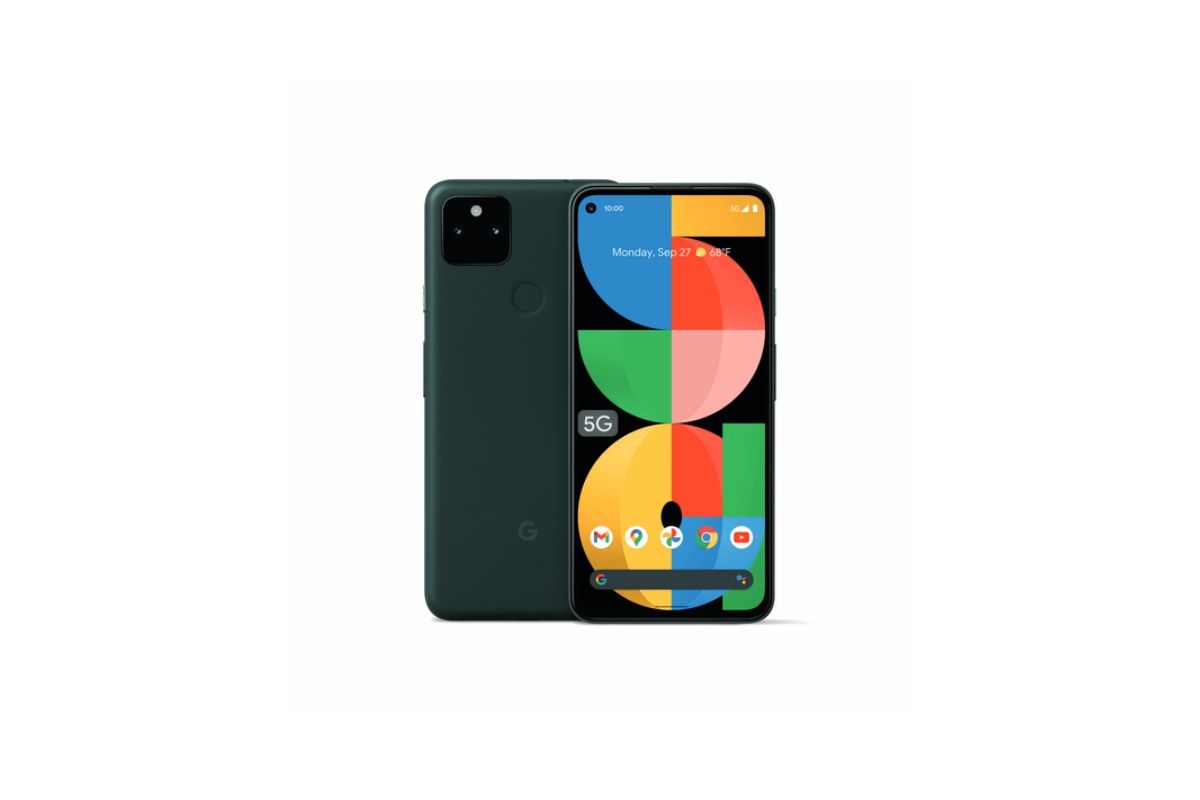
If you’re tight on budget and don’t mind older hardware, the Pixel 5a is a solid option. Except for its boring and rather unassuming design, the Pixel 5a is a well-rounded offering. It has got the same amazing cameras as the Pixel 6a, a sleek body that feels great in hand, and stellar battery life.
It was launched in August 2021 for around $450, but you can often find it on sale for $400 or less. You’d also find a bunch of these on the second-hand phone market, which is why the Pixel 5a makes its way onto our list. It’s a nice no-nonsense smartphone that will give you a good entry into the Google Assistant and Google Pixel ecosystems. It only comes in one color: Mostly Black. In case it wasn’t clear, the Pixel 5a is closer to the Pixel 5 than it is to the Pixel 4a.
The phone is powered by Qualcomm’s Snapdragon 765G SoC, which is not as fast as the Tensor chipset in the Pixel 6a but is still a capable driver as far as day-to-day performance is concerned. The camera performance is the main highlight of the Pixel 5a’s hardware package. You get a 12MP main shooter and 16MP ultra-wide camera, both of which deliver excellent results in most lighting conditions. While the Pixel 6a and Pixel 5a use the same main camera, the Pixel 6a features Tensor’s new image signal processor, giving it an edge in image processing.
The battery is an area where the Pixel 5a excels. Its 4,680mAh will easily get you through a full day of heavy usage. Remember that the Pixel 5a launched with Android 11 out of the box, and Google generally only provides three major Android OS updates to Pixel phones. That means the Pixel 5a likely won’t receive OS updates after Android 14. If you’re planning to use your phone for longer than that, we would recommend picking up the Pixel 6a instead.
That said, the Pixel 5a is one of the best Pixel phones to get if you’re looking into something to get into the Google ecosystem, don’t want to break the bank, and still want to get the absolute most out of it.
This is pretty much it for our list of the best Pixel phones you can get right now. The most logical choices you can get right now include the Google Pixel 6 Pro and the Pixel 6. They are arguably the best Pixels phones ever made. If you don’t have $700 to pony up on a smartphone though, then you might be well served by the Pixel 6a. Ideally, you’d not pick up the Pixel 5a 5G, but you can look at it if you find it on a very sweet deal or in the second-hand phone market.
When it comes to laptops that cost under a thousand dollars, it really feels like you can’t beat the HP Pavilion Plus. This thing comes with a Core i7-12700H, 16GB RAM, a 256GB SSD, and a 2.8K 90Hz OLED display. That’s not all either, because it also comes with HP’s 5MP webcam, meaning that camera quality is better than a lot of competitors’ flagship laptops.
There are two key flaws. One is that it doesn’t have Thunderbolt, which isn’t the worst thing in the world. The other is that thanks to the 45W CPU that’s inside, battery life is pretty bad. The good news is that HP actually offers this laptop with all three of Intel’s main tiers of mobile processors. You can also get it with a 15W or a 28W processor, which should get you better battery life.
In fact, it might even end up getting you better sustained performance. Overall, this laptop is fantastic. If you’re looking to spend less than a thousand dollars, there are few other options I could recommend as much. After all, it has a 90Hz OLED display. It wasn’t that long ago that OLED was reserved for high-end SKUs of already-expensive laptops. Seeing them in mainstream devices like this one is refreshing.
The HP Pavilion Plus is available from HP.com, Walmart, Staples, and more, starting at around $700
Announced earlier this year, the HP Pavilion Plus is available from major retailers like Walmart and Staples, and of course, HP.com. With the prices provided by HP, the lower end models are frequently marked down to around $700 at Staples and Walmart. Those include a 2.2K display, a P-series Core i5, 8GB RAM, and either 256GB or 512GB of storage.
Over on HP.com, you’ll find the model that the firm sent to me, which is normally $999 but marked down to $849. It includes a Core i7-12700H, 16GB RAM, 256GB of storage, and a 2.8K 90Hz OLED display. There’s also a U-series model with the OLED display and RTX 2050 graphics for $1,229.99.
The HP Pavilion Plus comes in Natural Silver, Warm Gold, Mineral Silver, Space Blue, and Tranquil Pink. While all are available at HP.com, others will vary by retailer.
HP Pavilion Plus specs
Processor
Intel Core i7-12700H (up to 4.7 GHz with Intel Turbo Boost Technology, 24 MB L3 cache, 14 cores, 20 threads)
Realtek Wi-Fi 6 (2×2) and Bluetooth 5.2 combo (Supporting Gigabit data rate)
Battery
3-cell, 51 Wh Li-ion polymer
90 W USB Type-C power adapter, Supports battery fast charge: approximately 50% in 30 minutes
Ports
2 SuperSpeed USB Type-C 10Gbps signaling rate (USB Power Delivery, DisplayPort 1.4, HP Sleep and Charge)
2 SuperSpeed USB Type-A 5Gbps signaling rate
1 HDMI 2.1
1 headphone/microphone combo
1 microSD media card reader
Webcam
HP True Vision 5MP camera with temporal noise reduction and integrated dual array digital microphones
Audio
Audio by B&O; Dual speakers; HP Audio Boost
Input
Full-size, backlit, natural silver keyboard
HP Imagepad with multi-touch gesture support
Color
Natural Silver
Material
Aluminum
OS
Windows 11 Pro
Price
$999.99
Design: It weighs just over three pounds
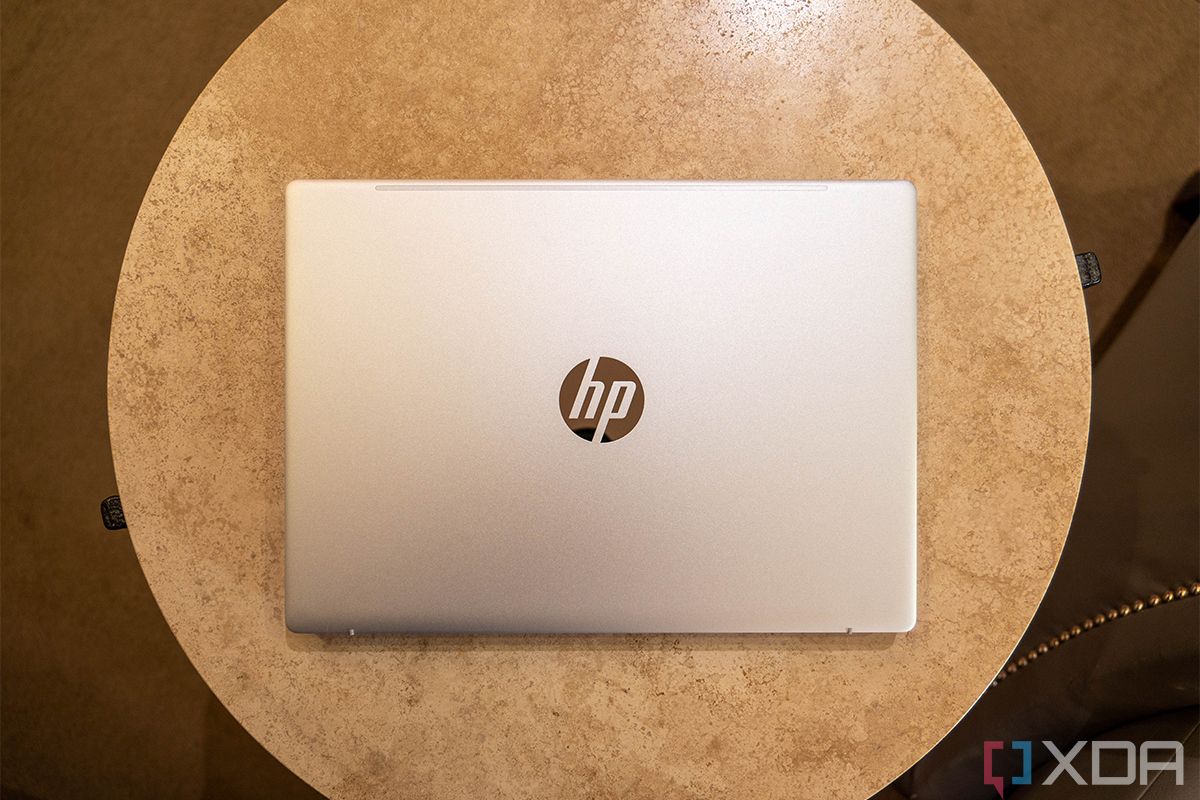
The HP Pavilion Plus is made out of aluminum, comes in pretty colors, and it’s pretty light
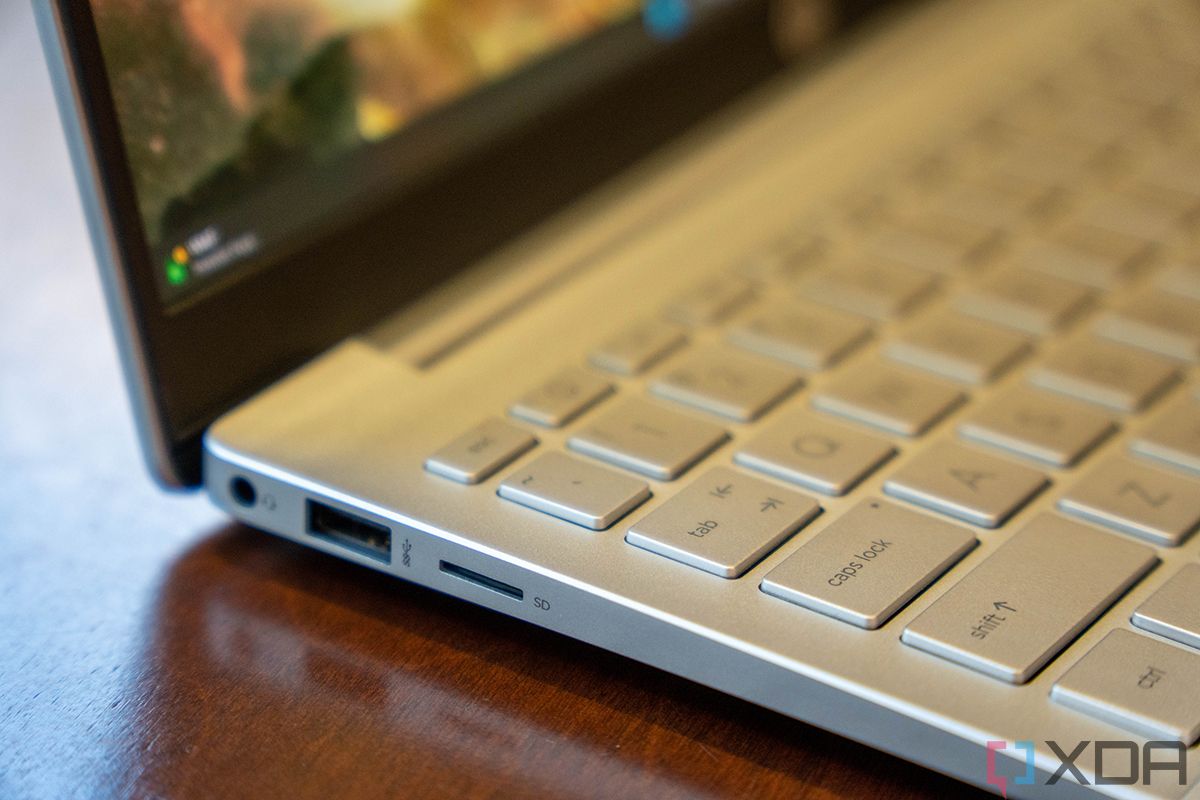
It has two USB Type-A ports and two USB Type-C ports
Most laptop manufacturers tend to stick to their flagship products when they send out review units, and then we occasionally get to see products that are mainstream. I feel like about once a year, HP sends me something from the Pavilion lineup. For example, almost a year ago, I reviewed the Pavilion Aero, a sub-2.2-pound laptop with a Ryzen 7 5800U, 16GB RAM, a 512GB SSD, and a 16:10 display all for under a thousand dollars.
While, like any reviewer, I have a ton of fun in the premium segment, it’s really enjoyable to witness this more mainstream segment evolve. The Pavilion Plus isn’t as light as the Aero (the Aero still exists, if that’s more up your alley), but it has other perks, such as more powerful hardware and an OLED display. And also, the chassis is made out of aluminum instead of a magnesium alloy.
Aluminum feels more premium, and it's prettier
Aluminum, while heavier, always feels more premium. The build quality is more solid than it is with magnesium, so that’s what you get for a machine that comes in at just over three pounds. To be clear, that’s not heavy. This is only 0.08 pounds heavier than a Spectre x360 13.5.
It comes in colors like Natural Silver, Warm Gold, Tranquil Pink, Space Blue, and Mineral Silver. There’s something for everyone there. If you want basic, you can get a regular silver laptop. That’s fine; it’s the most popular color. If you want something a little more personal, there are pink and blue options.
One benefit the Pavilion Plus has over some other consumer laptops is that it has more ports. On the right side, there’s one USB 3.2 Gen 1 Type-A port (5Gbps), two USB 3.2 Gen 2 Type-C ports (10Gbps), and an HDMI 2.1 port. It’s nice to see an HDMI port with the latest technologies, but sadly, the USB Type-C ports are not Thunderbolt. That means that they support 10Gbps speeds instead of 40Gbps.
On the left side, there’s another USB Type-A port, a headphone jack, and a microSD card slot. Every time I see a microSD card slot, I wish that the company used a full-size one, but it’s better than nothing. After all, you can use a microSD card and an adapter in your camera, and then you’re good to go. Also, take note of the second USB Type-A port. More premium consumer laptops from HP (and Lenovo too) only have one.
The design of the HP Pavilion Plus is really nice, feeling premium and sturdy. The only way you’d know it’s a Pavilion – as opposed to an Envy or a Spectre – is that it has the mainstream HP logo stamped into the lid. Yes, HP has two logos, one of which is reserved for premium products.
Display: The OLED display is beautiful
The 14-inch 2.8K OLED screen is excellent, and you can’t beat it for this price
It has a 5MP webcam
Laptops with OLED displays aren’t new, but they’re better than they’ve ever been. In the old days, OLED screens were reserved for very expensive SKUs of already-premium laptops. Now, we’re seeing them show up in laptops like this one, that cost under a thousand dollars.
They’ve gotten better too. For one thing, panels are being made at different aspect ratios like 16:10 and 3:2, and they’re also available at higher refresh rates. This one is 2.8K and 16:10, and you can turn the refresh rate up to 90Hz.
With an OLED display, the bottom line is that you’re going to get true blacks and more vibrant colors. The display isn’t entirely backlit like a regular LCD, so pixels are turned properly off. On devices where the screen is flush with the bezel, you actually might not be able to see where the screen ends and the bezel begins. I’ll put it this way. If your TV is showing something all black, you can still tell that it’s on. That’s because it’s backlit. If it was OLED, it would be truly black.
The HP Pavilion Plus democratizes OLED displays on laptops.
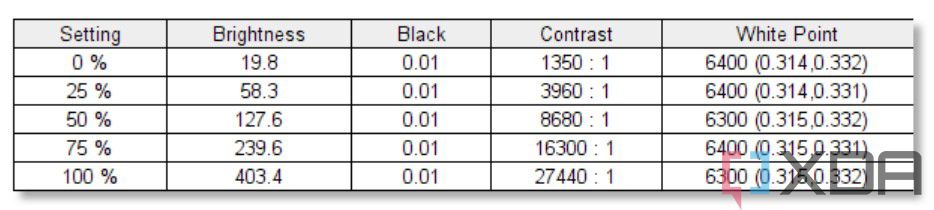
Now that that explanation is out of the way, I can say that my test showed support for 100% sRGB, 94% NTSC, 96% Adobe RGB, and 100% P3. That’s really good. On any OLED display, you’ll likely see 100% sRGB and 100% P3, and you’ll see scores in the 90s for NTSC and Adobe RGB, but this is still pretty good, even for an OLED screen.
As you can see, the black rate doesn’t change with the brightness. Max brightness was 403.4 nits, and the contrast ratio was 27,440:1, which is excellent. Indeed, this is an excellent display.
And again, you can turn it up to 90Hz for smooth animations. It’s a truly pleasant experience, but do be aware that it will burn through battery life. This is something that I’ve experienced a lot with Intel-powered laptops with 90Hz or 120Hz displays.
The webcam is 5MP, which is just wild. Over the last two and a half years, we’ve seen a boom in working from home, and suddenly webcam quality began to matter. It still took a good 18 months for decent webcams to start showing up in laptops. Some companies, like Dell, still aren’t using even FHD webcams in their premium laptops. But now, an FHD webcam is recommended in the latest Intel Evo spec.
If you want the best webcam in a laptop, you buy an HP. If you want the best in a sub-$1,000 laptop, you buy the Pavilion Plus.
HP has taken it a step further, and instead of the 2.1MP sensor that we’re seeing from competitors, HP is using a proper 5MP webcam. That means that not only does it support 1080p video capture, but there are enough pixels where it can crop around you and follow you around the room with the company’s Auto Frame feature. This is also just a great webcam, and the bottom line is that if you want the best webcam, you buy HP right now.
But also, most companies have included these better webcams in their high-end to flagship products. With a Pavilion, I’m always looking for the compromise that HP used to hit the price point it wanted. I once reviewed a $699 Pavilion laptop with 4G LTE, one of the least inexpensive cellular laptops at the time, but it didn’t have a backlit keyboard. For most companies, the webcam would be that place to compromise and still include that old 720p sensor.
HP didn’t compromise here, and I comment it for that. I feel comfortable saying that the Pavilion Plus has the best webcam on a $999 laptop, because HP is just using the best webcams right now.
Keyboard: No compromises this time
The full-size keyboard is backlit
It has a big touchpad and a fingerprint sensor
I did mention earlier that I’ve reviewed Pavilion laptops without backlit keyboards, so I should point out that this one is backlit. I can safely take it a step further than that though. This is one of the best keyboards you can get on a mainstream notebook. HP makes really great keyboards, and that’s something that’s we’re starting to see show up in its more mainstream devices.
The touchpad is pretty big for the size of the device, which is always nice. I do enjoy seeing touchpads getting bigger on Windows laptops, as it just makes for a better experience.
As you can see, there’s also a fingerprint sensor to the bottom-right of the keyboard. There’s no IR camera for facial recognition, so this is your only shot at biometric authentication. It’s a pretty good fingerprint sensor too.
Performance: The H-series processor isn’t really practical
HP offers the Pavilion Plus with 15W, 28W, and 45W processors
Battery life with a 45W processor is not good
This is a really weird year for laptops. Intel has four different tiers for what can go inside of an ultrabook, and the HP Pavilion Plus comes with three of those. You can get it with a 15W U-series processor, a 28W P-series processor, or a 45W H-series processor. Interestingly, the U-series option can also come with a RTX 2050 graphics.
In any other year, this would probably just come with a 15W processor, but like I said, this is a weird year for laptops. Never in my career have I seen so many laptops with 45W CPUs and no dedicated graphics. The problem is that, while the unit that HP sent me comes with an H-series processor, it seems to be designed for a U-series processor. It’s the same problem I’m having with other laptops that have P-series or H-series processors. Performance actually ends up being better on the U-series chip because it can actually sustain its load, and then battery life ends up being better as well.
As for what performance is actually like with this Core i7-12700H, it’s fine. It’s everything you’d expect from a productivity laptop. It’s just not going to provide any real-world benefit that you’d get over a P-series or U-series chip, and you’re going to suffer a battery life hit.
As you can see, H-series processors look a lot better when they’re paired with dedicated graphics. And when you look at the scores next to that of a 28W P-series processor, there isn’t much of a difference.
Like I’ve been alluding to, battery life isn’t very good. The best I got was three hours and 20 minutes, which isn’t good for this form factor at all. On average, it was more like two hours and 40 minutes. I normally say that HP laptops are the best on battery life, and I’m sure I’d still be saying that if this had the U-series processor, but this unit is right in line with other laptops I’ve used with H-series processors.
Ultimately, I really think that if you go for the HP Pavilion Plus, you should go for the U-series processor, or maybe P-series if you know you need more performance cores.
Should you buy the HP Pavilion Plus?
At this point, you might be wondering if you’re the right person to buy the HP Pavilion Plus.
You should buy the HP Pavilion Plus if:
You’ve been waiting for a laptop with a 90Hz OLED display to come in at an affordable price point
You want a great productivity laptop with a lot of value
You’re looking for a mainstream laptop that has the best webcam
You should NOT buy the HP Pavilion Plus if:
You would benefit from Thunderbolt
You need a lot of power
You’re on the road a lot and you need great battery life
Ultimately, you might actually get better battery life from the model with the U-series processor. In fact, I’d expect that you would, but I don’t have experience with that. As for Thunderbolt, most people actually don’t benefit from that. The Intel technology is somewhat ubiquitous, but at the same time, most people aren’t connecting an external GPU, dual 4K monitors, or anything else that you can’t do with just a standard USB Type-C port.