LightBlog

mercredi 17 août 2022

Android 13 custom ROMs are here already, starting with OnePlus 5/5T and Moto G60/G40 Fusion

It didn’t take long for the development community to start porting Android 13 to older devices. Besides kickstarting the roll out of official updates for the eligible Pixel smartphones earlier this week, Google also started uploading Android 13’s source code to AOSP. For some users on the development-friendly devices, this means a swift update to the latest release is now possible — at least unofficially. That’s right, within two days after the latest iteration of Android was launched, a couple of OnePlus and Motorola phones already have unofficial ports of Android 13 available for them.


Modded AOSP 13 for the Motorola Moto G60 and Moto G40 Fusion

First up is a unified AOSP ROM by XDA Senior Member Raghu varma for the Motorola Moto G40 Fusion and Moto G60 (code-name: hanoip). Most functions seem to be working as you would expect, plus you can also enjoy a number of Pixel-specific goodies like the launcher, wallpapers, icons, and fonts out of the box. SELinux is set as enforced and the build even passes SafetyNet, which are undoubtedly quite the accomplishment for a newly released custom ROM.

Moto G40 and G60 AOSP 13 custom ROM 1 Moto G40 and G60 AOSP 13 custom ROM 2 Moto G40 and G60 AOSP 13 custom ROM 3

If you are interested in installing this Android 13 port on your Moto G60 or Moto G40 Fusion, then check out the support thread for the release in the link below. Be sure to follow the installation instructions carefully as performing steps out-of-order might cause problems.

AOSP 13.0 for the Motorola Moto G40 Fusion and Moto G60


AOSP 13 for the OnePlus 5 and OnePlus 5T

An Android 13-based custom ROM is now available for the OnePlus 5 (code-name: cheeseburger) and 5T (code-name: dumpling), courtesy of XDA Senior Member robertogl. The big news here is that the vanilla AOSP ROM is based on a modular device tree that doesn’t interfere with the AOSP codebase. As a result, one can easily produce upgradable AOSP builds for the device duo with minimal effort.

OnePlus 5 and 5T AOSP 13 custom ROM

The release seems to be pretty much stable for the most part and it comes with enforcing SELinux too. In the support thread for the ROM, unreliable mobile data is the only known bug that’s listed. That’s not to say there aren’t other issues in the build, but in the developer’s experience, the ROM has no major bugs of note.

AOSP 13.0 for the OnePlus 5 and 5T


Although we applaud the efforts, unless you are happy to tinker and know how to revert back to factory firmware in case things go south, we do not recommend installing these on your daily driver. If you’re looking for something like stable LineageOS 20 for your phone, you will have to wait a little bit.

Motorola Moto G40 Fusion and Moto G60 XDA Forums || OnePlus 5 XDA Forums || OnePlus 5T XDA Forums

The post Android 13 custom ROMs are here already, starting with OnePlus 5/5T and Moto G60/G40 Fusion appeared first on XDA.


from XDA https://ift.tt/cue6DNl
via IFTTT

You don’t need AirPods to have Siri announce notifications on iOS 16

Apple sometimes intentionally resorts to software exclusivities to make its devices more appealing. After all, many users feel pressured to upgrade to get their hands on the latest and greatest features. For example, prior to iOS 16, the Fitness app and its social features were exclusive to Apple Watch users. Those who wanted to compete with their friends through this app had to buy the company’s wearable. The Cupertino overlord revised its decision in iOS 16 and made Fitness available for all iPhone users. Though, this major update to the iPhone doesn’t only fix that. On previous versions, having Siri announce notifications required compatible Beats or AirPods models. iOS 16 and iPadOS 16 change that.

If you’re an AirPods user, you’re probably aware of the Announce Notifications feature. For the unfamiliar, when you turn it on, Siri reads your incoming notifications through the AirPods or compatible headphones you’re wearing. Despite Apple’s ability to make it available on all earbud models, it chooses not to. iOS 16 now tweaks this offering — making it accessible to more users.

Siri can now announce notifications on speaker

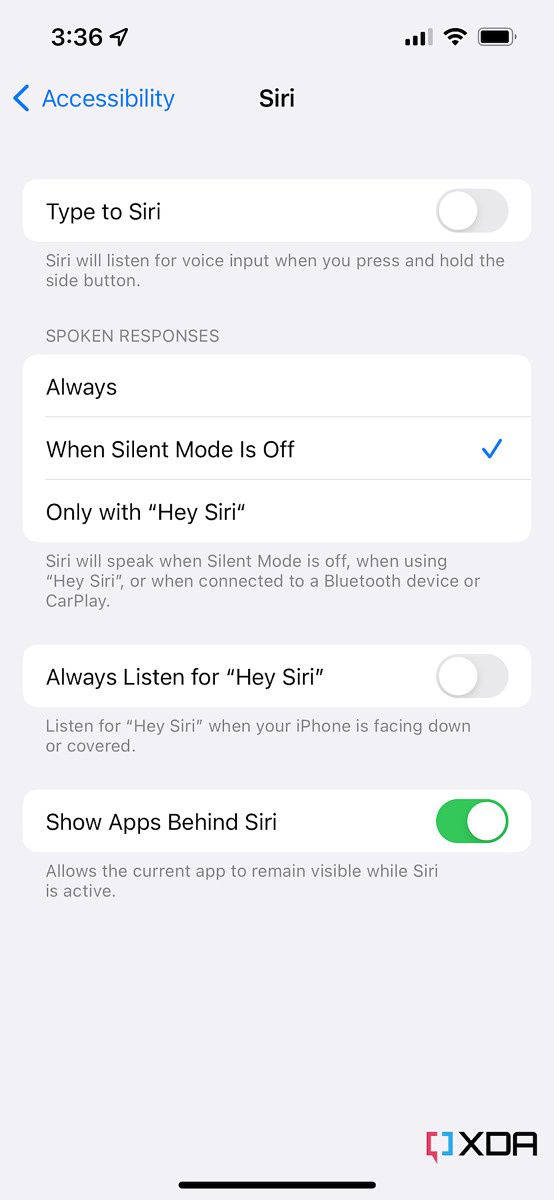
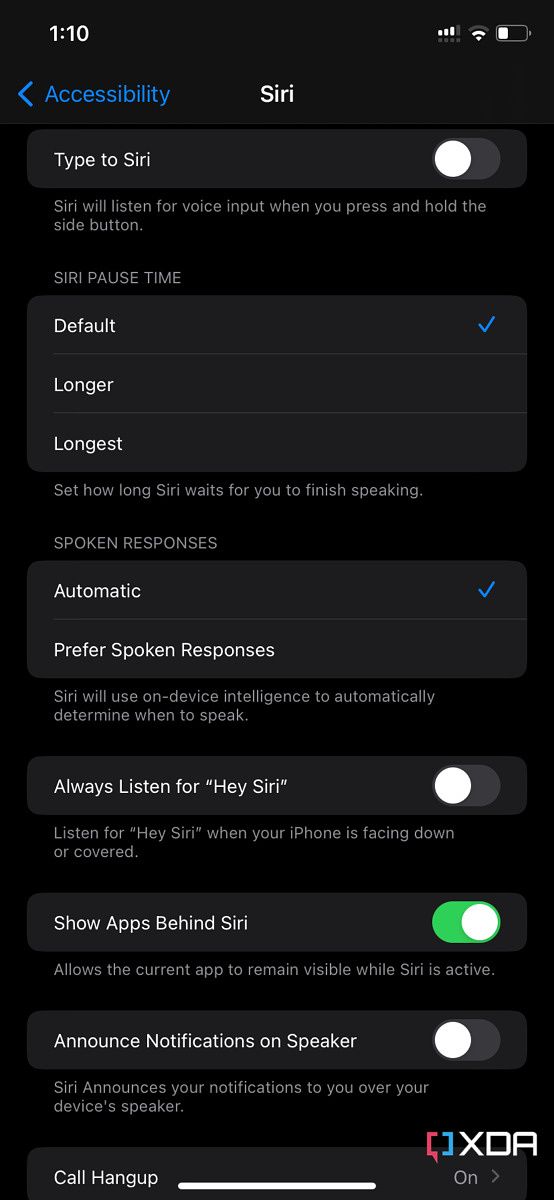
Siri accessibility settings on iOS 15 Siri accessibility settings on iOS 16 beta

In the Accessibility settings, iOS 16 introduces a new Announce Notifications on Speaker toggle. When you enable it, your iPhone reads incoming notifications aloud — assuming it’s not silenced. This feature is handy for those who often have their hands full. Instead of interacting with their phones when a notification comes in, Siri can just read them the incoming messages.

Of course, if you often receive notifications that include embarrassing or confidential text, you might want to refrain from enabling this feature. In AirPods’ case, the buds are in your ears — so only you hear the announcements, privately. This new addition can put users in awkward or unwanted situations, if Siri reads a certain notification aloud in public. Notably, though, you get to blacklist apps of your choice. So it’s not an all-or-none implementation. Ultimately, it’s great to see Apple bring even more options to iOS and make iPhone features even richer.

Do you plan on enabling this feature? Why or why not? Let us know in the comments section below.

The post You don’t need AirPods to have Siri announce notifications on iOS 16 appeared first on XDA.


from XDA https://ift.tt/7BxXPRd
via IFTTT

OxygenOS 13 Open Beta 2 is now available for the OnePlus 10 Pro

Earlier this month, OnePlus rolled out the first OxygenOS 13 Open Beta build for the OnePlus 10 Pro, giving users a chance to experience the Android 13 release ahead of the stable rollout. The company is now rolling out a fresh OxygenOS 13 Open Beta build for its flagship, bringing several new features, optimizations, and bug fixes.

OxygenOS 13 Open Beta Hands On: This is what official Android 13 looks like on OnePlus smartphones

According to the announcement post on the OnePlus Community forums, OxygenOS Open Beta 2 for the OnePlus 10 Pro brings a new Aquamorphic Design to the device, featuring new theme colors for enhanced visual comfort, updated animations, optimized fonts, and new illustrations. It also includes a new Meeting Assistant, support for large folders on the homescreen, media playback controls in the Quick Settings, and new markup tools for screenshot editing.

Furthermore, the update optimizes earphone connectivity to deliver a more seamless experience, introduces an automatic pixelation feature for screenshots of chats, Private Safe optimizations, and a new Dynamic Computing Engine to improve the system speed, stability, battery life, and app experience. But that’s not all. OxygenOS 13 Open Beta 2 for the OnePlus 10 Pro also packs a host of bug fixes and other improvements. Check out the full changelog reproduced in the section below for more details.

OxygenOS 13 Open Beta 2 changelog:

  • Aquamorphic Design
    • Adds Aquamorphic Design theme colors for enhanced visual comfort.
    • Applies the Aquamorphic Design philosophy to animations to make them natural and vivid.
    • Adds a Home screen world clock widget to show the time in different time zones.
    • Upgrades to Quantum Animation Engine 4.0, with a new behavior recognition feature, which recognizes complex gestures and provides optimized interactions.
    • Applies real-world physical motions to animations to make them look more natural and intuitive.
    • Optimizes fonts for better readability.
    • Enriches and optimizes illustrations for features by incorporating multicultural and inclusive elements.
  • Efficiency
    • Adds Meeting Assistant to enhance the meeting connection and introduces an option to make notifications more subtle and less distracting.
    • Adds large folders to the Home screen. You can now open an app in an enlarged folder with just one tap and turn pages in the folder with a swipe.
    • Adds media playback control, and optimizes the Quick Settings experience.
    • Adds more markup tools for screenshot editing.
    • Optimizes Shelf. Swiping down on the Home screen will bring up the Shelf by default. You can search content online and on your device.
  • Seamless interconnection
    • Optimizes earphone connectivity to deliver a more seamless experience.
  • Personalization
    • Optimizes Bitmoji to offer more Always-On Display animations.
    • Optimizes Insight Always-On Display, with more personalized Always-On Display settings available.
    • Optimizes Canvas Always-On Display, with more drawing tools and line colors available.
  • Security & privacy
    • Adds an automatic pixelation feature for screenshots of chats. The system can identify and automatically pixelate profile pictures and display names in a chat screenshot to protect your privacy.
    • Adds regular clearing of clipboard data for privacy protection.
    • Optimizes Private Safe. The Advanced Encryption Standard (AES) is used to encrypt all files for enhanced security of private files.
  • Health & Digital wellbeing
    • Adds Kid Space, providing screen time limit, ambient light reminders, and Eye-protecting display features.
  • Performance optimization
    • Adds Dynamic Computing Engine to improve the system speed, stability, battery life, and app experience.
    • Optimizes Dolby Sound effects with enhanced spatial sound field perception and more accurate sound sourcing.
  • Gaming experience
    • Upgrades to HyperBoost GPA 4.0 to stabilize the frame rate and balance the performance and power consumption in key scenarios.
  • System
    • Improves system stability for some scenarios.
    • Fixes an issue where icons would sometimes overlap in Quick Settings.
    • Fixes an issue where a panel might be automatically pulled down from the status bar in some cases.
    • Fixes an issue that might cause auto brightness to respond slowly.
    • Fixes an occasional flicker issue that might occur when your device screen is turned off or on.
    • Fixes an issue where the Quick Settings background might appear transparent.
    • Fixes an issue where you might be unable to wake your screen by double-tapping it in Guest mode.
    • Fixes an issue where your screen might be slow to wake when the Power button is pressed.
    • Fixes an issue where the “Other” category might take up a huge portion of your device storage.
  • Camera
    • Fixes an issue where the Camera would lag.

OnePlus has also highlighted a few known issues in the release, which you should be aware of if you plan on installing it on your device. The known issues in OxygenOS 13 Open Beta 2 include:

  1. RCC cannot work normally in this build. (Re-logging may resolve the problem.)
  2. The carrier version (Zain) in Kuwait is unable to send MMS.
  3. The carrier version (Telecom) in North Macedonia is unable to send IMS.
  4. There is no response when clicking Capture log after switching Multiple users/System cloner/Languages. (You need to switch Multiple users/System cloner/Languages first before capturing the log in the feedback tool).
  5. A dot will display abnormally when pairing Bluetooth.
  6. The photos might be blurred when taking multiple pictures of people with Ultra Dark mode and zoom out at the same time.
  7. The screen will freeze when taking videos in specific scenarios.
  8. The pictures might be black when taking photos in the dark with Night mode. (You may solve the issue by clearing camera’s data.)
  9. A dot displays abnormally in the status bar.

If you wish to try out OxygenOS 13 Open Beta 2 on your OnePlus 10 Pro despite the aforementioned issues, you’ll have to update your device to the latest OxygenOS 12 release (A.15 or A.16). You can then download the firmware update package from the links provided below and flash it by following the instructions highlighted in the announcement post (linked below).

Those who have already installed OxygenOS 13 Open Beta 1 on their devices should receive an OTA update for the latest release in the coming days. OnePlus has also provided rollback packages to make it easy for users to downgrade to OxygenOS 12.

Download OxygenOS 13 Open Beta 2 for the OnePlus 10 Pro


Source: OnePlus Community forums

The post OxygenOS 13 Open Beta 2 is now available for the OnePlus 10 Pro appeared first on XDA.


from XDA https://ift.tt/qEnpeIQ
via IFTTT

mardi 16 août 2022

Does the Samsung Galaxy Z Fold 4 have a headphone jack?

Samsung has introduced the Galaxy Z Fold 4, the latest iteration of its flagship foldable phone with numerous improvements, including a more durable screen, a more compact hinge, and slimmer bezels all around. If you want a foldable smartphone, Samsung’s Galaxy Z Fold series has been the only valid choice for many. But there’s one thing many will probably wonder about, and that’s whether the Galaxy Z Fold 4 has a headphone jack.

The answer, unsurprisingly, is no, there is no headphone jack on the Samsung Galaxy Z Fold 4. We’re in 2022, and this is the expectation you should have for the majority of flagship smartphones. Companies are trying to save space inside their smartphones, and removing the headphone jack has become increasingly common since Apple did it with the iPhone 7.

Instead, you can try to use USB Type-C headphones, or buy a USB Type-C to 3.5mm headphone jack adapter for the Galaxy Z Fold 4, if you really want to use wired headphones. Of course, what Samsung probably wants you to do instead is buy wireless headphones or earbuds, such as the new Galaxy Buds 2 Pro, which were introduced alongside the Galaxy Z Fold 4. Bluetooth headphones will work with any modern phone, and you’ll probably need them for most phones, seeing as the headphone jack is rarely seen on any flagship phone these days.

    Samsung Galaxy Z Fold 4
    The Samsung Galaxy Z Fold 4 is flagship foldable, now with a wider display, a more compact hinge, and a Snapdragon 8 Plus Gen 1. There's no headphone jack, though.

If you choose to go that route, there are a couple of options for you below. There, you can also find a link to buy Samsung’s latest foldable, but you can check out the best deals you can get on the Samsung Galaxy Z Fold 4 as well. You may also want to protect such an expensive phone, so we have a round-up of the best cases you can buy for it. And if you don’t have a charger, you should know that the phone doesn’t include one, so you may want to check out the best chargers for it, too.

    Samsung Galaxy Buds 2 Pro
    The Samsung Galaxy Buds 2 Pro offer high-quality sound with Hi-Fi 24-bit Audio and the new Samsung seamless codec (SSC). They also have a smaller design and support ANC.

The post Does the Samsung Galaxy Z Fold 4 have a headphone jack? appeared first on XDA.


from XDA https://ift.tt/tlfKoNx
via IFTTT

Apple MacBook Air M2 gets discounted, knocking $100 off its retail price

In June, during WWDC, Apple announced its new laptop, the MacBook Air M2 2022. The release was significant because it marked the first new MacBook Air redesign in years. It also featured a brand new processor with Apple’s M2 silicon. While discounts on the laptop have been few and far between, we now get two models discounted, knocking $100 off of their retail price.

Amazon and BHPhotoVideo have posted discounts, offering $100 off the retail price of the MacBook Air M2. While both companies are offering a discount on the base model MacBook Air, BHPhotoVideo has an additional offering, discounting the 10-core model with 512GB of internal storage. The former is priced at $1099.99, making it $100 less than the retail price. The latter is priced at $1,399.99, which is also $100 less than the retail price. One thing to note about the base model being sold is that only the Starlight color is being offered at a discount. For the higher-end model with 512GB, only the Space Gray model is being discounted at this time.

The MacBook Air M2 model comes with a 13.6-inch display, weighing in at 2.7 pounds and measuring in at 0.44-inches thin. The laptop offers a MagSafe 3 charging port, 3.5mm headphone jack, and two Thunderbolt / USB 4 ports. While small, light, and compact, the laptop offers excellent battery life, with Apple claiming up to 15 hours when surfing the internet. For the most part, this will be the best option if you’re looking for an Apple laptop with long battery life.

If you need a little more convincing to make a purchase, be sure to check out our hands-on with the MacBook Air M2. You can also take a deeper dive by reading our review, where it picked up top honors. If you are interested in the new laptop, you can purchase it from either Amazon or BHPhotoVideo. As mentioned before, Amazon and BHPhotoVideo have the base model, while only BHPhotoVideo will carry the 512GB Space Gray model at a discount.

    MacBook Air M2 2022
    The latest MacBook Air from Apple featuring its M2 processor
    MacBook Air M2 2022
    The latest MacBook Air from Apple featuring its M2 processor


The post Apple MacBook Air M2 gets discounted, knocking $100 off its retail price appeared first on XDA.


from XDA https://ift.tt/SE6fNth
via IFTTT

Microsoft and Canonical bring .NET 6 to Ubuntu 22.04

Microsoft has announced that .NET 6 is now available as part of Ubuntu 22.04, meaning developers can get started using .NET much more quickly out of the box. Ubuntu 22.04 is the latest release of the popular Linux distro maintained by Canonical, and the company has been working with Microsoft to create a better environment for .NET developers on Ubuntu.

With .NET built into Ubuntu, it means you can much more quickly install the .NET 6 SDK by just entering apt install dotnet6 in your terminal. There are also packages for ASP.NET Core (aspnet-runtime-6.0) and the .NET Runtime (dotnet-runtime-6.0), which can be installed in the same way. This should more easily give you access to the tools you need to start developing .NET apps on Linux. Microsoft says it will keep working with Canonical to update these packages every month, so developers using Ubuntu aren’t missing out on new features and fixes.

The company does warn that Arm64 builds aren’t available yet, though both sides are working to release them as soon as possible. Additionally, if you want to start developing in .NET 7, you’ll have to wait a while longer, since Microsoft says packages for that won’t be available until .NET 7 reaches general availability.

In addition to being built into Ubuntu 22.04, Microsoft has also announced that the .NET 6 packages are now available in chiseled Ubuntu containers. Chisels are a new take on containers that allow a distro to be made as small as possible by only installing the paths and files that are necessary inside each package. The .NET packages for chiseled Ubuntu containers are also much smaller than regular packages, with around 100MB being trimmed.

As Microsoft and Canonical continue to work together, the companies aim to make new versions of .NET available with new Ubuntu releases, so things are looking up if you’re a .NET developer that prefers Linux to Windows.


Source: Microsoft

The post Microsoft and Canonical bring .NET 6 to Ubuntu 22.04 appeared first on XDA.


from XDA https://ift.tt/sI1GOZ8
via IFTTT

Windows 11 version 22H2 may launch on September 20th

Microsoft has been testing Windows 11 version 22H2 with Windows Insiders for a while now, with both the Beta and Release Preview channels, but a clear release date has remained a mystery. Now, it looks like the first major update for Windows 11 may start rolling out on September 20th.

The information comes from Zac Bowden of Windows Central, though it’s not official confirmation just yet. This is just the date that’s being tossed around right now, and it would line up fairly well with last year’s launch of Windows 11 itself. That began rolling out on October 5th, so this would be very close to that. Plus, this is usually around the time Microsoft releases new Surface devices, so it would make for a great time to have a big new software release as well. In fact, we’re expecting new Surface devices, such as the Surface Pro 9 and Surface Laptop 5, to be announced in the fall, so this makes perfect sense.

But that’s not all. Microsoft is also apparently working on the first “moment” feature update for Windows 11 version 22H2, and that’s planned to release before the year is over. “Moments”, as they’re referred to, are apparently part of Microsoft’s strategy for Windows 11 going forward. A few weeks ago, it was reported that the next major version of Windows (after Windows 11 version 22H2) would be Windows 12, and that would only come in 2024. Instead of annual feature updates, these updates will add a smaller set of new features to Windows 11, and there will be about three or four each year.

Windows 11 File Explorer with Tabs and new navigation pane

According to this new information, it looks like Microsoft won’t be wasting any time in releasing the first “moment” update. According to Bowden, additions in this update might include features like suggested actions and tabs in File Explorer, which are currently in testing in the Dev channel and with a subsection of the Beta channel of the Insider program. This could explain why Microsoft split the Beta channel a few weeks ago, with some users getting more new features. Those features also include the new taskbar overflow and a refreshed “Open with” menu, which could well be part of the same “moment” update. We’ll have to wait and see if that ends up being the case.


Source: Zac Bowden (Twitter)

The post Windows 11 version 22H2 may launch on September 20th appeared first on XDA.


from XDA https://ift.tt/wyq6Sgm
via IFTTT