LightBlog

vendredi 22 juillet 2022

WhatsApp might soon let you hide your online status

WhatsApp has released several new features over the last few weeks, and the Meta-owned messaging app doesn’t seem to be stopping anytime soon. After rolling out new visibility options for last seen, profile photo, and status, Android-to-iOS chat transfer support, and support for larger group chats, WhatsApp is now prepping another new feature.

According to a recent WABetaInfo report, WhatsApp is now readying a feature that will let you hide your online status from your contacts. The feature was first spotted in a beta build of WhatsApp for iOS a few weeks ago and it has now made its way to the Android app on the beta channel. Although it is not live in the latest WhatsApp beta release (v2.22.16.12), WABetaInfo has managed to grab the following screenshot of the in-development feature.

Screenshot of upcoming WhatsApp Last seen and online settings.

Credit: WABetaInfo

As shown in the screenshot, the upcoming online status visibility feature will show up in a new section within WhatsApp’s Last Seen privacy settings. It will include two options — “Everyone” and “Same as last seen.” If you pick the former, everyone will be able to see when you’re online. But if you go with the latter, WhatsApp will automatically pick the visibility option you selected for the Last Seen feature.

Depending on the option you picked for the Last Seen feature, you’ll be able to limit your online status to your contacts or your contacts except for the users you’ve blocked for the Last Seen feature. You’ll also be able to block everyone from viewing your last seen and online statuses by selecting the option labeled “Nobody.”

As mentioned earlier, this feature is still in development and it’s not available in the latest WhatsApp beta release. We don’t have any information regarding its rollout at the moment, but we’ll let you know as soon as it starts rolling out on the beta or stable channels.


Via: WABetaInfo

The post WhatsApp might soon let you hide your online status appeared first on XDA.


from XDA https://ift.tt/AzhbCto
via IFTTT

Fitbit app gets redesigned charts to improve readability

Fitbit is rolling out a fresh update for its app on Android with redesigned charts for health metrics. The new charts offer better readability, making it easier for users to understand their health and fitness data.

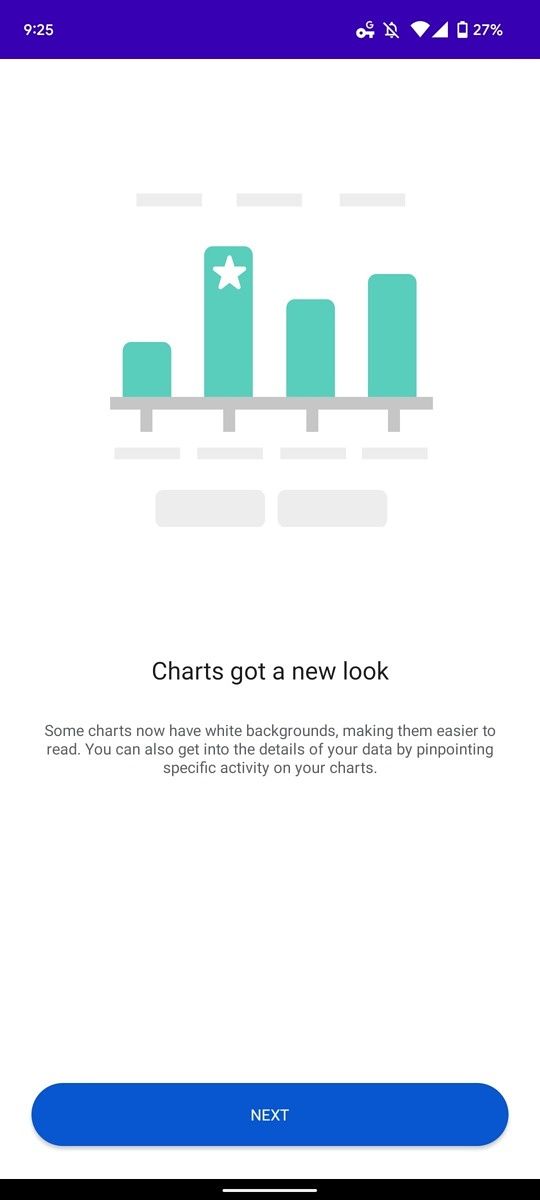
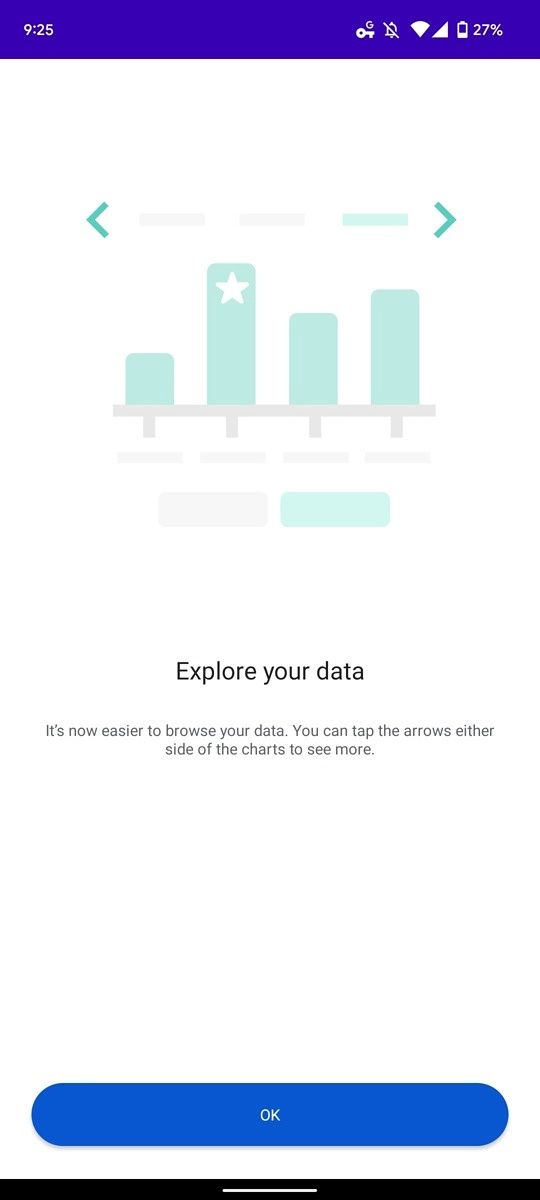
According to 9to5Google, the redesigned charts are rolling out with version 3.64.4 of the Fitbit app. The update doesn’t seem to be available widely at the moment, but it should reach more users in the next few days. Once you do receive the update, you’ll see an introductory prompt when you open a chart with details about the redesign. The redesigned charts are reportedly available for steps, miles, calories, zone minutes, sleep, heart rate, stress, etc.

Screenshot of Fitbit chart redesign tutorial. Screenshot of Fitbit chart redesign tutorial. Screenshot of Fitbit chart redesign tutorial.

Credits: 9to5Google

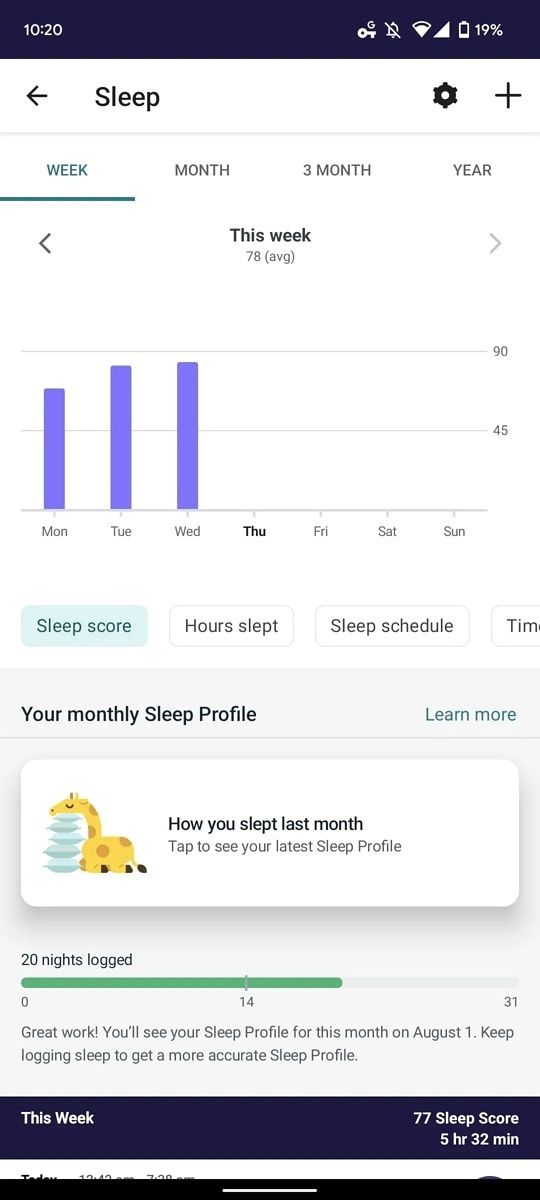
As you can see in the attached screenshots, the new charts have a white background. Within each chart, you’ll see navigation tabs at the top to help you easily switch views by week, month, three months, or year. Underneath the tabs, you’ll find navigation arrows to cycle through older data, followed by the chart itself and buttons to help you quickly view various metrics like resting heart rate, cardio fitness, sleep score, hours slept, sleep schedule, and more.

Fitbit redesigned sleep chart. Fitbit redesigned heart rate chart.

Credits: 9to5Google

It’s worth noting that the redesigned charts are not available on the Fitbit app for iOS at the moment. You might not see them on your Android devices right away, either, as the update doesn’t seem to be widely available. You can check whether the update is available on your device or not by following the Play Store link below. Note that the update was not available on any of our devices.

What do you think of the redesigned charts in the Fitbit app? Do they really make it easier for you to understand your health and fitness data? Let us know in the comments section below.


Via: 9to5Google

The post Fitbit app gets redesigned charts to improve readability appeared first on XDA.


from XDA https://ift.tt/xiEYs4Z
via IFTTT

Google’s new Fast Pair audio switching will debut with the Pixel Buds Pro

Google announced several new features for Bluetooth-enabled audio devices this January. At the time, the company highlighted features like multipoint audio switching, Spatial Audio, and audio-only Chromecast support, but it did not release the features to supported devices. Now that the company is gearing up to bring its flagship TWS earbuds, the Pixel Buds Pro, to the market, it has confirmed that the new multipoint audio switching feature will debut with the new earbuds.

In a recent blog post, Google revealed that the new audio switching feature builds on top of the existing Fast Pair feature found on several Bluetooth-enabled audio devices. It uses contextual information on what you’re listening to in order to switch the audio based on your actions.

The company further explained that, unlike regular Bluetooth multipoint audio switching, its new audio switching feature utilizes various ranked categories “to determine how to prioritize sounds between phone calls, media and all of the sound your devices may make. So for example, if you’re watching a video on your tablet and you receive a notification on your phone, your headphone audio will not switch to your phone. But if you receive a phone call, your headphone audio will make the switch.”

Since users prioritize these actions differently, Google’s audio switching feature will give users full control of the experience with a notification. The notification will give users the option to switch the audio back to the original device with a single tap.

As mentioned earlier, the new audio switching feature will roll out with the Pixel Buds Pro. But it will not be limited to Google’s flagship TWS earbuds. The company says that it will also be rolling out to select Sony and JBL headphones in the coming weeks. Note that Google’s audio switching feature will only work when switching between Android devices initially. However, the company plans to expand support to more platforms and devices in the future.


Source: Google

The post Google’s new Fast Pair audio switching will debut with the Pixel Buds Pro appeared first on XDA.


from XDA https://ift.tt/cQrpUME
via IFTTT

Windows 11 build 22000.829 enables version upgrades during setup

Microsoft has released a new optional cumulative update for Windows 11 users, bringing the OS to build number 22000.829. This is the same build that rolled out to Windows Insiders in the Release Preview channel last week, but now it’s available for anyone who wants to install it. The update is labeled as KB5015882, and you can download it manually here.

The highlight of this update is that it allows Windows 11 to install major version updates for Windows during the out-of-box-experience (OOBE). Basically, when you first set up your computer with your user account, you can be prompted to install a version upgrade if it’s available and your device is eligible. This change comes at just the right time, considering we’re expecting Windows 11 version 22H2 to roll out at some point in the next few months. This way, people who buy a new PC with the original release of Windows 11 will be able to upgrade and get the latest features out of the box.

That’s not all that’s new, though. There’s also a new option to allow Windows 11 to show urgent notifications when focus assist is on. Here’s the breakdown of the highlights in this update:

  • New!  Gives you the option to receive urgent notifications when focus assist is on. Focus assist is like a do not disturb mode that hides notifications.
  • New! Gives you the option to update to a newer Windows 11 version at the very first startup of Windows if your device is eligible.
  • Addresses an issue that causes File Explorer to stop working when you use the play and pause keyboard buttons on certain devices.
  • Addresses an issue that causes File Explorer to stop working when you use the Start menu’s context menu (Win+X) and an external monitor is connected to your device.
  • Addresses an issue that displays a blank window that you cannot close when you hover over the search icon on the taskbar.
  • Addresses an issue that prevents certain troubleshooting tools from opening.

The full list of changes in Windows 11 build 22000.829 is much longer, and as you’d expect, it’s mostly about fixes and minor improvements. Various issues have been resolved, and you can find the full list below.

Improvements in WIndows 11 build 22000.829

  • New! Provides the ability for you to consent to receive urgent notifications when focus assist is on.
  • New! Provides the option for eligible devices to update to a newer Windows 11 version during the out-of-box experience (OOBE) when you first sign in. If you choose to update to a newer version, the update process will begin shortly after the update is installed on the device.
  • New! Restores functionality for Windows Autopilot deployment scenarios that are affected by the security mitigation for hardware reuse. This update removes the one-time use restriction for self-deploying mode (SDM) and pre-provisioning (PP). This update also re-enables any User Principal Name (UPN) display in user-driven mode (UDM) deployments for approved manufacturers.
  • Addresses an issue in UIAutomation() that causes an application to stop working.
  • Addresses an issue that prevents the Startup Task API from working as expected for certain apps.

  • Improves the reliability of a push-button reset after an OS upgrade.
  • Addresses an issue that makes the tenant restrictions event logging channel inaccessible if you remove the EN-US language pack.
  • Addresses an issue that causes certificate-based machine account authentication to fail in some circumstances after you install the May 10, 2022 security updates on domain controllers.
  • Addresses an issue that affects the Arm64EC code you build using the Windows 11 software development kit (SDK).
  • Updates the Remove-Item cmdlet to properly interact with Microsoft OneDrive folders.
  • Addresses an issue that prevents certain troubleshooting tools from opening.
  • Addresses an issue that causes port mapping conflicts for containers.
  • Addresses an issue that causes Code Integrity to continue trusting a file after the file has been modified.
  • Addresses an issue that might cause Windows to stop working when you enable Windows Defender Application Control with the Intelligent Security Graph feature turned on.
  • Deploys search highlights to devices. To access the policy for search highlights (on a device that has installed the June 2022 Cumulative Update Preview or July 2022 monthly quality update), go to C:\Windows\PolicyDefinitions and locate Search.admx. For your convenience, we will be publishing an updated version of the Administrative Templates (.admx) for Windows 11, version 21H2 to the Microsoft Download Center soon.
  • Addresses an issue that causes explorer.exe to stop working when you use the play and pause keyboard buttons on certain devices.
  • Addresses an issue that causes explorer.exe to stop working when you use the Start menu’s context menu (Win+X) and an external monitor is connected to your device.
  • Addresses an issue that displays a blank window that you cannot close when you hover over the search icon on the taskbar.
  • Reduces the overhead of resource contention in high input/output operations per second (IOPS) scenarios that have many threads contending on a single file.
  • Addresses an issue that causes the Windows profile service to fail sporadically. The failure might occur when signing in. The error message is, “gpsvc service failed to sign in. Access denied”.

If you want to get these fixes, you can simply look for updates in Windows Update, then choose to install the KB5015882 cumulative update. Otherwise, you can download it manually with the link we provided at the top.

While this is an optional update, all of these changes will be making their way to everyone next month, when Microsoft rolls out new cumulative updates for Patch Tuesday. Those are mandatory updates, and they can often include additional fixes. Lately, though, Microsoft has mostly published Patch Tuesday updates without much of a changelog, so the bulk of the changes are in this update.

The post Windows 11 build 22000.829 enables version upgrades during setup appeared first on XDA.


from XDA https://ift.tt/MLC0fgy
via IFTTT

jeudi 21 juillet 2022

What colors does the MacBook Pro 13 (2022) come in?

So, you’ve decided you want a new Apple laptop, and you naturally want one of the best Macs, so that’s one with the newest M2 chip inside. Like the MacBook Pro 13 (2022), which while a minor refresh from the outside, boasts the latest and greatest on the inside. But which one to get? Quite rightly, you want to make sure you spend your money wisely and get the one you really want, and that includes getting the right color.

Apple has been less restrictive on its choice of colors in recent years. Are there some outrageous choices for the newest MacBook Pro 13? Alas, no. It’s a more clear-cut choice here.

MacBook Pro 13 (2022) has two colors only

MacBook Pro 13 (2022) colors

The MacBook Pro 13 (2022) is available in only two colors. And they’re both variants of grey. You can get it in either Apple’s signature Space Grey, or you can get it in Silver, the same shade as has been available on pretty much every MacBook Pro to date.

In a pinch, we’d suggest the Space Grey version looks the best. The darker tone suits the MacBook Pro 13 well. You’re perhaps a little disappointed in this selection, but if you want something else, there is another way.

MacBook Air comes in four colors

The latest MacBook Air also boasts the Apple M2 chip and similar specs all-round to the MacBook Pro 13 (2022). It’s a similar size, too, but it also has a wider range of colors to choose from. The MacBook Air is available in a total of four different colors:

  • Midnight
  • Starlight
  • Space Grey
  • Silver

Two of these are the same as the MacBook Pro 13 (2022), but the MacBook Air has the addition of Midnight and Starlight. The former is the darkest hue available, with a hint of navy blue in it, while the latter is essentially a gold MacBook Air. It’s a more subtle gold than its predecessor, though, and better looking overall.

So, if you wanted something a little different, the MacBook Air is a decent alternative. Prices are similar to the MacBook Pro 13 (2022) as well as being a little more striking on the color front.

    MacBook Pro 13-inch (M2)
    The MacBook Pro 13-inch now comes with Apple's M2 processor, promising up to 39% more performance in games and image processing compared to the M1 model while delivering long-lasting battery life.
    Apple MacBook Air 13 (2022)
    The 2022 MacBook Air offers the M2 chip and a redesigned chassis with MagSafe support. It's available in four colors to choose from.

The post What colors does the MacBook Pro 13 (2022) come in? appeared first on XDA.


from XDA https://ift.tt/0ImgTlb
via IFTTT

Magisk v25.2 marks the beginning of the project’s Rust-ification

Back in 2021, we saw the first baby steps toward the adoption of the memory-managed Rust programming language into the Android codebase. John Wu, aka XDA Senior Recognized Developer topjohnwu, has apparently been thinking along the same lines for the Magisk Project. As per Wu, the experimentation had already begun after releasing the v25.0 build of Magisk via stable channel. Now, topjohnwu has rolled out a new stable build of Magisk in the form of v25.2, with the whole logging infrastructure transitioned to Rust.

A majority of Magisk’s low level components are written in C++. However, as a nonmemory-managed language, it opens the programmer up to memory leaks and buffer overflows. Rust, on the other hand, provides the raw speed, flexibility, and most of the direct mapping to hardware functionality that C++ would while offering a memory-safe environment. Although we don’t expect to see a full implementation of Magisk in Rust anytime soon, this early work on integrating Rust code into the project’s logging infrastructure is likely to be very important.

Magisk XDA Forums

Notably, an intermediate v25.1 build came out just twelve days after the v25 release went live, but it was a minor bug-fix update. The latest stable release of Magisk, however, is a full-fledged maintenance update that also features a number of MagiskInit-related improvements.

Below you can find the complete changelog for Magisk v25.2:

  • [MagiskInit] Fix a potential issue when stub cpio is used
  • [MagiskInit] Fix reboot to recovery when stub cpio is used
  • [MagiskInit] Fix sepolicy.rules symlink for rootfs devices
  • [General] Better data encryption detection
  • [General] Move the whole logging infrastructure into Rust

If you want to check out the v25.2 release in full detail, go ahead and download it to your device right now from the link below. In case you happen to run into any problems with the latest build, make sure to file a bug report on the “Issues” section of the project’s GitHub repository.

Download Magisk v25.2


Source: John Wu on Twitter

The post Magisk v25.2 marks the beginning of the project’s Rust-ification appeared first on XDA.


from XDA https://ift.tt/kJLn2gd
via IFTTT

LineageOS 19 is now available for the OnePlus Nord N200, FairPhone 3, and Redmi 7

The LineageOS team has extended LineageOS 19 support to several Android devices since the Android 12-based custom ROM debuted earlier this year. Last month, the team added support for several OnePlus, Poco, Xiaomi, and Sony devices. Now, it’s extending LineageOS 19 support to three more devices — OnePlus Nord N200, FairPhone 3, and Redmi 7.

The OnePlus Nord N200 is one of the latest devices added to the LineageOS 19 build roster. It’s a budget-friendly phone that runs OnePlus’ custom Android skin, OxygenOS, out of the box. The device recently received its first stable build of OxygenOS 12 based on Android 12. But if you’re not enjoying the official Android 12 release, you can now try out LineageOS 19 on the device.

The FairPhone 3 and Redmi 7 are older devices that are yet to receive official Android 12-based builds. If you’re still rocking these phones and want to give Android 12 a shot, you can download LineageOS 19 from the links provided below. The Wiki links will direct you to the respective device pages, where you’ll find the flashable ZIP file and instructions for your device.

Sr. No. Device and Forum Link Device codename and Wiki Link Maintainer
1. OnePlus Nord N200 dre
  • tangalbert919
2. FairPhone 3 FP3
  • dk1978
  • teamb58
3. Xiaomi Redmi 7 onclite
  • Dhina17

To flash LineageOS 19, you’ll have to unlock your device’s bootloader and install a custom recovery like TWRP. If you’re not sure how to do that, check out our detailed guides on how to install a custom ROM and how to install TWRP for instructions. Before you proceed, though, make sure you carefully read the installation instructions and other linked documentation in the Wiki pages linked above. Also, take a backup of your data before starting the process, or you may lose it during the installation.

Note that LineageOS 19 doesn’t come with Google apps pre-installed. You’ll have to flash a compatible GApps package after installing the ROM if you wish to use any Google apps or services. Head over to our guide on how to download and install the latest GApps for detailed instructions.

The post LineageOS 19 is now available for the OnePlus Nord N200, FairPhone 3, and Redmi 7 appeared first on XDA.


from XDA https://ift.tt/ANMgZqi
via IFTTT