LightBlog

mardi 19 juillet 2022

New Galaxy Z Fold 4 & Galaxy Z Flip 4 renders showcase the devices in all colorways

After sharing renders of the Galaxy Watch 5 series and the Galaxy Buds 2 Pro earlier this month, renowned leaker Evan Blass is back again with new renders of the upcoming Galaxy Z Fold 4 and the Galaxy Z Flip 4. The latest renders give us a good look at Samsung’s next-gen foldables in all colorways.

The following renders (via 91mobiles) showcase the Galaxy Z Fold 4 in three colors — phantom black, beige, and gray-green. Although the renders focus on the foldable main screen, a closer look confirms that Samsung’s next flagship foldable will feature a side-mounted fingerprint scanner and volume rocker on the right edge. On the opposite edge, you’ll spot the SIM card slot.

Samsung Galaxy Z Fold 4 leaked render showcasing the device in three colorways.

If you zoom in on the top edge of the right half of the display, you’ll also spot two in-display sensors. Since the Galaxy Z Fold 3 included an in-display selfie shooter, we suspect that one of these sensors will be used for the same purpose. But we don’t have any information on the other sensor at the moment.

Along with the Galaxy Z Fold 4, we also get a look at the Galaxy Z Flip 4 in four colors — gray, purple, gold, and light blue. As with the Galaxy Z Fold 4 renders, the ones for the Galaxy Z Flip 4 focus on the folding inner display. But they do reveal a few other details about the device.

Samsung Galaxy Z Flip 4 leaked render showcasing the device in four colorways.

As you can see in the attached image, the Galaxy Z Flip 4 appears to have a side-mounted fingerprint scanner and volume rocker on the right edge. The device features a USB Type-C port on the bottom edge, sandwiched between the speaker grille and two holes (presumably for the microphone). You can also spot the selfie shooter housed within a hole-punch cutout at the top of the inner display and the earpiece carved into the bezel around the display.

Currently, Blass has not shared other renders of Samsung’s upcoming foldables. But the leaker says they will release renders showcasing the devices from different angles and in special edition Thom Browne and Bespoke colorways in the days leading up to the launch. Speaking of which, a recently leaked invite for the upcoming Samsung launch event suggests that Samsung could unveil the new foldables on August 10.


Via: 91mobiles

Featured image: Samsung Galaxy Z Fold 3 & Galaxy Z Flip 3

The post New Galaxy Z Fold 4 & Galaxy Z Flip 4 renders showcase the devices in all colorways appeared first on XDA.


from XDA https://ift.tt/byCSRz7
via IFTTT

Netflix to charge some users in Latin America more for sharing their passwords

Netflix launched over a decade ago, and it’s one of the most popular TV streaming services out there. It has evolved and attempted to adapt to the changing times — through different strategies and offerings. What started as a DVD rental platform now has its own catalogue of original content, which it offers digitally. Recently, though, Netflix started losing subscribers for the first time in over ten years. That could be due to various factors — such as viewers losing interest in the content it’s producing, competitors launching their own rivaling services, etc. Netflix partially blames password sharing for this decline in subscriber count. Since then, it has been coming up with new strategies to combat this depression.

Over the last 15 years, we’ve worked hard to build a streaming service that’s easy to use, including for people who travel or live together. It’s great that our members love Netflix movies and TV shows so much they want to share them more broadly. But today’s widespread account sharing between households undermines our long term ability to invest in and improve our service.

In its latest attempt to increase its revenue stream, Netflix will start charging select users more for sharing their passwords. Starting next month, subscribers in Argentina, the Dominican Republic, El Salvador, Guatemala, and Honduras will have to pay an additional $2.99 per month to add a new household. The number of houses a user can add to their account varies — depending on the plan they’re paying for.

Earlier this year, the company tested an add an extra member paid feature in Chile, Costa Rica, and Peru. This addition is quite similar — as it pushes users to pay more when sharing their account passwords with friends. Those who aren’t willing to pay the additional sharing fee can simply ask their friends to migrate to independent, paid accounts. It’s yet to be seen whether this strategy will increase Netflix’s revenue or tempt users to resort to piracy instead.

Would this additional fee push you to cancel your Netflix subscription? Let us know in the comments section below.


Source: Netflix

The post Netflix to charge some users in Latin America more for sharing their passwords appeared first on XDA.


from XDA https://ift.tt/SLOyEBP
via IFTTT

Fitbit Charge 5 receives ‘Find Phone’ feature with latest update

Fitbit is rolling out a new software update for its affordable fitness tracker — the Fitbit Charge 5. The update brings a new ‘Find Phone’ feature to the fitness tracker, making it easy for users to find connected phones.

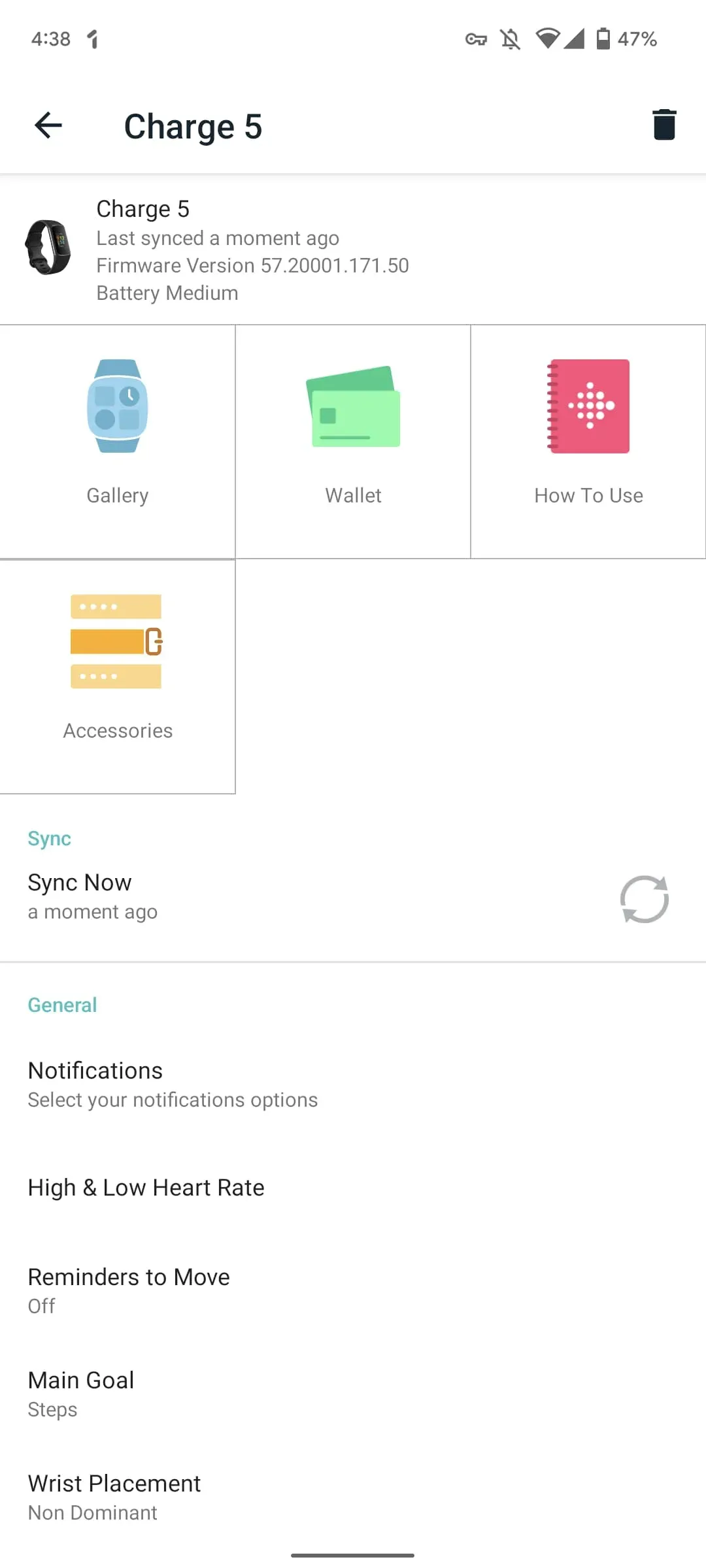
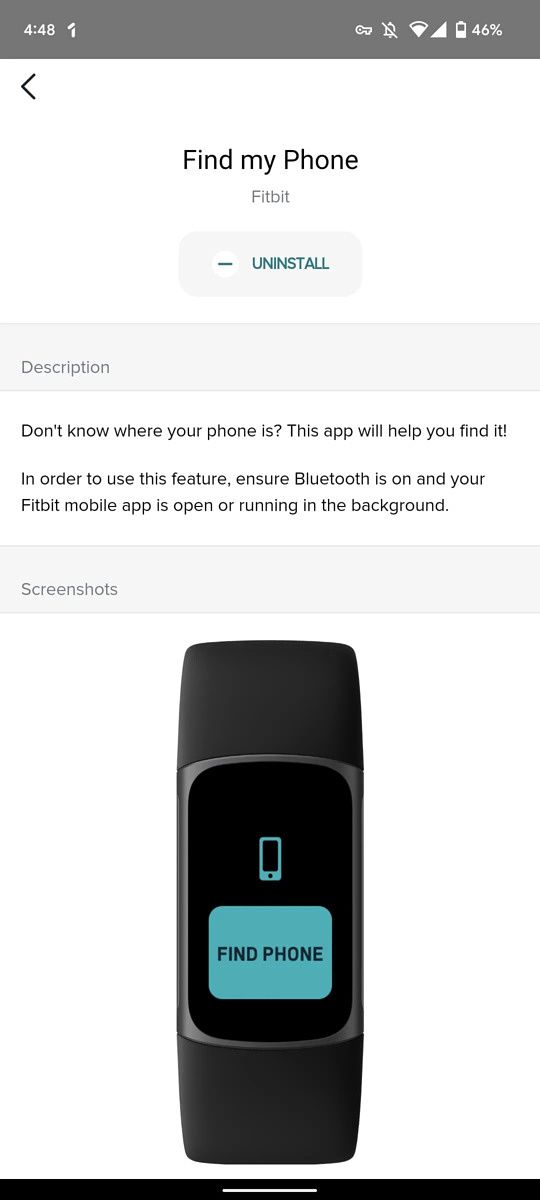
According to 9to5Google, the software update (v1.171.50) has started rolling out to Charge 5 users widely. While Fitbit hasn’t published a detailed changelog for the update, the publication notes that it brings the ‘Find Phone’ feature. The feature, which was previously limited to certain premium Fitbit smartwatches, lets you locate your misplaced phone with just a tap. It appears between Screen Wake and Water Lock when you swipe down from the clock face, and it presents you with just one ‘Find Phone’ button.

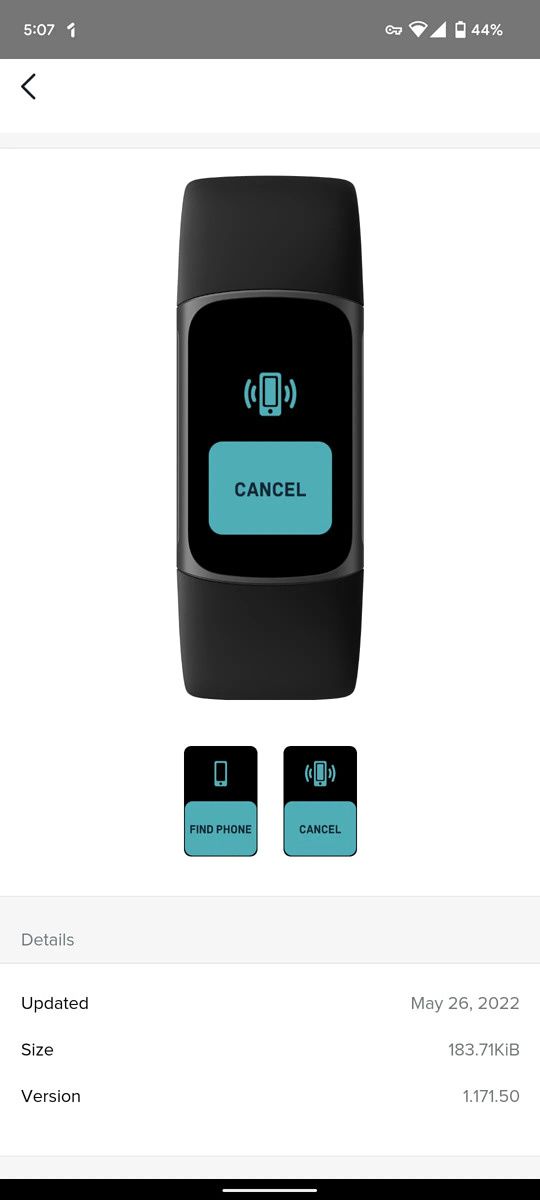
Screenshot of Fitbit Charge 5 update. Screenshot of Fitbit Charge 5 Find Phone feature. Screenshot of Fitbit Charge 5 Find Phone feature.

Screenshots via 9to5Google

When you tap on the button, your paired smartphone will play a loud tone, and the fitness tracker will replace the ‘Find Phone’ button with a ‘Cancel’ button. Once you locate your phone, you can tap on the button to stop playing the tone. Although Fitbit hasn’t specified the requirements for this feature to work as intended on the Charge 5, on the Fitbit Sense, the requirements include:

  • Your watch must be connected (“paired”) to the phone you want to locate.
  • Your phone must have Bluetooth turned on and be within 30 feet (10m) of your Fitbit device.
  • The Fitbit app must be running in the background on your phone.
  • Your phone must be turned on.

The feature comes months after Fitbit released the ECG app for the Charge 5, introduced Daily Readiness Score, and added irregular heart rhythm notifications. At the moment, we don’t have any info on the other changes included in the latest update for the Fitbit Charge 5. We’ll update this post with the detailed changelog as soon as it goes live.

Have you received the latest software update on your Fitbit Charge 5? Let us know in the comments section below.


Via: 9to5Google

The post Fitbit Charge 5 receives ‘Find Phone’ feature with latest update appeared first on XDA.


from XDA https://ift.tt/s9NQp7a
via IFTTT

This Tasker project lets you easily copy YouTube video descriptions

While the YouTube app on Android gives you access to video descriptions, it doesn’t let you interact with the content in the description field. Unless the description has links, you can’t interact with it in any way. And even if it has links, you can only tap on them to open them in a WebView wrapper within the YouTube app. As a result, you can’t copy text from the video description and paste it into a different app or copy links to open them in your browser of choice. Thankfully, there’s a Tasker project that lets you copy YouTube video descriptions with a single tap.

The new Copy YouTube Video Description Tasker project does exactly what its name suggests. It presents the content from the description field for the current YouTube video as selectable text, making it easy for you to copy text and links from the description. Check out the video embedded below to see it in action.

While this might seem like a niche use case, Tasker gives you access to a bunch of such projects that could help make your life easier. Thanks to its new beginner-friendly Tasky interface, you can now try out this project and many others without going through a complex setup process. The pre-built routines range from simple “flip to shhh” options to more complex automatic parking notifications. For starters, you can import the Copy YouTube Video Description project by following the link below.

Import Copy YouTube Video Description project

For more information on Tasky and how you can use it to automate various actions, check out our previous coverage. Make sure you check out our Tasker Tips & Tricks forum for useful tips and to interact with fellow Tasker users.

Are you a new Tasker user? What are your thoughts on the beginner-friendly Tasky interface? Let us know in the comments section below.

Tasker ($3.49, Google Play) →

The post This Tasker project lets you easily copy YouTube video descriptions appeared first on XDA.


from XDA https://ift.tt/gO8QTuN
via IFTTT

Amazon Prime Video gets a visual overhaul on several platforms

Amazon is rolling out a major update for the Prime Video app on several platforms. The update brings a much-needed visual overhaul to Google TV, Android TV, Fire TV, Roku, and Apple TV devices. In addition, the updated UI is also available on the Prime Video app for consoles.

The refreshed Prime Video UI resembles that of Netflix and Disney+, with a large preview window at the top, followed by a new top 10 list and rows of recommended movies and TV shows sorted according to various categories. The interface also has a navigation bar along the left edge, which gives you quick access to Search, Home, Store, Live TV, Free, and My Stuff sections.

Along with the interface changes, Prime Video now also has new visual cues to indicate whether a piece of content is available in your subscription or available to rent/buy. Videos that are included in your Prime Video subscription have a blue check-mark, while those available to rent/buy have a gold shopping bag icon.

Talking about the new visual cues, Helena Cerna, global director of product management for Prime Video, told Variety“We certainly wanted customers to understand the breadth of content available to them, with a clear ingress and being able to know which titles cost extra.”

The new Amazon Prime Video interface will start rolling out to users on the aforementioned platforms this week. In addition, it will roll out to the Prime Video app on Android. The web interface and iOS app, however, will receive the update “in the coming months.” At the moment, it is not clear if the new interface is rolling out to the Prime Video app for macOS. Check out the video embedded above for a quick overview of the new Prime Video interface.

Have you received the updated Prime Video interface on your device? What are your thoughts on the changes? Let us know in the comments section below.


Via: Variety

The post Amazon Prime Video gets a visual overhaul on several platforms appeared first on XDA.


from XDA https://ift.tt/h2orZC3
via IFTTT

lundi 18 juillet 2022

Amazon Fire 7 (2022) vs Amazon Fire 7 Kids (2022): Which tablet should you buy?

When Amazon sent over their Fire 7 tablet for me to review, they also included a Fire 7 Kids tablet. For those of you wondering what the differences are between the Fire 7 and the Fire 7 Kids, there really aren’t any. The Fire 7 Kids tablet comes with a big, poofy, foam rubber case, but inside, the tablet is exactly the same. If you read my review of the Amazon Fire 7 tablet, you’ll know that this is a cheap “knockabout” tablet that you should buy, but not care about all that much.

Adding on

But the Fire 7 Kids tablet has a few extras piled on top of it to justify that extra $49 it’ll cost you. We’ll take a look at those extras and find out if they’re worth the extra money. Here’s what you get when you buy the Fire 7 Kids tablet:

  1. Amazon Fire 7 tablet
  2. Foam rubber case
  3. One year of Amazon Kids Plus subscription
  4. Two-year worry-free guarantee

Bumper case

A Fire 7 Kids tablet side view with two lego minifigs

That last item is the most interesting and we’ll get to that in a moment, but for now, let’s talk about this case. This is a thick foam-rubber case that more than doubles the thickness of the Fire 7. But let me assure you, that thickness is well-used. It is not an exaggeration to say that I spent dozens of minutes literally bouncing this tablet off the concrete floor of my sunroom. I wanted to see if I could bounce it like a basketball. I never came close but not from a lack of trying.

The corners of this case absorb rough impacts when dropped and indeed thrown from a sitting position. I dropped this tablet on its face, back, side, and corner and the tablet itself suffered no damage. About the only way you’re going to break this Fire 7 while it’s in the case is if you happen to hit the screen on a corner of a table or something. Even if that happens…

Two-year worry-free guarantee

Amazon sees this tablet as a device for kids and kids don’t always take the best care of electronics. From drops to spills, there are probably a hundred different ways a kid could take out this tablet despite its armor. That’s why Amazon backs this tablet up with a two-year, no questions asked, guarantee. If it breaks, send it back and they’ll send you a new one. The bumper only goes so far and the guarantee takes you the rest of the way.

One year of Amazon Kids Plus

Amazon Kids Plus is Amazon’s subscription program for kid-friendly content. As parents, you can set up what your child is allowed to download, when they can access that content, and even set up reading or learning limits, such as, “Yes, Billy, you can watch Backyardigans, after you read for 30 minutes and work on this Math app for another 30 minutes.” Amazon charges $4.99 per month for the subscription, so a year is a $60 value that you get included when you buy this tablet.

Why you should buy the Fire 7 Kids tablet

The Fire 7 Kids tablet on a concrete floor.

So who should buy this tablet? Parents who want to give their kids some worry-free entertainment are the main customers here. Having lived through the challenges of raising two children past the age of seven, I can attest to how stressful putting electronics in the hands of children can be. Personally, I have watched some parents hand an iPhone to children and I have privately questioned their sanity. It’s a bold choice.

This tablet with its bumper case is a much better proposition for something like that. Add in the two-year guarantee and the peace of mind it offers, and that by itself could justify the extra cost.

When my children were growing up, Amazon Kids Plus wasn’t really a thing yet, so I can’t attest to how useful it would be for children that young. But, some of the foundations are there for it to be a worthwhile experience. If you want to set limits on screentime, or what apps can be downloaded, Amazon Kids Plus is a good mechanism for doing that. The main thing I really like about Kids Plus is the Learn First mechanism that allows a parent to set learning goals that have to be met before a child can go on to watch a video or play a game. That’s a really smart idea, and I frankly wish more parental control software did that, and yes I’m talking to you Google, and Apple.

What if you don’t have a child?

A man holds the Fire 7 kids by the handle.

The important point to remember here is that if you buy the Fire 7 Kids tablet, you are getting a normal Fire 7 tablet with an easily-removable bumper.

Some might look at that two-year guarantee and think to themselves, “If I buy this Kids tablet, I get the same Fire 7 tablet, but with a two-year guarantee, so if I break it, I can get it replaced for less money than a second Fire 7.” That’s a legitimate argument, once you work out the math. The Fire 7 tablet is $60 and this Kids tablet is $110. If you break it once over the course of two years and Amazon replaces it, you get $120 worth of tablets for $110. You would save yourself $10 in the long run. Of course, that’s only if you actually break it.

Put simply, even without the bumper, the Fire 7 tablet is a tough little tablet and even if you break it within the first two years, you’re only saving $10 on a replacement. As I said in my review, this is a cheap tablet that’s already pretty durable. The bumper case that comes with the Kids edition allows you to bounce it off the walls and floor, for sure, but unless you plan to actually do that, it doesn’t add anything else to the equation.

Of course, there’s more to this than one single replacement. Amazon does not cap the number of replacement tablets you can get. As long as you can send the broken tablet in, Amazon will replace it throughout the two years. It can be two broken tablets, or twenty, though good luck explaining number twenty to customer service.

Assuming you are not the most accident-prone person on Earth, the only reason to buy this tablet is if you have children that are in the appropriate age range. Amazon says that’s between the ages of three to twelve. I suspect my daughter wouldn’t be caught dead with that bumper past the age of eight or so, but of course, your mileage may vary.

Both the Fire 7 tablet and the Fire 7 Kids tablet are available at Amazon.com.

    Amazon Fire 7 Kids
    The Amazon Fire 7 Kids is a child-friendly version of the Fire 7 tablet.

      Features:

      Pros:

      Cons:

Overall, if you have kids, this is not a bad deal. If you plan to use Amazon Kids Plus, it gets even better. The tablet is probably tough enough to withstand a lot that you could throw at it. That means the guarantee alone isn’t worth the extra money. The bumper case is gaudy and no self-respecting person over the age of seven would be caught dead with it in public, so also keep that in mind. But if you have kids and you want to hand them a tablet and not care about it for the next two years, this is a good buy.

The post Amazon Fire 7 (2022) vs Amazon Fire 7 Kids (2022): Which tablet should you buy? appeared first on XDA.


from XDA https://ift.tt/R0Z31sm
via IFTTT

Leaked event invite reveals the launch date for Samsung’s next-gen foldables

Over the last few weeks, we’ve seen plenty of leaks about Samsung’s next-gen foldables — the Galaxy Z Flip 4 and the Galaxy Z Fold 4. The leaks have revealed quite a few details about the devices and even given us an early look at the affordable model. While Samsung has yet to make official announcements about the two foldables, a new leak reveals that the company could launch the devices early next month.

The leak in question comes from noted leaker Evan Blass, who recently shared renders of the Galaxy Z Flip 4. It’s an image of the launch invite for the upcoming foldables, confirming that Samsung will host an event on August 10 to unveil the devices. The image includes a silhouette of the Galaxy Z Flip 4, but it doesn’t reveal anything about the Galaxy Z Fold 4. Blass notes that the image has been edited to obfuscate certain details, but we have no info on the removed details.

In case you’ve not been keeping up with our coverage of Samsung’s upcoming foldables, here’s a quick rundown of what we know so far. The Galaxy Z Flip 4 will reportedly feature the same design as its predecessor with some minor changes. It could pack Qualcomm’s Snapdragon 8 Plus Gen 1 chip, a larger external display, a side-mounted fingerprint scanner, and a bigger battery. On the other hand, the Galaxy Z Fold 4 will reportedly feature a boxier design, up to 1TB storage, a side-mounted fingerprint scanner, and the Snapdragon 8 Plus Gen 1 chip.

Samsung might unveil the new Bora Purple colorway for the Galaxy S22 series at the event as well, but the company has not shared any official information on the matter.

Are you excited about Samsung’s next Galaxy Unpacked event? Which upcoming foldable are you looking forward to? Let us know in the comments section below.

The post Leaked event invite reveals the launch date for Samsung’s next-gen foldables appeared first on XDA.


from XDA https://ift.tt/k7wGreg
via IFTTT