LightBlog

samedi 10 octobre 2020

Everything you need to know about Android’s Project Mainline

One of the biggest changes in Android in recent years that flew under the radar, relatively speaking against its importance, was the introduction of Project Mainline in Android 10. Google mandates the inclusion of specific Mainline modules across Android releases, with Android 11 coming in with a combined compulsory total of 25 Mainline modules. Here is an explanation on what Project Mainline is and what it aims to solve, alongside a list of all of Android’s Project Mainline modules.

What is Project Mainline?

To properly understand Project Mainline, we will have to rewind a bit. If you go back a few years, a lot of the conversation around Android updates centered around the fragmentation problem. Fragmentation was one of the biggest challenges for Google to solve on Android around the Ice Cream Sandwich – Lollipop era. Even though Android as a platform received regular updates across a largely-predictable pattern, these updates used to take a very long time to reach the hands of final consumers, if at all. So while Google was fixing critical bugs and security issues at the platform level, the actual rollout of these changes left a lot to be desired. There were/are a lot of middlemen (SoC vendor, OEMs, carriers, etc.) and a lot of moving parts involved in delivering updates to your phone, and the fragmentation problem did not appear like it would solve itself without requiring some hard-hitting interventions.

Project Treble

One of the major efforts to address this problem came in the form of Project Treble alongside Android 8.0 Oreo, which involved a major rearchitecting of Android, separating the Android OS framework components from the vendor HALs and Linux kernel. Project Treble, in essence, modularized Android by separating the OS framework from the device-specific, lower-level software. This way, device makers (OEMs) need not wait for silicon manufacturers (SoC vendor) to update their vendor implementation code, and OEMs could update the Android OS framework independently. The end result is faster adoption of newer Android releases from the OEM, as they no longer need to wait around for the middleman (SoC vendor) to finish its job first before they can begin doing theirs.

While the Android update situation did not dramatically improve right off the bat with Project Treble, it did largely enable broader OEM participation in Android 10 and Android 11 betas as well as making it easier for OEMs to update more of their devices on a quicker timeline. Plus, the entire concept of the GSI (Generic System Image) has had a major impact on aftermarket development on our forums.

Developer boots Android 11 on 22 older devices with a Project Treble GSI

Project Mainline extends the efforts of Project Treble. While Treble reduced how dependent OEMs were on SoC vendors for every single OS update, Mainline reduces how dependent Google is on OEMs for delivering security updates to key OS components. Project Mainline extends the Treble philosophy to more critical parts of the Android framework, removing OEMs as the dependent middlemen from this equation. The purpose of Project Mainline is for Google to wrest control of framework components and system applications that are critical to security and maintaining development consistency away from OEMs. Project Mainline is rightfully referred to as the biggest change to Android since Project Treble.

For Project Mainline, Google makes use of Mainline modules which are delivered through the Google Play Services framework and the Google Play Store. Each Mainline module is delivered as either an APK file, an APEX file, or as an APK-in-APEX. When a Mainline module is being updated, the user sees a “Google Play System Update” (GPSU) notification on their device. Effectively, to deliver updates to critical components, Google has bypassed the need to wait for an OEM to roll out an update, choosing to do the task itself.

As Google states on the Android website:

Modular system components enable Google and Android partners to distribute updates broadly, quickly, and seamlessly to end-user devices in a non-intrusive manner. For example, the combination of media codec fragmentation and critical bugs can dramatically slow app adoption and user engagement. Frequent updates to media-related modules can reduce codec fragmentation to make media app behavior more consistent across different Android devices and fix critical bugs to build user trust.

Android 10 or higher converts selected system components into modules, some of which use the APEX container format (introduced in Android 10) and some of which use the APK format. The modular architecture enables system components to be updated with critical bug fixes and other improvements as needed, without affecting lower-level vendor implementations or higher-level apps and services.

As Ars Technica mentions:

Project Mainline, AKA “Google Play System Updates,” was introduced in Android 10 as a major effort to make core system components of Android more modular and updatable. Mainline introduced a new “APEX” filetype specifically for system components, with the goal of shipping core Android code through the Play Store as easily as you ship an app update. Previously, Android’s only shippable code block was the APK, a filetype originally designed for third-party apps. This came with all sorts of security restrictions and could only start up late in the boot-up process, so APEX was created with more powerful system components in mind. APEXes can only be created by Google or your device manufacturer, so they can be noticeably more powerful and house critical boot-up components like the app runtime.

Mainline isn’t just a technical solution, it’s also about making more parts of Android centrally distributed by Google, which involves negotiating with device manufacturers and getting them to all agree to ship the same block of code. Mainline modules eventually become mandatory to ship, so Mainline is actually a big collaboration with device manufacturers to make sure a single ecosystem-wide module meets everyone’s needs. Not every Mainline module is an ultra-powerful APEX module—some are just APKs that are now Google-distributed Android code.

Project Mainline — Modules

With Android 10, Google mandated the inclusion of 13 specific Mainline modules. With Android 11, the total number of mandatory modules is 25. Here is the full list, alongside some key details:

Module Name Package Name Type Device
Upgraded to or Launched with
Android 11
Device
Launched with
Android 10
Device
Upgraded to
Android 10
adbd com.google.android.adbd APEX Must Unsupported Unsupported
Android Neural Network API Runtime com.google.android.neuralnetworks APEX Must Unsupported Unsupported
Captive Portal Login com.google.android.captiveportallogin APK Must Strongly Recommended Optional
Cell Broadcast com.google.android.cellbroadcast APEX Must Unsupported Unsupported
Conscrypt com.google.android.conscrypt APEX Must Strongly Recommended Optional
DNS Resolver com.google.android.resolv APEX Must Strongly Recommended Optional
Documents UI com.google.android.documentsui APK Must Must Optional
ExtServices – APK com.google.android.ext.services APK Must Must Must
ExtServices – APEX com.google.android.extservices APEX Must Unsupported Unsupported
IPsec/IKEv2 Library com.google.android.ipsec APEX Must Unsupported Unsupported
Media Codecs com.google.android.media.swcodec APEX Must Must Optional
Media Framework Components com.google.android.media APEX Must Must Optional
Media Provider com.google.android.mediaprovider APEX Must Unsupported Unsupported
Module Metadata com.google.android.modulemetadata APK Must Must Must
Network Stack Components com.google.android.networkstack APK Must Strongly Recommended Optional
Network Stack Permission Configuration com.google.android.networkstack.permissionconfig APK Must Strongly Recommended Optional
Permission Controller – APK com.google.android.permissioncontroller APK Must Must Must
Permission Controller – APEX com.google.android.permission APEX Must Unsupported Unsupported
SDK Extensions com.google.android.sdkext APEX Must Unsupported Unsupported
Statsd com.google.android.os.statsd APEX Must Unsupported Unsupported
Telemetry Train Version Package com.google.mainline.telemetry APK Must Unsupported Unsupported
Tethering com.google.android.tethering APEX Must Unsupported Unsupported
Time Zone Data com.google.android.tzdata APEX Must NOT Must Optional
Time Zone Data 2 com.google.android.tzdata2 APEX Must Unsupported Unsupported
Wi-Fi³ com.google.android.wifi APEX Must Unsupported Unsupported

To provide some context to the columns above, the column titled “Device Upgraded to or Launched with Android 11” includes details on whether the module must be present (or must not be present, in case of Time Zone data because of the inclusion of its alternative) on all devices that have either been upgraded to Android 11, or are launching with Android 11 out of the box. Similarly, devices launching with Android 10 are required to include a few modules, are strongly recommended to include a few others, and are unsupported by the rest. For devices that are upgraded to Android 10 (as opposed to launched with Android), the list of required modules is shorter.

What does each Mainline module do?

Here’s a brief explanation for each of the Mainline modules:

Adbd

The adbd module manages command-line adb and IDE debugging sessions. Modularizing adbd allows Google to deliver performance improvements and bug fixes quicker. This is crucial as some bugs in the past were related to battery drain, and could cause devices to continue using 100% CPU until the phone dies. So getting these fixes out is crucial for Google as adb is widely used by app developers and OEMs for testing.

Android Neural Networks API Runtime

This is a library that sits between an app and backend drivers. The API in turn is an Android C API for running computationally intensive machine learning operations on mobile devices, and to enable hardware-accelerated inference operations.

CellBroadcast

Cell Broadcast refers to emergency and non-emergency alerts (such as AMBER alerts). This module is concerned with tasks around these alerts, and with other ancillary functions such as SMS decoding and geofencing for wireless emergency alerts.

Conscrypt

The Conscrypt module handles Android’s TLS implementation and other cryptographic functions such as key generators, cipers, and message digests. Shipping this is as a module allows Google to accelerate security improvements, without needing to rely on OTA updates.

DNS Resolver

As the name implies, the DNS resolver resolves DNS, i.e. it converts human-readable URLs into IP addresses. The module contains the code that implements the DNS stub resolver, and shipping this as a module lets Google provide better user protection against DNS interception and configuration update attacks.

Documents UI

Documents UI is the module responsible for controlling access to specific files for components that handle document permissions. As Google states, making storage access and permissions into a module increases privacy and security for end users, while the runtime resource overlay (RRO) feature allows OEMs to theme the experience (referring to the Files app) if they need to. As a module, all Google-Android devices will ship with the same Documents UI experience.

ExtServices

This module includes framework components for core OS functionality such as notification ranking, autofill text-matching strategies, storage cache, package watchdog, and other services.

IPsec/IKEv2 Library

This library module concerns itself with new and existing features around Interworking Wireless LAN (IWLAN) and VPNs, such as negotiating security parameters like keys, algorithms, and tunnel configurations. The idea with modularizing these functions is to promote ecosystem consistency and provide a way to deliver quick fixes for security and interoperability issues.

Media, Media Codecs, Media Provider

These are three bifurcated modules, but they have functions that are reliant on each other. These media modules handle media types and codes, interact with the ExoPlayer, expose transport controls and playback information to the framework, optimize indexed metadata, etc. Remember Stagefright, the exploit that changed Android and brought about the very concept of monthly security updates to the platform? That exploit relied on vulnerabilities within the media playback library. So a modularization of the media components allows Google to react quickly and widely in case security bugs are found in this often targetted component.

Module Metadata

The function of this module is immediately clear from its name, although its purpose isn’t. Module Metadata module contains….metadata about the list of modules on the device. And that’s about it.

Network Stack Components, Network Stack Permission Configuration, Captive Portal Login

The Network Stack Components module provides common IP services, network connectivity monitoring, captive login portal detection. The Permission Configuration module defines the permission that enables other modules to perform network-related tasks. The Captive Portal Login module deals with Captive Portals — web pages that are displayed when connected to certain public Wi-Fi networks, where the user is asked to enter details to gain Internet access.

Permission Controller

This module delivers updatable privacy policies and UI elements around granting and managing permissions. If this sounds familiar to what Package Installer does, that is because it is. Functions like runtime permissions granting, management, and usage tracking were part of the Package Installer app up till Android 9. In Android 10, the Package Installer app is split into sections to enable the permissions logic to be updated. The Permission Controller module is delivered as an APK file, and in Android 11, the module can automatically revoke runtime permissions for apps that haven’t been used for an extended period of time.

SDK Extensions

This module is a little difficult to understand and consequently explain. Every Android release is assigned an SDK level (usually +1 from its predecessor). When an app targets a particular SDK, it is assumed that the developer has taken into account the platform behavioral and API changes that the Android release has brought along.

SDK Extensions module decides the “extension SDK” level of the device and exposes APIs for apps to query the extension SDK level. That’s about all that the official documentation mentions. ArsTechnica, though, mentions that this is likely a secondary API layer that will be shipped through the Play Store.

Statsd, Telemetry Train Version Package

Statsd is responsible for collecting device metrics. The Telemetry Train Version Package, on the other hand, does not contain active code or any functionality of its own. It simply contains a version number for the “Telemetry Train” which Google says is a set of metrics-related modules. Based on the version number, Google Play displays the security patch version to end users and figures out if updates are available for metric-related modules.

Tethering

The Tethering module shares the device’s Internet connection with other connected client devices through Wi-Fi, USB, Bluetooth, or Ethernet. The module includes the tethering components and their dependencies. By using this Tethering module, OEMs can rely on a single, standard reference implementation and bring a consistent experience across devices.

Time Zone Data

The Time Zone Data module updates daylight saving time (DST) and time zones on Android devices, standardizing both the data (which can and does change rather frequently in response to religious, political, and geopolitical reasons) and the update mechanism across the ecosystem. Android 8.1 and Android 9 used an APK-based time zone data update mechanism, and Android 10 replaces it with an APEX-based module update mechanism. Google states that AOSP continues to include the platform code necessary for APK-based updates, so devices upgrading to Android 10 can still receive partner-provided time zone data updates through the APK. However, Google does warn that APK-based updates supersedes an APEX-based update.

Wi-Fi

This is the module for Wi-Fi functionality. End users can now get a consistent Wi-Fi experience across Android devices, as well as fixes to interoperability issues through module updates, app developers can get reduced platform fragmentation, and OEMs can fulfill carrier requirements while also reducing costs for individual customizations.


Hopefully, this article highlights just how important Project Mainline is to Google’s Android ecosystem.

The post Everything you need to know about Android’s Project Mainline appeared first on xda-developers.


from xda-developers https://ift.tt/3nDxbta
via IFTTT

Download: OnePlus 8 and OnePlus 8 Pro receive stable Android 11 with OxygenOS 11 update

OnePlus is gearing up for the launch of the OnePlus 8T on October 14. And while that is something to look forward to, existing OnePlus 8 series owners also have something to rejoice about. After rolling out two Open Betas for OxygenOS 11 based on Android 11, OnePlus is now rolling out stable OxygenOS 11 build based on stable Android 11 to the OnePlus 8 and OnePlus 8 Pro.

OnePlus Android 11 Tracker: Here are all the official OxygenOS 11 beta and stable builds to download and install

How OnePlus designed OxygenOS 11 to make bigger phones easier to use

The highlight of Oxygen OS 11, other than the rebase to Android 11, is the new UI visual design that attempts to make these large screen devices easy to use. Since this is the stable release, we expect this to roll out to all users over the coming week, unless any showstopper bugs are spotted. You can wait for your device to get picked up on the staged rollout, or you can sideload the update using the download links provided below. OnePlus mentions that OxygenOS 11 will also roll out for the OnePlus 7T Pro, OnePlus 7T, OnePlus 7 Pro, OnePlus 7, OnePlus 6T, OnePlus 6, and OnePlus Nord in the future.

Here is the complete changelog for the full update:

Changelog for OxygenOS 11 stable update for the OnePlus 8 and OnePlus 8 Pro

Key updates:

  • System
    • Fresh new UI visual design brings you a more comfortable experience with various optimizations of details.
    • Brand-new weather UI supports dynamic switches between sunrise and sunset. You can have day and night at your hand now.
    • Optimized stability on some third-party applications and improved user experience.
  • Game Space
    • Newly added gaming tools box for convenient switches of Fnatic mode. You can now choose three ways of notifications: text-only, heads up and block, just for your immersive gaming experience.
    • Newly added quick reply feature in a small window for Instagram and WhatsApp. (Enable it by swiping down from upper right/left corners of the screen in gaming mode)
    • Newly added mis-touch prevention feature. Enable it, swipe down from the top of the screen, click and the notification bar will pop out.
  • Ambient Displsy
    • Added Always-on ambient Display function, custom Schedule/All day option included. (To set: Settings > Display > Ambient Display)
    • Newly added Insight clock style, a joint creation with Parsons School of Design. It will change according to the phone usage data. (To set: Settings > Customization > Clock Style)
    • Newly added 10 new clock styles. (To set: Settings > Customization > Clock Style)
  • Dark Mode
    • Added the shortcut key for Dark Mode, pull down the quick setting to enable.
    • Supporting automatically turn on feature & customize time range. (To set: Settings > Display > Dark Mode > Turn on automatically > Automatically enable from sunset to sunrise/Custom time range.)
  • Zen Mode
    • Added 5 new themes (ocean, space, grassland, and so on), and more timing options.
    • Included the Group feature in Zen Mode, now you can invite your friends and enable the Zen Mode together.
  • Gallery
    • Story function supported, automatically forming weekly videos with photos and video in storage.
    • Loading speed optimized, and the image preview is now faster.
  • Others
    • The widget on the desktop might disappear. It can be set as followed: Long press on the desktop -“Widget” – “Settings” – Select the widget.

OnePlus 8 XDA Forums || OnePlus 8 Pro XDA Forums

Buy from Amazon.in: OnePlus 8 || OnePlus 8 Pro


Download: Stable OxygenOS 11 update based on Android 11

You can download the update and sideload it onto your phone. Download the appropriate package for your phone, go to Settings > System > System Updates, and then click on the top-right icon and select “Local Upgrade” option. From there, select the update package that you have downloaded and proceed.

OnePlus 8

OnePlus 8 Pro


Thanks to XDA Senior Member Some_Random_Username for the download links!

The post Download: OnePlus 8 and OnePlus 8 Pro receive stable Android 11 with OxygenOS 11 update appeared first on xda-developers.


from xda-developers https://ift.tt/2SV9S05
via IFTTT

Samsung Galaxy S20 FE 4G First Impressions: Function over Form

It’s fair to say that Samsung was caught with its pants down with the COVID-19 pandemic this year. Every device maker’s smartphone sales have been affected by the pandemic, and this is natural—consumer spending is down because of the decrease in purchasing power. However, Samsung has been affected more than Huawei or Xiaomi, for example. The company’s decision to raise the pricing of its flagship Galaxy S20 series this year came at a bad time. The flagship Galaxy S20 Ultra’s $1,399/₹97,999 price tag raised many eyebrows, and even the regular Galaxy S20 and the Galaxy S20+ experienced steep increases in pricing. According to multiple reports, the Galaxy S20 series has sold in significantly lesser amounts than its predecessors. The decline in sales was such that Samsung lost its position as the top global smartphone vendor to Huawei. The Galaxy Note 20 series brought an ultra-expensive Galaxy Note 20 Ultra, and a surprisingly hobbled regular Galaxy Note 20. Samsung needed something more effective in terms of pricing, and to deliver on the need, the company has gone back to basics by launching the Samsung Galaxy S20 FE (Fan Edition).

Samsung first used the Fan Edition branding with the Galaxy Note 7 FE, bringing back the ill-fated Galaxy Note 7 with a revised edition because of fan demand. Three years later, the company is bringing back the branding for the Galaxy S20 FE. Names don’t necessarily mean much, though; the Galaxy S20 FE could easily be called a Galaxy S20 Lite, and it is actually that in all but name. In some ways, it can be taken as the successor to the Galaxy S10 Lite, which was released earlier this year.

The Galaxy S20 FE is available in different 4G and 5G variants. The 5G variant is powered by the Qualcomm Snapdragon 865 (not dependent on region), while the 4G variant makes do with Samsung’s own Exynos 990 SoC. Interestingly, the 5G variant comes with only 6GB of RAM, while the 4GB RAM variant comes in 6GB RAM and 8GB RAM variants depending on regional availability. In India, Samsung has chosen to launch only the 4G variant in a single 8GB RAM + 128GB storage variant, which is what we have here today for quick first impressions. This 4G, Exynos 990-equipped model is also sold in the UK and other countries in Europe.

Specification Galaxy S20 FE 5G Galaxy S20 FE 4G
Dimensions & Weight
  • 74.5 x 159.9 x 8.4 mm
  • 190g
  • 74.5 x 159.9 x 8.4 mm
  • 190g
Display
  • 6.5-inch 20:9 FHD+ (2400×1080) Super AMOLED display
  • Centered hole-punch cutout
  • 120Hz refresh rate
  • Gorilla Glass 3
  • 6.5-inch 20:9 FHD+ (2400×1080) Super AMOLED display
  • Centered hole-punch cutout
  • 120Hz refresh rate
  • Gorilla Glass 3
SoC Qualcomm Snapdragon 865 Samsung Exynos 990
RAM & Storage
  • 6GB + 128GB
  • 8GB + 128GB (Indian variant)
  • 8GB + 256GB
Battery & Charging
  • 4,500 mAh
  • 15W wired charging
  • 15W fast wireless charging
  • Wireless PowerShare support
  • 4,500 mAh
  • 15W wired charging
  • 15W fast wireless charging
  • Wireless PowerShare support
Rear Camera
  • Primary: 12MP f/1.8 primary camera
  • Secondary: 12MP f/2.2 wide-angle camera
  • Tertiary: 8MP f/2.0 telephoto camera
  • Primary: 12MP f/1.8 primary camera
  • Secondary: 12MP f/2.2 wide-angle camera
  • Tertiary: 8MP f/2.0 telephoto camera
Front Camera 32MP f/2.0 32MP f/2.0
Other Features
  • IP68 dust and water resistance
  • USB Type-C
  • Optical under-display fingerprint scanner by Goodix
  • Wi-Fi
  • Bluetooth
  • MST
  • NFC
  • IP68 dust and water resistance
  • USB Type-C
  • Optical under-display fingerprint scanner by Goodix
  • Wi-Fi
  • Bluetooth
  • MST
  • NFC
Android Version One UI 2.5 based on Android 10 One UI 2.5 based on Android 10

About this preview: Samsung India sent the 8GB RAM + 128GB storage variant of the Samsung Galaxy S20 FE (SM-G780F) to us. I have used the phone for six days now, and this is my first impressions preview. Our full review will be published next week. Samsung had no input on the content of this article.

Samsung Galaxy S20 FE – Design

Samsung Galaxy S20 FE

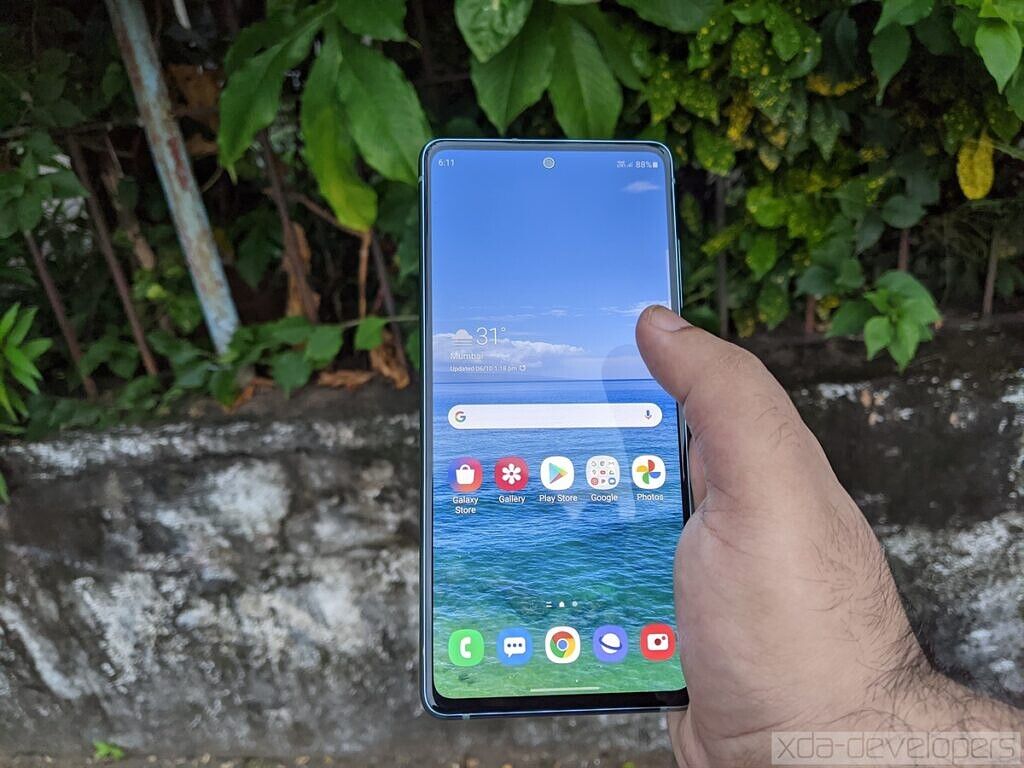
The Samsung Galaxy S20 FE has an interesting design. From the front, it looks just like the Galaxy S20. In terms of size, it falls in between the compact 6.2-inch regular Galaxy S20 and the mid-sized 6.7-inch Galaxy S20+. It’s quite a bit smaller than the Galaxy S20 Ultra, which has a behemoth 6.9-inch display. The size will be optimal for a large subset of smartphone users, but I was mildly disappointed with Samsung’s choice of a tall 20:9 aspect ratio. For this screen size, I think 19.5:9 would have been better, and 19:9 would have been optimal. As it is, the display width here feels a little cramped for me, coming after months of using 6.7-inch+ phones.

From the front, it was also a bit disappointing to see the bezels, which are noticeably larger than those seen on the Galaxy S20, S20+, and S20 Ultra. Interestingly, they are also larger than Samsung’s own previous affordable flagship phones such as the Galaxy S10 Lite (review), Galaxy Note 10 Lite (review), and even the lower mid-range Galaxy M51. The screen-to-body ratio is 84.8%, which is on the lower side for phones today (the Galaxy S20+ has a 90.5% screen-to-body ratio, for reference.) Another downgrade here is the presence of Gorilla Glass 3 on the front. As I said in my Galaxy M51 review, this is not something that makes sense apart from a cost-cutting reason. For an affordable flagship, the lack of something like Gorilla Glass 6 is a sore omission. On the other hand, the hole punch front camera is small, smaller than the one used in the Galaxy M51, and smaller than OnePlus’ front camera in the OnePlus 8 Pro, for example.

It’s not as if there aren’t any positives here, though. The Galaxy S20 FE uses a flat display, and that is a plus in almost every practical use case. Yes, it doesn’t look as futuristic as a curved display, but in terms of usability, it’s still better than even the mildly curved display on the Galaxy S20 series in terms of accidental touches, glare, and more.

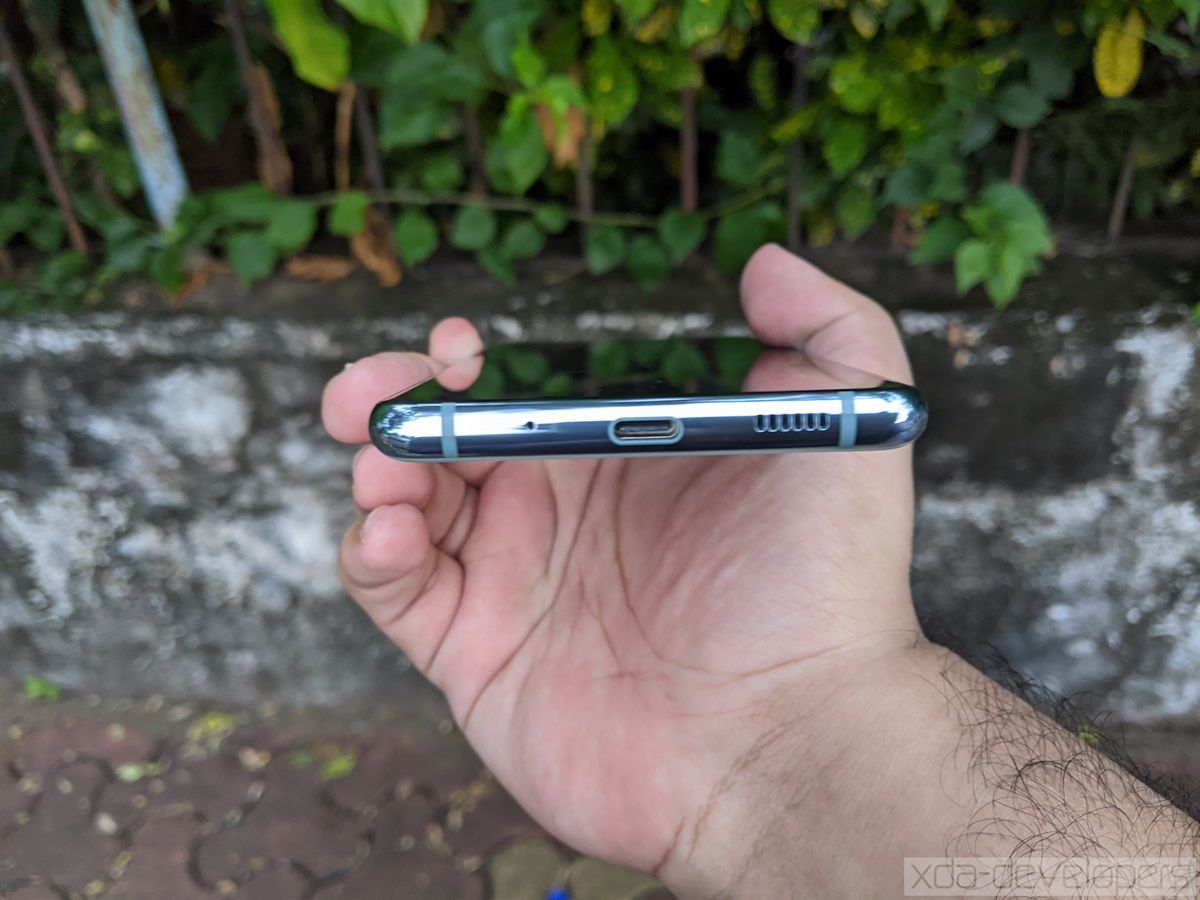
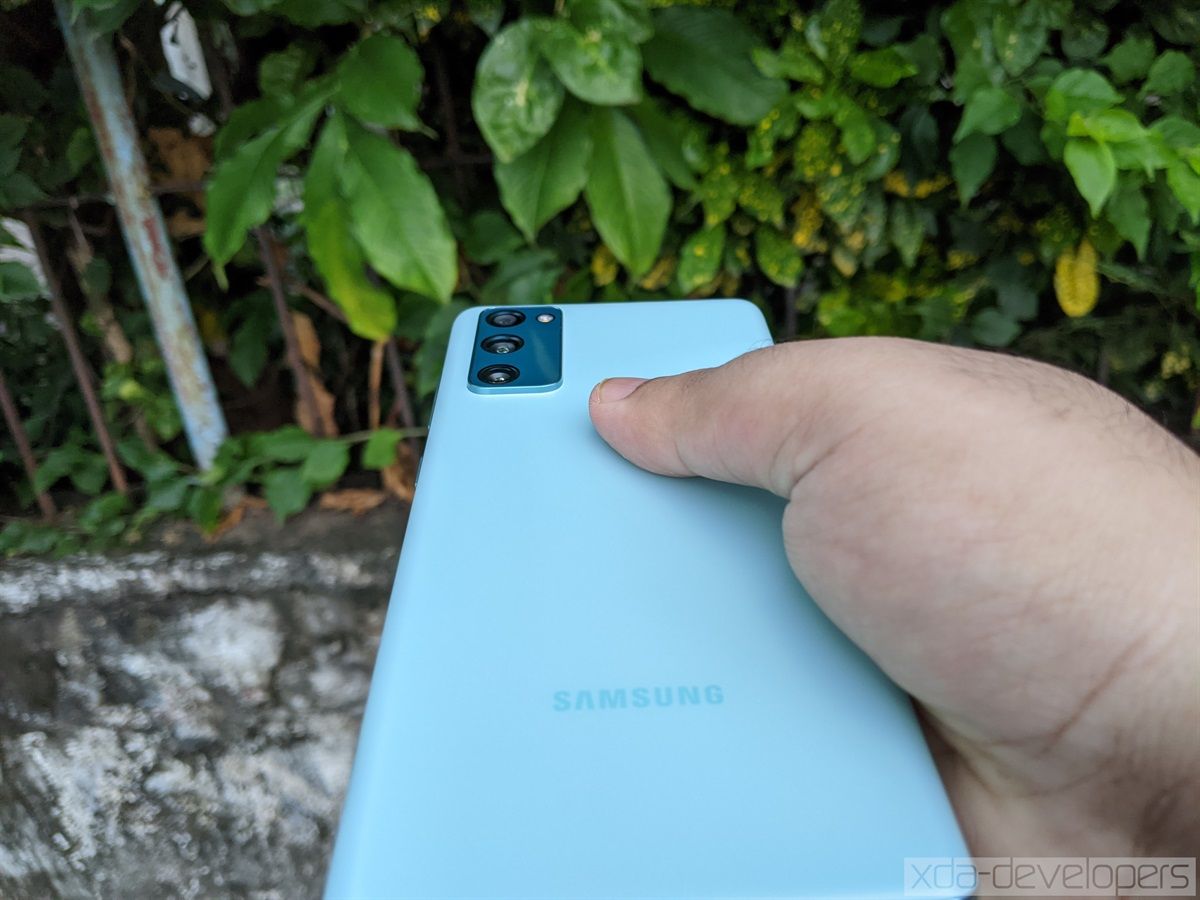
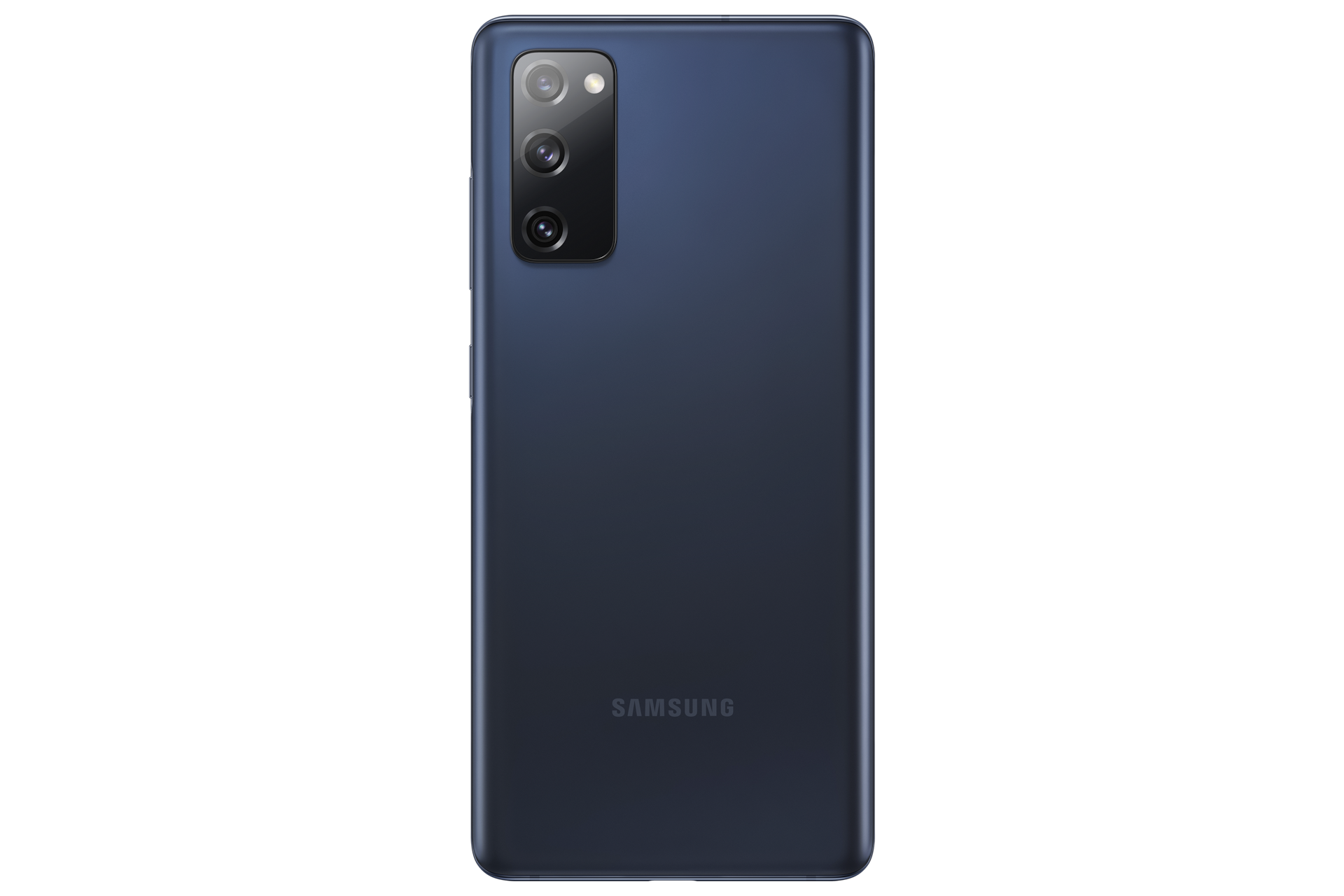
The sides are polished aluminum that looks and feels like glass. The aluminum frame on the sides is noticeably thin as the back and sides are aggressively curved. The back is where we find the real differences from the Galaxy S20 series. The triple camera enclosure is placed at the top left, with the camera lenses being designed like the lenses of the Galaxy Note 20 series and the Galaxy Z Fold 2 (review). The back’s material itself is noteworthy. It’s matte plastic with a soft touch texture that feels surprisingly OK. It feels noticeably plastic, but it’s also noticeably better than the glossy, fingerprint-prone plastic that Samsung uses in the cheaper M-series and A-series phones.

Other reviewers have compared the Galaxy S20 FE’s plastic material to the one seen on the regular Galaxy Note 20. While I can’t condone a plastic back on a phone with a $1,000/₹77,999 price tag, it is significantly more palatable on the Galaxy S20 FE, which has a significantly lower price tag (£599/$699/₹49,999). For the price, I would have preferred a matte glass back as seen on the OnePlus 8 Pro (review), as that feels significantly more premium in the hand. Plastic presents a different set of trade-offs: It’s much more durable than glass, but it doesn’t feel as nice as glass, generally speaking.

The Galaxy S20 FE’s other design features include having the capability to do wireless charging with 15W fast wireless charging, IP68 water resistance, and the lack of a 3.5mm headphone jack. It does feature a microSD card slot, which is of the hybrid variety (dual-SIMs or a single-SIM + microSD).

The box package of the Galaxy S20 FE is bare-bones. Samsung is bundling only a 15W Adaptive Fast Charger with this phone with a Type-C to Type-A cable, although the cheaper Galaxy M31s and Galaxy M51s both feature a 25W USB Type-C PD 3.0 charger with PPS and PDO. The phone does support 25W fast charging, but you will have to buy a charger separately. At a time when even lower mid-range phones costing ₹14,999 feature 65W ultra-fast charging, I fail to see how Samsung can get a free pass for bundling a 15W charger in an affordable flagship in late 2020. This wouldn’t have been a great move in 2019; in 2020, it only passes off as cutting too many corners. The company also doesn’t bundle any earphones or a case, while the Galaxy S20’s box package contains wired USB Type-C earphones as well as a generic transparent case.

Overall, the design of the Galaxy S20 FE is acceptable. It won’t win any awards for innovation, but at the same time, it features a usable, practical design that won’t need a case so much as a phone with a glass back. It’s still disappointing to see Samsung regress in key areas such as bezels and bundling fast chargers, though.

Samsung Galaxy S20 FE – Initial Thoughts

My initial thoughts with the Samsung Galaxy S20 FE have led largely in one direction. For the price tag of ₹49,999/£599/€649, this phone is undoubtedly a very good phone, fit for 2020’s pandemic-stricken smartphone market. As far as Samsung’s affordable flagship phones go, it is excellent. With features such as a 120Hz AMOLED display, a flagship choice of SoCs, a primary camera borrowed from the Galaxy S20 (although with different image processing), and a 4,500mAh battery—ithe Galaxy S20 FE has all the makings of a successful value flagship.

At the same time, however, the phone has to contend with a field of competitors that is quickly getting better. The upcoming OnePlus 8T, the OnePlus 8 Pro, the Xiaomi Mi 10T, Mi 10T Pro, and the Mi 10, and the ASUS ROG Phone 3 (review) are all competitors that have better specifications in a few areas, although they won’t match Samsung’s brand name. In our upcoming review of the Galaxy S20 FE, we will attempt to answer the following questions:

  • How good is the display of the Galaxy S20 FE? Does the lack of QHD+ resolution make a noticeable difference? In terms of display quality, is the panel a top-quality display with respect to brightness, contrast, viewing angles, and color accuracy?
  • The performance of the Exynos 990 SoC. We have done a deep-dive on the Exynos 990 in our Galaxy S20+ review and examined its gaming performance in the Galaxy Note 20 Ultra review. In the eight months since the Galaxy S20’s launch, has the Exynos 990 aged poorly? Can its real-world performance compare favorably with that of Snapdragon 865-powered phones such as the OnePlus 8 Pro?
  • The cameras. The primary camera may be lifted from the Galaxy S20, but Samsung has made quite a few image processing changes since the Galaxy S20’s launch, and not all of them have been for the better. How does the 12MP camera with 1.8μm pixels hold itself to that of Quad Bayer cameras such as the 48MP OnePlus 8 Pro? The ultra wide-angle camera has a smaller sensor than the Galaxy S20’s ultra wide-angle camera, while Samsung has moved to a 8MP camera with a true telephoto lens (73mm) to achieve nearly 3x optical zoom instead of having a 64MP secondary wide-angle camera on the regular Galaxy S20 and S20+ that used crop sensor zoom to achieve 3x “hybrid optic zoom”. How does the telephoto camera hold up to that of the Galaxy S20’s? How well does the night mode work in all cameras?
  • 120Hz + Exynos 990. It wasn’t a great combination for battery life on the Exynos variant of the Galaxy S20+. Is it the same for the Galaxy S20 FE 4G?
  • How well does the phone’s overall value proposition compare to that of its competitors?

To learn the answers to these questions, stay tuned for our full review, which will be published next week. For now, the Galaxy S20 FE 4G has held up promisingly in some respects, while showing predictable weaknesses in other areas.

Samsung Galaxy S20 FE Forums

    Samsung Galaxy S20 FE 4G
    Samsung's Galaxy S20 Fan Edition packs the best of the Galaxy S20 into a more affordable package.

The post Samsung Galaxy S20 FE 4G First Impressions: Function over Form appeared first on xda-developers.


from xda-developers https://ift.tt/3nvcHmx
via IFTTT

vendredi 9 octobre 2020

An early build of LineageOS 18.0 GSI brings Android 11 to Project Treble compatible devices

Android 11 is the latest Android version out there, albeit it is available officially on only a handful of devices. But since the source code of the new release has already made its way to AOSP, aftermarket developers have helped us experience all the new features on Android through custom ROMs across a growing list of devices. Unless you’ve been living under a rock, you should also have heard about the Android 11-based custom Generic System Image (GSI) created by XDA Recognized Developer phhusson that can be installed on any device that supports Project Treble. We now have a new addition to the list, as the first alpha build of LineageOS 18.0 GSI is up for grabs.

LineageOS XDA Forums

The LineageOS team has yet to officially mark its major version bump up to LineageOS 18.0 with Android 11 as the base, but the developers have been incredibly hard at work to bring everything up. This has led to XDA Recognized Contributor AndyYan compiling an experimental LOS 18.0 GSI build. Currently, the ROM is rather barebones as it’s the first public release and is only meant to be for testing stability. The GSI backbone is based on phhusson’s release, which means it does carry forward nearly the same set of bugs and glitches.

Download Unofficial LineageOS 18.0 GSI based on Android 11

At the time of writing this article, there is only one GSI variant (ARM64 AB non-VNDKLite to be precise) available for download. Once phhusson’s custom AOSP GSI becomes more stable, the developer will start building more variants so everyone can get the appropriate build for their devices. Before you go ahead and flash the LineageOS GSI on your device, be sure to take a backup of your data and then only go through our GSI installation guide.

Unofficial LineageOS GSI — XDA Discussion Thread

The post An early build of LineageOS 18.0 GSI brings Android 11 to Project Treble compatible devices appeared first on xda-developers.


from xda-developers https://ift.tt/3deBhn1
via IFTTT

Today’s Top Tech Deals: Blinks Minis for $25, $120 Projector, and More!

Big things are happening here at XDA! We have a nice, fancy new logo, and other exciting things in the works. Make sure to sign up and mark your calendars for October 27th! While you’re waiting for the big unveiling, you can learn web development for just $35. Who says education is expensive? (I do, but still, this is a great deal.)

As for today’s top tech deals, retailers and companies are holding back for what will only be a mad rush next week. Still, there are a few early deals to take advantage of, like a $25 Blink Mini, a nicely priced projector, and more!

Good news–as of the time of this writing, the Nintendo Switch is in stock at Amazon again! Grab one before it inevitably sells out.

$10 Best Buy Gift Card with $100 Hulu or Netflix Gift Card Purchase

You know what is happening next week? Best Buy’s start of their Black Friday event. Yes, it’s October, and yes, it starts on a Tuesday. What can you do? You can get yourself a $10 Best Buy gift card when you purchase a Netflix or Hulu $100 gift card. Gift card deals aren’t all that common, and a Netflix or Hulu gift card can make a fantastic gift for someone during the holidays, so why not get a little back while you start gift shopping early?

    $10 Gift Card with Hulu/Netflix Gift Card Purchase
    Get a perfect holiday gift for someone that's impossible to shop for while getting something for yourself! Purchase a $100 Netflix or Hulu gift card and get a $10 Best Buy gift card. Perfect for the deals next week!

Early Prime Day Deal: Blink Mini for $25

Why post a regular deal when you can post an early Prima Day deal? The Blink Mini is currently $10 off for Amazon Prime members, and it’s a perfect little camera to go along with your Echo Show. In fact, you can even buy both of them together for just $50! That’s a pretty great deal, too, but if you already have the Show and just need a camera, you can pick up the Blink Mini by itself and get 10% cashback if you have an Amazon Prime credit card.

    Blink Mini
    Keep an eye around the house with the Blink Mini camera, $10 off at Amazon ahead of Prime Day. These go perfect with the Echo Show and other smart home devices, allowing you to make sure the baby or pets are alright or keep an eye on the front door for security purposes.

Anker Soundcore Life Q20 Headphones, $10 Off

If you’re not an audiophile, do you really need that $300 pair of headphones? Not really, if you’re not going to be able to really detect the difference. Besides, there are plenty of quality headphones that are reasonably priced, like Anker’s Soundcore Life Q20 headphones! If you clip the coupon on the page, these wireless noise-canceling headphones are just $50. With memory foam earcups and up to 40 hours of playtime on a charge, you’re paying for less but not settling for less.

    Anker Soundcore Life Q20 Headphones
    You deserve good headphones that don't cost you an arm and a leg. Get Anker's Soundcore Life Q20 headphones for just $50 by clipping the coupon on the page.

Early Deal Days Deal: Project for $120

Amazon isn’t the only company with deals, deals, and more deals next week–Target is holding their Deal Days event, and they’re also running some deals early in an attempt to beat out the competition. There are some really good shouts too, like this Mini Video Projector for $120, $80 off the MSRP. This projector can give you a picture of up to 236 inches, which is just perfect for your socially-distanced outdoor party or an incredible home theater set-up.

    VANKYO Leisure 430 Projector
    Get the big picture experience without going to the movie theaters! This $120 projector can help you host the outdoor movie night of your dreams--or turn your home theater setup into the closest you can get to an actual theater without spending an arm and a leg.

AUKEY 30000mAh Battery Pack for $41

What Aukey’s Slimline battery pack from yesterday not powerful enough for you? Looking for something… meatier? The Aukey Power Delivery Power Bank has a whopping 30,000 mAh of power, and you can grab it for just $41. To get the full discount, use the code WMPYADFW and clip the $20 off coupon on the page. You only have until Monday to grad this beast of a battery pack, so don’t delay!

    AUKEY 30000mAh Battery Pack
    Get a big battery pack that will charge everything you need it to, and then some. Aukey's 30,000 mAh battery pack is just $41 by clipping the coupon and using the code WMPYADFWat checkout. Don't sleep on this deal!

More Tech Deals

Looking for even more tech deals? We have them for you below!

Early Prime Day 2020 Deals

We’ve rounded up the early Prime Day 2020 deals we have found so far below. Tech deals or not, take advantage of these deals to possibly save even more on Prime Day!

The post Today’s Top Tech Deals: Blinks Minis for $25, $120 Projector, and More! appeared first on xda-developers.


from xda-developers https://ift.tt/2GTWTsp
via IFTTT

Get an Education in Web Development With 35 Hours of Training for Under $35

As businesses move their operations online and people look to digital entertainment, the digital economy is booming right now. As a result, web developers are in demand. If you would like to start a career in code, The Web Development Masterclass Certification Bundle provides 35 hours of essential content. You can currently get lifetime access for just $34.98 at the XDA Developers Depot.

There are many good reasons to learn web development. Full-time pros can earn six figures, and other people use the same skill set to build successful online businesses. Even outside the tech world, employers will be impressed if you can create a website from scratch.

Comprising six beginner-friendly courses, this bundle provides a complete education in web development. Through concise video tutorials, you learn how to construct sites with HTML, CSS, JavaScript, and Bootstrap.

The training also helps you master PHP, add some style with jQuery, and build a backend with MySQL. Along the way, you get to work on multiple fun projects. These help you gain real-world experience, and you can use the finished sites in your portfolio.

The courses come from YouAccel, a leading creator of online training. They have an average student rating of 4.2 stars, and you get lifetime access to all the content.

You would normally pay $1,194 for this training, but it’s now only $34.98 with the bundle.

 
The Web Development Masterclass Certification Bundle – $34.98

See Deal

Prices subject to change 

The post Get an Education in Web Development With 35 Hours of Training for Under $35 appeared first on xda-developers.


from xda-developers https://ift.tt/2GRwWK2
via IFTTT

Something special is coming on October 27th…

Over the past few years, we have witnessed consumer privacy eroded in many ways, too many for us even to begin recounting them. Then, there are never-ending antitrust lawsuits between big corporations and regions like the EU and USA; Facebook’s ongoing straddling of the line between judge and jury; and this year alone, an entire saga where the privacy of Americans has resulted in the expected, then likely, and now probable, sale of TikTok’s western business. It’s right about time to reclaim your privacy back.

Something special is coming on October 27th, and trust us, this is one you won’t want to miss! If you’ve been following my cryptic tweets, you’ll know we’ve been working on something different.

What is it, we hear you ask? We can’t reveal it all just yet, but we’re delighted to announce that we’ve partnered with London-based technology company F(x)tec to bring you a special product. One that puts you back in control and helps ensure that your private life stays private, as it should.

To find out more and get a headstart for the early bird specials when the Indiegogo page launches on October 27th, enter your details in the widget below! There are limited numbers of early bird perks, so you’ll definitely want to be on this list!

We also want to have a bit of fun, so for one lucky XDA user, we’ll give away the product we’re launching. To enter, though, you’re going to need to get creative. All you have to do is think of the funniest answer you can – and we mean funny, but not dirty, nasty, or prejudiced – to the following question:

What is XDA and F(x)tec launching? 🤔

Once you’ve come up with an answer, enter it in the widget below alongside your email. You only get one chance, so get creative! 😉 This competition ends on October 26th, and we’ll announce the winner on October 27th. The XDA team will pick the winner, so get funny, get creative, and join us for a special Tuesday!

Something Special Is Coming…

The post Something special is coming on October 27th… appeared first on xda-developers.


from xda-developers https://ift.tt/2FiYGqO
via IFTTT