LightBlog

jeudi 25 juin 2020

TWRP 3.4.0 enables OZIP decryption for Realme/OPPO devices and support for legacy devices upgraded to Android 10

Whether you are an experienced flashaholic or just a newcomer to the flashing scene, you likely have used Team Win Recovery Project, or TWRP for short, at some point. The custom recovery solution officially supports hundreds of Android-powered devices (including TV Boxes and smartwatches). On the other hand, the modding community has managed to integrate unique features like true dual booting in the unofficial builds. Thanks to the ever-changing world of Android, TWRP needs to adapt to newer partition schemes and encryption logics while retaining compatibility with legacy devices. The project has now received a major update that bumps TWRP’s version number to 3.4.0.

As many of you are aware, TWRP developers faced several challenges on their way to make the custom recovery fully compatible with Android 10. A significant portion of the TWRP codebase needed to be revised to support the changes Google introduced in AOSP’s recovery implementation. TWRP 3.4.0 does not yet bring support for dynamic/logical partitions, which is required to support devices that launch with Android 10. It does, however, fix support for legacy devices that upgraded to Android 10, but retain the old partition scheme.

Besides featuring an enhanced decryption module, the latest version of TWRP comes with a bunch of improvements in System-as-Root and A/B dual partitions handling. The A/B installer zip format is completely re-written from scratch based on the contributions of XDA Senior Recognized Developer osm0sis and XDA Recognized Developer arter97. Moreover, OZIP decryption is now natively supported, courtesy of XDA Recognized Developer mauronofrio. It means that OPPO and Realme smartphone users can flash official firmware packages directly from TWRP without converting them to standard ZIP files beforehand.

The full changelog for the update can be found below:

TWRP 3.4.0-0 Changelog

  • System As Root (SAR)
    • Fix backup and restore using SAR – dianlujitao
    • System mount point – Chaosmaster
    • ORS – Chaosmaster
    • Zip install – Chaosmaster
    • system_root bind mount to /system – Chaosmaster
    • Autodetection of SAR – Chaosmaster
  • Digest
    • fix creation of digests for sub-partitions (was bugfix applied to many devices since last year) – Bigbiff
  • Encryption
    • ext4Crypt Wrapped Key Update – Peter Cai
    • Fix upgrading encryption key if export fails – Peter Cai
    • Fix wrapped key support for devices without metadata partition – mauronofrio
    • Don’t skip decryption when using block map file in order to write to /data in ORS – CaptainThrowback
    • FDE – Decrypt master key first – AndroidableDroid
    • vold_decrypt – set Android version and patch level automatically – CaptainThrowback
    • Set wrapped decrypt support by twrp flag – Peter Cai
    • Don’t try wrapped support unless needed – mauronofrio
    • restore ext4 policy on /data/cache – Bigbiff
    • multiuser decryption – Noah Jacobson
    • FDE retry – AndroidableDroid
  • TWRP App
    • unmount system after checking for app – Bigbiff
  • Prebuilt updates –
    • android.hardware.confirmationui@1.0 – cryptomilk
  • Compilation Fixes:
    • TW_EXFAT_FUSE compilation fixes – Bigbiff
    • libuuid – cryptomilk
    • ‘system/etc/ld.config.txt’ not found error – Martin Dünkelmann
  • Language Updates:
    • Portugal – Vasco Machado
    • Dutch – Ian Macdonald
    • Turkish – Fatih Fırıncı
    • Localisation of Backup_Tar: Ian Macdonald
  • ld.config.txt
    • updates for 8.x trees – CaptainThrowback
    • fix search path for /sbin – CaptainThrowback
    • /sbin should come first in search path – Ian Macdonald
  • General Bugs
    • Fix persistent log storage – SyberHexen
    • Compress Persistent Logs – Bigbiff
    • FB2PNG compilation errors – Bigbiff
    • exclude per_boot from backups – Darth9
    • Unmount all directories that point to same block device – AndroidableDroid
    • Blank screen fixes – Sean hoyt
    • Toolbox is default on android-9+ – mauronofrio
  • Cleanup –
    • Typo fix in comment – VDavid003
    • newlines in ext4crypt – CaptainThrowback
    • TW_OEM_BUILD compilation issue – Patrick Zacharias
    • Fix Dependency requirements – Dees_Troy
    • Fix Symbolic links for BB and Toolbox – Dees_Troy
  • Bootloader Message
    • cleanup – Alessandro Astone
    • add configurable offsets
  • Error Cleanup
    • uevent errors and decryption error – mauronofrio
    • using copy_file to copy files from /etc – CaptainThrowback
    • ueventd access to /acct – early directory creation in init – cryptomilk
  • Haptics
    • TSP Driver – LameMonster82
    • QTI Input – AndroidableDroid
  • update_engine
    • read all asserts – Hernán Castañón
  • Resetprop
    • Add Resetprop from Magisk – CaptainThrowback & mauronofrio
    • compile from source – Chaosmaster
    • fix for android-7 and earlier – Chaosmaster
    • cleanup for spaces in properties – AndroidableDroid
  • Properties
    • Add Property override – Chaosmaster
  • Backuptool
    • mount system and vendor for A/B installs for backuptool – Chaosmaster
  • twrpTar
    • fix backup freezes when pigz and openaes are used – Fabrice Bellet
  • Zip Installs
    • Info for A/B zip installing to inactive slot – Chaosmaster
    • Reboot to system button now allows to be rebooted to different partitions after zip install
    • progressbar rework – Chaosmaster
  • Magisk updates
    • update binaries from source – AndroidableDroid
  • A/B Updater Zip Template
    • rewrite A/B installer zip from scratch using a new generic template and latest magiskboot – osm0sis
    • installer zip support for recovery_a/recovery_b partition ramdisks on newer 2SI SAR A/B devices – osm0sis
    • generate installer zips for all prod A/B devices – bigbiff
    • improve installer zip dump/write speed and add more error catching – arter97 & osm0sis
  • OZIP Encryption Support
    • add OZIP encryption – mauronofrio
  • File Selector
    • Support for more extensions in File Selector – mauronofrio

The resetprop support that has been added was used to create libresetprop in the TWRP source which allows read-only props to be easily overwritten by device maintainers. This helps ensure broad compatibility for stock ROMs, decryption, etc. but does not impact end-users.

You can download the latest build of the custom recovery for your device from the official website linked below. Don’t forget to take a look at the device-specific discussion threads as well, which are usually created under the respective XDA sub-forums.

Download TWRP for your device

The official TWRP app is another choice to download the latest version right from your device. With root access, the handy tool can also be used to install the updated TWRP build without rebooting to recovery.

Official TWRP App (Free+, Google Play) →

The post TWRP 3.4.0 enables OZIP decryption for Realme/OPPO devices and support for legacy devices upgraded to Android 10 appeared first on xda-developers.


from xda-developers https://ift.tt/37XwUdl
via IFTTT

Huawei P40 Pro series gets EMUI 10.1.0.140 with Smart Eye Tracking, Super Night Portrait Mode 3.0, and Ring Light compensation

Huawei has been striving to give several reasons for users to buy its phones despite the unavailability of Google’s apps. It has been bolstering its own App Gallery as a replacement for the Google Play Store by onboarding several third-party applications like HERE WeGo Maps to run on its devices. Against all odd, Huawei launched its flagship P40 series in March this year featuring a 50MP UltraVision camera with RYYB sensor and a 32MP selfie camera across all three models, including Huawei P40, P40 Pro, and P40 Pro+. Huawei has also been releasing frequent EMUI updates to improve the camera.

Earlier this month, Huawei pushed the EMUI 10.1.0.131 update for its flagship Huawei P40 series, adding Petal Search as well as improvements to the Camera app. Huawei is now rolling out another update (EMUI v10.1.0.140) for the Huawei P40 Pro and Pro+ smartphones bringing new features for taking better night selfies and photographs.

huawei p40 pro EMUI update

The most interesting of the new features that arrive on the Huawei P40 Pro series with the EMUI 10.1.0.140 update includes “smart eye-tracking.” As per the changelog, the feature can “quickly and intelligently track human eyes” in case of both – still selfies and selfie videos. The feature is claimed to work perfectly whether you’re close to the phone or at a distance. This could be possible because of the front-facing IR depth sensor on the two smartphones.

Huawei has also upgraded the Super Night portrait mode 3.0 on the P40 series. With this update, the feature will capture more details and more accurate skin tone while capturing portraits at night.

Lastly, Huawei has added optimizations for selfie videos for users who use a light ring while recording videos for vlogs or TikTok videos. The new “ring light compensation” feature will improve the lighting conditions and make up for any lack of light while recording selfie videos, especially when you’re far from the light.

Thanks to Twitter user @RODENT950 for the screenshot. 


Source: Twitter

The post Huawei P40 Pro series gets EMUI 10.1.0.140 with Smart Eye Tracking, Super Night Portrait Mode 3.0, and Ring Light compensation appeared first on xda-developers.


from xda-developers https://ift.tt/31gYW2c
via IFTTT

OPPO F7 receives its stable Android 10 update with ColorOS 7

OPPO ships their smartphones with ColorOS, a custom Android skin that emphasizes on minimal UI and flat icons. The latest iteration of ColorOS, ColorOS 7, is based on Android 10 and it packs in features like a system-wide dark mode, new navigation gestures, improved Digital Wellbeing tools with Focus mode, and a revamped Camera UI. The update is already available on a number of OPPO devices, and the company had promised to bring the same to the OPPO F7 starting June 24. Staying true to their word, OPPO is now rolling out the long-anticipated update to the OPPO F7.

OPPO F7 XDA Forums

Tagged as software version CPH1819EX_11.F.11_2110_202006051136, the new firmware should be available across multiple African and Asian countries, including India. Those running ColorOS 6 based CPH1819EX_11.C.12/C.13/C.14 build should get the OTA prompt on their phones right away, or they can manually force the update by visiting Settings > Software Updates and clicking on Trial Version from the gear menu. Despite saying “Trial Version”, the option now leads to the stable build, thus existing beta users can seamlessly perform the transition.

oppo_f7_coloros_7_android_10

Thanks to ColorOS Community user luikham for the screenshot!

With the ColorOS 7 update, owners of the OPPO F7 are now able to utilize the handy AirDrop like cross-device P2P file transfer protocol. The new build also bumps the Android security patch level to June 2020, which is certainly a big plus. Expand the following section to take a look at the complete changelog of this update.

ColorOS 7 (Android 10) update changelog for the OPPO F7

  • Visuals
    • Brand new borderless design makes visuals more attractive and operation more efficient.
    • Added OPPO Sans as the default font. The new font delivers a refreshing feel and fits well with OPPO’s pursuit of blending beauty and technology.
  • Smart Sidebar
    • Optimised user interfaces and improved one-handed operation.
    • Drag an app out of Smart Sidebar to open it in Split-screen mode.
    • Added two settings: Assistive Ball Opacity and Hide Assistive Ball on Fullscreen App.
    • Optimised the Floating Window feature for more apps.
    • Added a bubble: A bubble is displayed when you open an app in a floating window from the Smart Sidebar. Tap the bubble to collapse and open the app.
  • Screenshot
    • Optimised 3-Finger Screenshot: Use 3 fingers to touch and hold the screen and swipe your fingers to adjust the screenshot size. Use 3 fingers to touch and hold the screen and swipe your fingers outwards to capture a long screenshot.
    • Added screenshot settings: You can adjust the position of the screenshot preview floating window and set the screenshot sound.
    • Optimised screenshot preview floating window: After taking a screenshot, drag it up and release to share it, or drag it down and release to take a long screenshot.
  • Navigation Gestures 3.0
    • New gesture: Swipe inward from both sides of the screen and then hold to switch to the previous app.
    • Optimised gestures: All gestures are supported in landscape mode.
  • System
    • Added Dark Mode: Protects your eyes while reducing power consumption.
    • Added Focus Mode: Shields you from outside distractions when you are learning or working.
    • Added all new charging animation.
    • Optimised the Quick Settings user interface for easier one-handed operation.
    • Swipe left or right to ignore banner notifications.
    • Added a pause function for screen recording.
    • Added a floating window and settings for screen recording.
    • New sounds added for file deletion, calculator key touches, and compass pointer.
    • Optimised system pre-loaded ringtones.
    • Added TalkBack floating prompts for Accessibility.
    • Colour Accessibility Mode added to improve the user experience for visually impaired users.
    • New management function for recent tasks: You can view memory information about recent tasks and lock apps.
  • Games
    • Optimised visual interaction for Game Space.
    • Optimised the startup animation for Game Space.
  • Home Screen
    • More live wallpapers.
    • Added Art+ static wallpapers.
    • Customise whether to open Global Search or the notification drawer when swiping down on the Home screen.
    • Customise the size, shape, and style of app icons on the Home screen.
    • Swipe up on the Lock screen to switch unlock methods.
    • Optimised the graphic design of password unlocks to facilitate one-handed operations.
    • Supported live wallpapers on the Lock screen.
    • More screen-off clock styles.
    • Added a simple Home screen mode, featuring larger fonts and icons and a clearer layout.
  • Security
    • Connect your phone to Wi-Fi networks using a random MAC address to avoid targeted ads and protect your privacy.
  • Tools
    • In Quick Settings or Smart Sidebar, you can open Calculator in a floating
    • Added the trim feature in Recordings.
    • Added the Weather (dynamic) ringtone, which automatically adapts to the current weather.
    • Added weather-adaptive animations in Weather.
  • Camera
    • Optimised the Camera UI for better user experience.
    • Optimised the Timer UI and sound.
  • Photos
    • Optimised the Album UI for a clear hierarchy and quick lookup of photos.
    • Added Album Recommendations that recognises more than 80 different scenes.
  • Communications
    • OPPO Share now supports sharing files with vivo and Xiaomi devices.
    • Optimised the Contacts UI for a more efficient experience.
  • Settings
    • Search Settings now supports fuzzy match and contains a search history.
  • Applications
    • Soloop Video Editor: Create your video with one tap.
    • Added DocVault, an app for easy management and use of your digital ID cards (available only on phones sold in India).

Source: ColorOS Community

The post OPPO F7 receives its stable Android 10 update with ColorOS 7 appeared first on xda-developers.


from xda-developers https://ift.tt/2Z5gXOd
via IFTTT

Realme X3, X3 SuperZoom flagship killers and Realme Buds Q in-ear TWS launch in India

Realme, true to its tagline of “dare to leap,” has taken several long-range leaps over the past couple of years since its inception. After stuffing the market with its entry-level and budget offerings, Realme launched its first true flagship – Realme X2 Pro (review) – last year followed by its first 5G-enabled signature device – the Realme X50 Pro (review) – earlier this year. Now, Realme added another flagship (read flagship killer!) device to its portfolio. The Realme X3 SuperZoom has launched in India along with the regular Realme X3, which just got unveiled. Along with these smartphones, Realme is also launching its third pair od TWS earphones – the Realme Buds Q.

The Realme X3 and the X3 SuperZoom are almost identical. But before we outline the differences, here are the features that the two devices share. Realme has chosen to base the X3 Series on last year’s Snapdragon 855+ mobile platform to avoid the extra costs attached to the 5G support on the Snapdragon 865 mobile platform. The Realme X3 gets 6GB/128GB and 8GB/128GB variants while the X3 SuperZoom comes in 8GB/128GB and 12GB/256GB options.

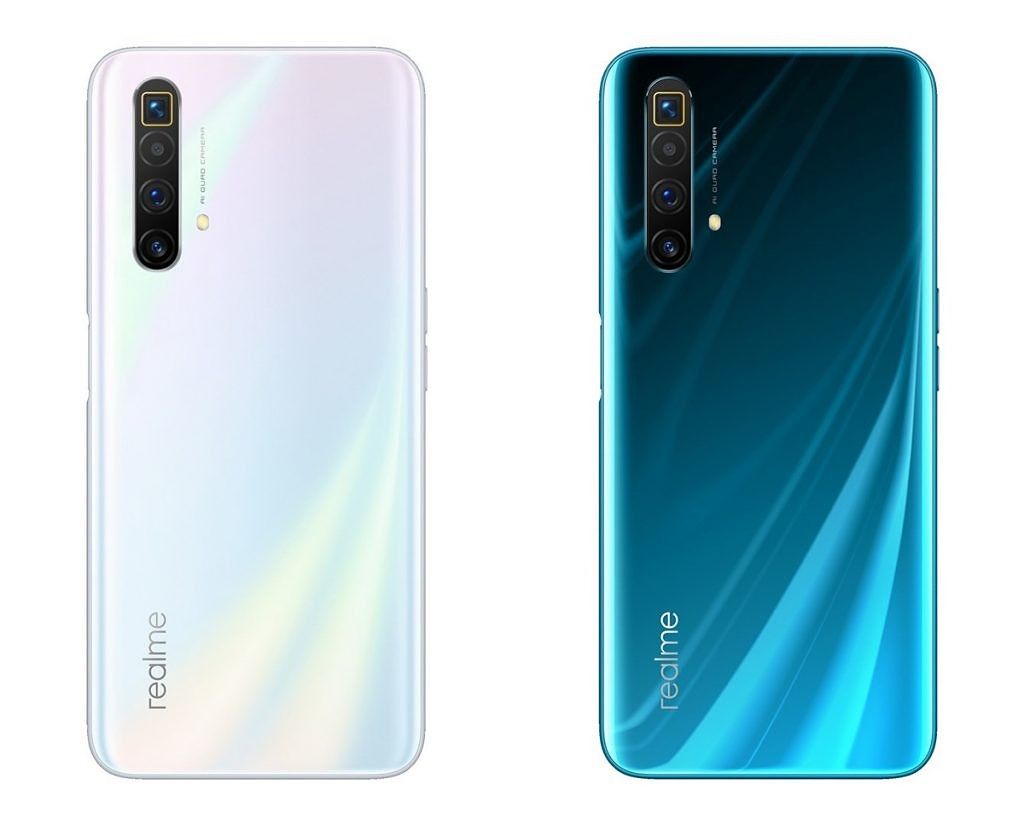
realme x3 superzoom

Realme X3 SuperZoom in Arctic White and Glacier Blue colors.

The biggest highlight of the Realme X3 SuperZoom is the periscopic zoom telephoto setup that allows up to 5x optical and up to 60x digital zoom. After smartphones like the Huawei P30 Pro and the OPPO Reno 10X popularized the concept, Samsung started mass producing these periscopic camera units and Realme could be using one of those. This periscopic camera also comes with OIS

The regular Realme X3 replaces the periscopic camera with a fixed 2x telephoto camera, as we saw on the Realme X2 Pro. Other cameras in the array are the same for both devices and include a 64MP Samsung GW1 primary camera that Relme has been using on every mid-range and premium device since the Realme XT. The other cameras include an 8MP wide-angle camera and a 2MP macro camera.

Realme has added a slew of interesting camera features along with a special emphasis on night photography. The company has added features such as Super Nightscape for hand-held night scenes, Ultra Nightscape for super low light shots, a Tripod Mode for long exposures shots in extremely low-light conditions, Starry Mode similar to Google Camera‘s Astrophotography feature, and lastly Pro Nightscape which is a manual mode specifically for the night.

realme x3 superzoom display

Skipping out on an AMOLED display, the Realme X3 uses a Full HD+ LCD display with a dual-hole-punch cutout to accommodate two selfie cameras. The lack of an AMOLED display is made up for by a high 120Hz refresh rate for the display. The 120Hz panel will support gaming on higher refresh in several popular titles like Hitman GO, Dead Trigger 2, Alto’s Adventure, Mortal Kombat, Temple Run etc.

Both the devices feature 4,200mAh batteries and support Realme’s DART 3.3 fast charging. The company claims that this will allow the battery to refilled fully in less than an hour.

In terms of software, Realme UI based on Android 10 powers these devices. Realme pushes out software updates proactively and Android 11 beta for the Realme X50 Pro has already been announced so we can expect the X3 series to get Android 11 updates by the end of this year or early next year.

Price & Availability

The Realme X3 will be available in two variants in India and will be priced as follows:

  • 6GB + 128GB – ₹24,999 (~$330)
  • 8GB + 128GB – ₹25,999 (~$345)

The Realme X3 SuperZoom, on the other hand, will also come in two variant but different configurations and will be priced as follows:

  • 8GB + 128GB – ₹27,999 (~$370)
  • 12GB + 256GB – ₹32,999 (~$435)

The devices will be available via Flipkart and Realme’s online store and the first flash sale will take place on noon, June 30th.

Realme X3 and X3 SuperZoom Specifications

Specifications Realme X3/X3 SuperZoom
Dimensions & Weight
  • 163.8 x 75.8 x 8.9 mm
  • 202g
Display
  • 6.57-inch dual-hole-punch FHD+ LCD
  • 1080 x 2400
  • 120Hz, 20:9 aspect ratio
  • Gorilla Glass 5
SoC
  • Qualcomm Snapdragon 855 Plus
  • Adreno 640
RAM & Storage Realme X3:
  • 6GB + 128GB
  • 8GB + 128GB

Realme X3 SuperZoom:

  • 8GB + 128GB
  • 12GB + 256GB
Storage Type UFS 3.0 + Turbo Write + Host Performance Booster (HPB)
Battery
  • 4,200mAh
  • 30W Dart 3.0 fast charging
Fingerprint Sensor Side-mounted fingerprint
Rear Cameras
  • 64MP Samsung ISOCELL GW1 primary sensor, f/1.8
  • 8MP 119° wide-angle sensor, f/2.3
  • Telephoto
    • Realme X3 SuperZoom: 8MP 5x periscopic telephoto, f/3.4
    • Realme X3: 13MP 2x fixed telephoto, f/2.5
  • 2MP macro camera, f/2.4
Front Cameras
  • Realme X3 SuperZoom: 32MP Sony IMX616, f/2.5
  • Realme X3: 16MP Sony IMX471, f/2.0
  • 8MP 105° wide-angle sensor, f/2.2
Android Version Realme UI based on Android 10

Realme Buds Q

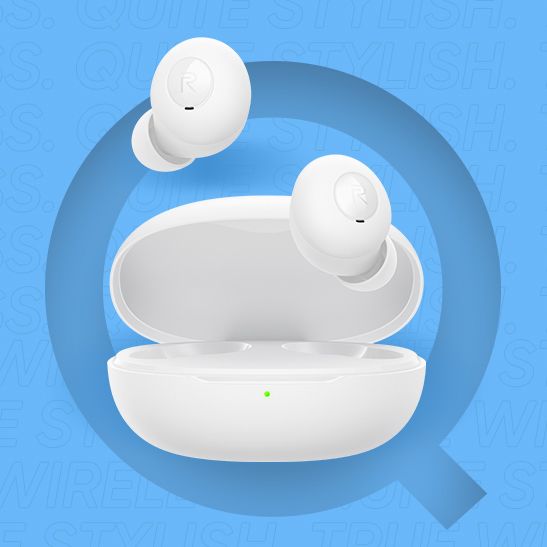
Along with the two new smartphones, Realme has also announced its third pair of TWS earphones – but, the first with an in-ear design. The Buds Q are Realme’s most affordable TWS earbuds so far and come with the smallest – 10mm – drivers. Each of the earbuds weighs only about 3.5 grams.  For controls, there are touch-sensitive capacitive buttons on both the earbuds instead of tactile buttons, and much like the Realme Buds Air, the Buds Q also customization of touch controls using the Realme Link app which can be used to control all of its wellness products including Realme Band and Watch.

realme buds q in-ear tws bluetooth 5.0

The Realme Buds’ charging case comes with a 400mAh battery while each earbud is equipped with a 40mAh battery. The case uses a microUSB port for charging and there’s no wireless charging. Realme claims a battery life of 20 hours per full charge. While the earbuds come with an IPX4 rating, there’s no such protection for the case. Realme has also added its signature low-latency Gaming mode.

realme buds q realme white bluetiooth earbuds realme yellow tws bluetooth

The Realme Buds Q will be available in three different colors – including Black, White, and Yellow. In contrast to the glossy surface of the Buds Air, the Buds Q come in a matte finish for all three options.

Price & Availability

The Realme Buds Q will be available for ₹1,999  on Amazon India and Realme’s online store and will be available starting July 1st.

Realme Buds Q Specifications

Specification Realme Buds Q
Drivers 10mm
Battery
  • Charging case: 400mAh
  • Each earbud: 40mAh
Charging Micro USB
Connectivity
  • Bluetooth 5.0
    • Codecs: SBC, AAC
  • MicroUSB port for charging
IP rating IPX4 for earbuds only
Dimensions Each earbud:
  • 3.6 grams

Charging Case only:

  • 28.2 grams
Controls Touch controls on earbuds (also customizable using Realme Link app)
    • Double-tap: play/pause and to accept calls
    • Triple-tap: Forward track
    • Long press on single earbud: End calls and trigger voice assistant
    • Long press on both earbuds together: Enter/exit gaming mode

The post Realme X3, X3 SuperZoom flagship killers and Realme Buds Q in-ear TWS launch in India appeared first on xda-developers.


from xda-developers https://ift.tt/2VksVm2
via IFTTT

Xiaomi Redmi 9 could launch under the POCO brand in some markets

POCO has evolved into an independent brand in markets like India, but it continues to share resources with Xiaomi across several key sectors like Product R&D. This is the reason why devices launched after POCO’s rebirth have been rebranded Xiaomi/Redmi devices. For instance, the POCO X2 (phoenixin) launched in India is a rebranded Redmi K30 4G (phoenix). Similarly, the POCO F2 Pro (lmi) launched internationally is a rebranded Redmi K30 Pro 5G (lmi). The story is set to continue forward, as information at hand suggests that the Xiaomi Redmi 9 could launch under the POCO brand in some markets.

A TUV Rheinland certification filing suggests that a new POCO device is coming with the model number M2004J19PI.

TUV Rheinland listing for POCO

From previous certification filings at Bluetooth SIG and Wi-Fi Alliance, we know that the model number M2004J19__ belongs to the Redmi 9 family of phones. This indicates that one of the upcoming POCO devices will likely be a rebranded Xiaomi Redmi 9. The Xiaomi Redmi 9 has already been launched in Spain, and more recently in China. There has been no indication from Xiaomi on which markets will receive the Redmi 9 or the POCO-branded phone. Seeing how successful the Redmi number series has been in markets like India, it would not make a lot of sense for Xiaomi to abandon the built-up goodwill and take a fresh bet on a rebranded lineup.

Xiaomi Redmi 9 display

Xiaomi Redmi 9

If the Redmi 9 does come to India as a POCO-branded smartphone, it will likely be released alongside the POCO M2 Pro, which is known to have a model numbering M2003J6CI. We already know that a new POCO phone is launching in India in July, so we speculate that there is a possibility that Xiaomi lets POCO launch the Redmi 9 as the POCO M2.

On the topic of the POCO M2 Pro, a TUV Rheinland certification hints that this phone could be a variant of the Redmi Note 9S/Redmi Note 9 Pro, with the model number M2003J6CI, codename “gram”, and the Snapdragon 720G SoC. XDA Senior Member kacskrz, who has been reliable with their tips in the past, has found evidence that the M2003J6CI will only be available in India, which aligns with what POCO GM Mr. C. Manmohan had mentioned in a recent interview, that the new POCO device will be an India-first launch.

We await further information from reliable sources on both, the POCO M2 (if it exists) and the POCO M2 Pro.

The post Xiaomi Redmi 9 could launch under the POCO brand in some markets appeared first on xda-developers.


from xda-developers https://ift.tt/2Z85woP
via IFTTT

mercredi 24 juin 2020

Samsung Galaxy Watch 3 leaked render gives us our clearest look yet at Samsung’s upcoming smartwatch

The Samsung Galaxy Watch 3 is Samsung’s next smartwatch in the successful lineup, following the first generation Samsung Galaxy Watch. If you’re wondering where the Watch 2 is, previous leaks have suggested that Samsung would be skipping over the “2” branding, likely to avoid any confusion among users because of the existence of the Watch Active 2. We’ve already seen some leaks for the Galaxy Watch 3, showing off both a toothed bezel and smooth bezel, as well as one with the display on. Now, we have our clearest look yet at the upcoming smartwatch, thanks to a leaked high-quality render.

This render of the Samsung Galaxy Watch 3 comes courtesy of Evan ‘evleaks’ Blass, so there is high confidence towards its veracity.

Samsung Galaxy Watch 3 45mm

The device pictured here comes with the model number SM-R840, which aligns with the model number of the previously leaked toothed bezel model. The markings on the underside reveal that the watch will come with a 45mm stainless steel case and Gorilla Glass DX for display protection. Further, the watch will have a rating of 5 ATM for water resistance. The Samsung Galaxy Watch 3 is also MIL-STD-810G certified, which is a military certification attesting to the durability of a device — so the watch can likely handle a drop or two just fine. The device will also come with integrated GPS for positioning and route tracking. The black-colored leather strap also appears to be easily replaceable, so that remains a big plus for the lineup.

For the front, there isn’t much to dissect. We see two buttons on the side, likely to be useful for navigating the UX of the watch. The Galaxy Watch 3 is expected to keep the rotating bezel, but there is no indication of rotating functionality on this particular render — though the bezel which could possibly rotate does not have any brandings or markings on it, so that’s a good sign. Markings for minutes appear on the inner bezel, just above the display.

Previous leaks have indicated that the Galaxy Watch Active 3 will come in two body sizes: 41mm and 45mm, and the displays will be 1.2-inches and 1.4-inches. The body materials will be titanium or stainless steel, and there will be WiFi-only and LTE variants. Battery sizes are 247mAh and 340mAh, respectively. Both models will have 1GB of RAM, 5 ATM water resistance, MIL-STD-810G durability rating, and GPS support. The Galaxy Watch 3 should also be capable of monitoring ECG and blood pressure. The device will run on Tizen OS, and that’s probably for the best seeing the state of Android Wear OS by Google. The Samsung Galaxy Watch 3 is expected to be revealed along with the Galaxy Note 20, and Galaxy Fold 2 at Samsung Unpacked 2020 in August.


Source: Evan Blass’ Patreon

The post Samsung Galaxy Watch 3 leaked render gives us our clearest look yet at Samsung’s upcoming smartwatch appeared first on xda-developers.


from xda-developers https://ift.tt/2Yt9JEy
via IFTTT

YouTube Music starts rolling out the ability to swipe on album art to change songs

Compared to its competitors, YouTube Music is still considered a newcomer to the music streaming scene. This isn’t Google’s first rodeo, though, as they’ve previously made Google Play Music. Since Google Play Music is shutting down, the YouTube Music team is working to bring new features to the service, ranging from major changes to minor quality-of-life improvements. Earlier this year, YouTube Music introduced a feature that lets you upload music, they redesigned the player page, rolled out an Explore tab, and much more. Today, some users noticed that a very useful feature has just been added to the Android app.

A Reddit user named /u/AMO124 from the /r/YoutubeMusic subreddit noticed that they could now swipe left or right on the album art to change songs. Previously, this was only possible by pressing the previous and next buttons, which can be difficult to tap if you’re not able to glance directly at your phone. I’ve been following the YouTube Music subreddit for a long time and users have been requesting an album art swiping feature for a long time, so it’s good that Google finally added this basic feature that’s found in dozens of other music players. Apart from the new album art gesture swiping, the player buttons have been slightly updated, too. They now trigger a smooth animation when you’re switching tracks.

Credits: Amadeo Iafelice (/u/AMO124) on Google Photos

The new feature is only available for a small number of users as of now. We all know that Google likes to roll out new features for users in a staggered manner. There is no way to manually enable this feature via a setting or APK update, so all you can do is sit and wait for the server-side update. We recommend that you download the latest version of the YouTube Music app for Android from the Google Play Store link below, though, in case this feature does require the latest version of the app.

YouTube Music - Stream Songs & Music Videos (Free, Google Play) →

The post YouTube Music starts rolling out the ability to swipe on album art to change songs appeared first on xda-developers.


from xda-developers https://ift.tt/2YtMFW4
via IFTTT